Error Culture Part II
In my last post I spoke about the idea of Error Culture. In that post I define what error culture. This time I'll talk about when it starts to happen. For a recap go back and read that before diving in here.
When does error culture start?
Error culture can start because of internal reason, external reason, or both and are almost always driven by the best of intentions. Error culture starts to happen because we don't finish the alert process. That is, we set up the alerts, but we don't indicate why they are important or what to do about them when we're notified.
Internal
Internal pressures driving error culture can usually be traced back to someone (usually someone important 1) declaring that ‘we’ need to be notified of when ‘this’ happens again. In and of itself self, this is actually a really good idea.
But if the important person doesn't identify why we need to be notified all that happens is that an alert is set up and NO ONE knows what to do when it fires off.
The opposite side of the coin here is being proactive in wanting to be notified when a bad thing might happen and being notified might be useful. Again, if there is no definition for why the alert might be useful, you're simply creating noise and encouraging alerts to be ignored.
External
External pressures that can drive error culture are similar to internal ones. There are some slight differences though.
For example, a consultant might indicate that it is best practice TM to be notified of an alert. However, they don't provide more context for why it's best practice. It could very well be that the recommendation IS best practice, but for a user base that is 100x your user base, or for an organization that is 1/10th your size. Context matters and while best practices should scale, they don't always.
Another example of external drivers are software applications provided by third party vendors with default alerts enabled but no context or steps for resolution. Sometimes there will be documentation describing the alert process, but without the context for why the alert is important it's just as likely to be ignored.
So far in this series we've seen what error culture is,and when it starts to happen. In the next post I'll talk about how to identify if you're in an error culture.
- important here just means someone with influence ↩︎
Error Culture
What is Error Culture?
It's inevitable that at some point a service 1 will fail. When that service fails you can either choose to be alerted, or not. Because technology is so important to so many aspects of work, not getting an alert for a failing service isn't really an option. So we enable alerts ... for EVERYTHING.
This is good in that we know when things have gone bad ... but it's bad in that we can start to ignore these alerts because we get false positives. If you hear comments like,
Oh yeah, that error always comes up, but we just ignore it because it doesn't mean anything
or
We don't really know why that error occurs, but it doesn't seem to impact anything, so we just ignore it
This is what I am calling, "Error Culture".
OK, but why is that bad?
Initially, it might not feel bad.
EVERYONE knows that you can ignore that error because it doesn't mean anything. Of course, this knowledge tends to NOT be documented anywhere, so when you onboard new team members they don't know what EVERYONE knows ... because they weren't part of the EVERYONE that learned the lesson.
Additionally, if you're getting error messages and nothing truly bad every happens, then a few things can happen:
- People start to question ALL of the alerts. I mean, if this one isn't valid, why is this OTHER one valid? Maybe I can ignore both 🤷♂️
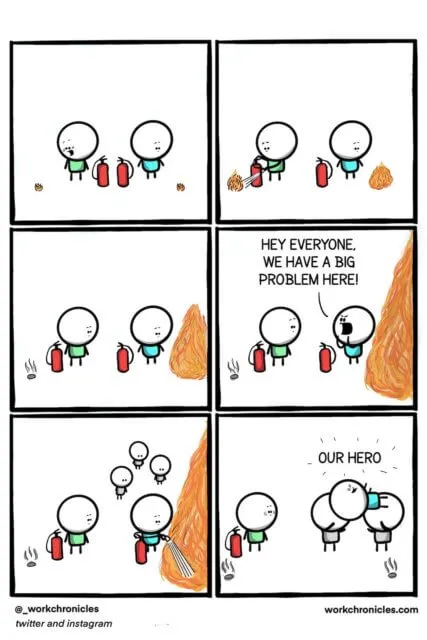
- You may be getting an alert about a small thing that can be ignored until it's a BIG thing. I think this image does good job of illustrating the point (found here)
Why does it happen?
In general, I've found that error culture can happen for a few reason
Error Fatigue
If you get 1000 alerts every day, you're not going to be able to do anything about anything. This is similar phenomenon to 'Alert Fatgiue' which can happen in software applications (my experience is in Electronic Health Record systems) where users can just click OK or Cancel when an alert shows up and users may not actually see that there is a problem
Lack of understanding of what the error is
It's surprising to find that people that receive alerts and they just delete them. They do this not out malice, but because they honeslty do not know what the alert is for. They were maybe opted into the alert (with no way to opt out) and therefore have no idea why they get it or what they are supposed to do with it. They may also be in an organization where asking questions to learn isn't encouraged and will therefore not ask why they are getting the alert.
Lack of understanding of why the error is important
Related to the item above, but different, a person can receive an alert, but they don't understand why it's important. This is usually manifested in some of the things mentioned before. Ideas like,
well, I've ignored this alert every day for 6 months, I don't know why I need to do anything about it now!
Lack of understand of who the error will impact
I'm reminded of the Episode of Friends where there is a light switch in Chandler and Joey's apartment and they don't know what it's for. At the end of the episide Monica is idly flipping the switch off and on and the camera pans to a Monica and Rachel's apartment where their TV keeps turning off and on.
Error culture can have a similar feeling. If I get an error every few days, but it doesn't impact me or my work I am likely to ignore it. It could be that the error is unimporatnt for me, but HUGELY important for you. This is a case where the error is being directled incorrectly. If we both got the error you could see that I got the email and then ask, hey, are you going to do anything about this?
Emphasis on Hero Culture
This is probably the worst of all possibilities. Some cultures tend to emphasize Heroes or White Knights. They appreciate when someone comes in and 'Saves the Day'. Sometimes people get promoted because of this.
This tends to disincentivize the idea of fixing small problems before they become BIG problems. I might be getting an alert about an issue, but it's not a BIG deal and won't be for some time. Once it becomes a big deal I'll know how to fix it quickly, and I will. When I do, I'll be celebrated. Who wouldn't want that?
In this post I've identified some of the characteristics of Error Culture.
In the next post I'll talk about how to tell if you're in an Error Culture.
In the final post I'll write about what you might be able to do to mitigate, and maybe even eliminate, Error Culture where you are.
- When I say service here I mean very loosely anything from a micro service up to a physical server. ↩︎
DjangoCon US 2023
My Experience at DjangoCon US 2023
A few days ago I returned from DjangoCon US 2023 and wow, what an amazing time. The only regret I have is that I didn't take very many pictures. This is something I will need to work on for next year.
On Monday October 16th I gave a talk Contributing to Django or how I learned to stop worrying and just try to fix an ORM Bug. The video will be posted on YouTube in a few weeks. This was the first tech conference I've ever spoken at!!!! I was super nervous leading up to the talk, and even a bit at the start, but once I got going I finally settled in.
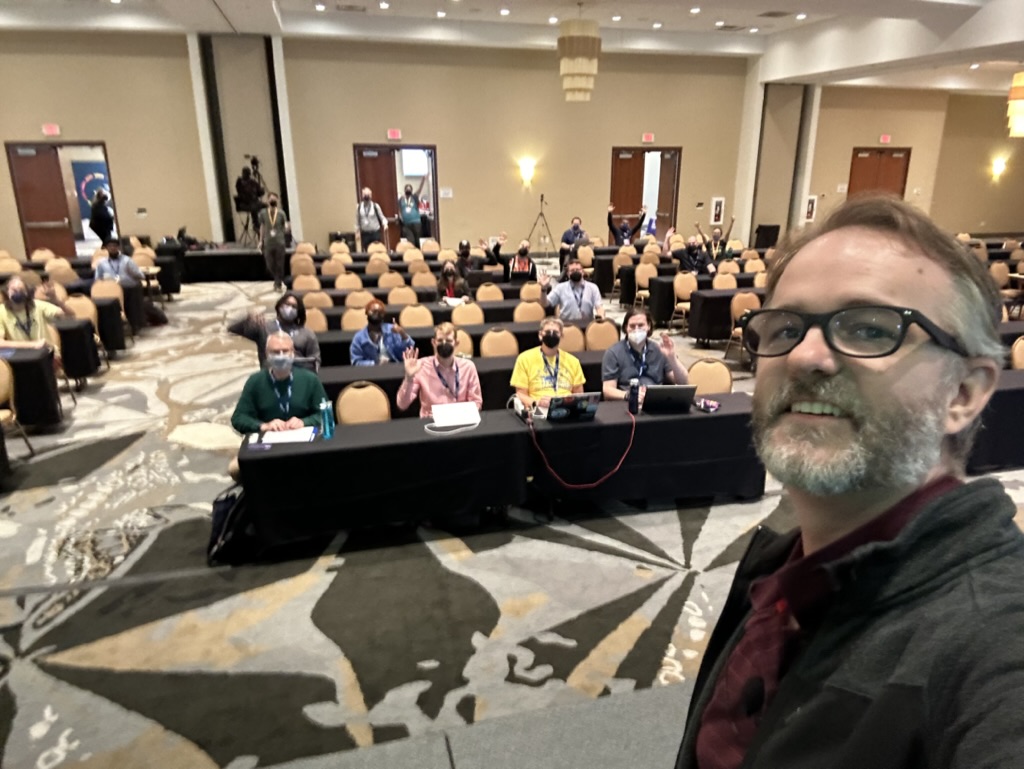
Here's me on stage taking a selfie with the crowd behind me
Luckily, my talk was one of the first non-Keynote talks so I was able to relax and enjoy the conference while the rest of the time.
After the conference talks ended on Wednesday I stuck around for the sprints. This is such a great time to be able to work on open source projects (Django adjacent or not) and just generally hang out with other Djangonauts. I was able to do some work on DjangoPackages with Jeff Triplett, and just generally hang out with some truly amazing people.
The Django community is just so great. I've been to many conferences before, but this one is the first where I feel like I belong.
I am having some of those post conference blues, but thankfully Kojo Idrissa wrote something about how to help with that. And taking his advice, it has been helpful to come down from the Conference high.
Although the location of DjangoCon US 2024 hasn't been announced yet, I'm making plans to attend.
I am also setting myself some goals to have completed by the start of DCUS 2024
- join the fundraising working group
- work on at least 1 code related ticket in Trac
- work on at least 1 doc related ticket in Trac
- have been part of a writing group with fellow Djangonauts and posted at least 1 article per month
I had a great experience speaking, and I think I'd like to do it again, but I'm still working through that.
It's a lot harder to give a talk than I thought it would be! That being said, I do have in my 'To Do' app a task to 'Brainstorm DjangoCon talk ideas' so we'll see if (1) I'm able to come up with anything, and (2) I have a talk accepted for 2024.
Firebirds Inaugural Season
On Wednesday June 21, 2023 the local sports puck team (i.e. Hockey), the Coachella Valley Firebirds hosted Game 7 of the Calder Cup Finals against the Hershey Bears.
There are sports writers that can write on how the series went, better than I can so I'll leave that to the pros. What I will talk about is why watching that game and seeing the Firebirds lose in Overtime hit me so hard.
I'm generally an introverted person. Even before the pandemic, I wasn't particularly fond of attending crowded events. The pandemic only intensified my preference for solitude. Suddenly, I found myself being advised to avoid social interactions altogether. As an introvert, the circumstances necessitating isolation weren't exactly ideal for me, but I did appreciate the fact that my family and I had to isolate.
However, after 2+ years of isolating from most everyone, being in large groups would bring out anxiety. And when I say large groups I mean like 10, maybe 15 people. On December 18th there was work holiday get together, the first one since the pandemic started. There were about 100 people in a mostly enclosed space and I did not do well with it. Super anxious, wore a mask the entire time, and generally ducked into the closet that also serves as my office more than once just to get away from people.
That same night was the home opener for the Firebirds at Acrisure Arena (due to construction delays their home arena opened 2 1/2 months after the start of the season). I didn't know it at the time, but it was a sell out (attendance of 10,087). This meant that I was going to a sporting event, in an enclosed arena with 10,000+ people. To say that I nearly lost my shit would be an understatement. The only thing that really got me to go was that the tickets I had purchased weren't cheap, and my wife and I were going with another couple friend.
That first home game was amazing. The Firebirds won 4-3 over the Tucson Roadrunners. The energy was amazing and I decided that I had to go to another game. And so I kept going. Again and again and again. I saw 34 games in person with an average attendance of 7,500.
I'd like to say that "just like that" my anxiety surrounding large indoor gatherings was gone, but it wasn't. It took me going to lots of hockey games to get through it.
So coming back to game 7 on Wednesday night. With less than 1 minute into the second period the Firebirds scored their second goal to go up 2-0. The crowd was the loudest I'd ever heard at Acrisure. Chants of "we want the cup" roared through the arena. It was unreal. And I sat there and realized that if it hadn't been for this team my anxiety surrounding large gatherings wouldn't have gone away for probably a very long time. And other than being a HUGE fan, I wanted the players, coaches, and team to win because they had helped me deal with something so personal. I won't ever be able to repay them for that, but my cheering them on to try and win the cup could maybe start.
And then the unthinkable happened. A penalty was called on the Firebirds and a Power Play goal was scored. Then less than 4 minutes later an even strength goal was scored and we were tied at 2 a piece.
The third period ended without any scorning by either team, and for only the second time in Calder Cup finals history, the first time since 1953, we were going to Overtime in a Game 7.
As we entered Overtime everyone in my section (107) was on their feet. We stood for the entire overtime period. Cheering, and screaming (honestly, I was still exhausted from the experience as I wrote this 2 days later).
About 2 minutes into the Overtime period Ryker Evan sent a shot on goal. From where I was sitting I could see the flight of the puck and my heart leapt as I thought it would find the back of the net ... but sadly it didn't. Within the first five minutes of overtime the Firebirds had outshot the Bears 5-0. It seemed like we were in control.
The next 10 minutes was some of the most intense back and forth hockey I'd ever seen.
With less than 4 minutes on the clock I thought, this might go into double overtime ... and then the unthinkable happened. The Firebirds defense was unable to clear a puck in their end, lots of players in front of the net, and just like that I see a puck flying over Joey's shoulder and past the cross bar, hitting the back of the net. The Bears player and their fans roared with joy, and suddenly a once deafening Acrisure was stunned into silence.
We lost. They won. The inaugural season was over. I stood in disbelief for a minute and then just sat down and stared across the arena at the Bears fans I could see that were losing their minds with joy. I wanted to cry. Some people around me did.
I stood up and looked over at our defensive end. The Firebirds players on the ice had taken a knee as they watched the Bears players celebrate. They don't show that part on TV. The defeated team looking sadly on as the victors celebrate. It was heartbreaking.
And then, in the middle of the celebration, the chants of "Let's go Firebirds" started. In short order, the fans were all saying it as loud as they could. An amazing season that didn't end the way we wanted it to, but we did our best to let the team know what they meant to us.
When I started writing this I thought maybe it was just me that needed something like this to get over some of the anxiety of large indoor gatherings, but maybe it was others. And those others at that game let the team know how much we appreciated them and what they did. This team will always hold a special place in the hearts of it's fans.
We didn't win it all this year, but there's always next year. Always.
Postlude
A friend of a friend of a friend works at a golf course called the 'Classic Club'. There were 3 players that were golfing the next day and they told this friend of a friend of a friend that the chants of "Let's go Firebirds" even after the loss meant so much to them.
GCP Cloud Architect Exam Experience
Last October it was announced that Desert Oasis Healthcare (the company I work for) signed on to pilot Google's Care Studio. DOHC is the first ambulatory clinic to sign on.
I had been in some of the discovery meetings before the announcement and was really excited about the opportunity. So far our use of any Cloud platforms at work has been extremely limited (that is to say, we don't use ANY of the big three cloud solutions for our tech) so this seemed to provide a really good opportunity.
As we worked through the project scoping there were conversations about the handoff to DOHC and it occurred to me that I didn't have any knowledge of what GCP offered, what any of it did, or how any of it could work.
I've had on my 'To Do' list to learn one of the Big Three Cloud services (AWS, Azure, or GCP) but because we didn't use ANY of them at work I was (a) worried about picking the 'wrong' one and (b) worried that even if I picked one I'd NEVER be able to use it!
The partnership with Google changed that. Suddenly which cloud service to learn was apparent AND I'd be able to use whatever I learned for work!
Great, now I know which cloud service to start to learn about ... the next question is, "What do I try to learn?". In speaking with some of the folks at Google they recommended one of three Certification options:
After reviewing each of them and having a good idea of what I need to know for work, I opted for the Cloud Architect path.
Knowing which certification I was going to work towards, I started to see what learning options were available for me. It just so happens that Coursera partnered with the California State Library to offer free training which is great because Coursera has a learning path for the Cloud Architect Exam! So I signed up for the first course of that path right before Thanksgiving and started to work my way through the courses.
I spent most of the holidays working through these courses, going pretty fast through them. The labs offered up are so helpful. They actually allow you to work with GCP for FREE during your labs which is amazing.
After I made my way through the Coursera learning Path I bought the book Google Cloud Certified Professional Cloud Architect Study Guide which was really helpful. It came with 100 electronic flash cards and 2 practice exams, and each chapter had questions at the end.
I will say that the practice exams and chapter questions from the book weren't really like the ACTUAL exam questions BUT it did help me in my learning, especially regarding the case studies used in the exams.
I read through the book several times, and used the practice questions in the chapters to drive what parts of the documentation I'd read to shore up my understand of the topics.
Finally, after about 3 months of pretty constant studying I took the test. I opted for the remote proctoring option and I'd say that I really liked this option. I was able to take the test in the same place I had done most of my studying. I did have to remove essentially EVERYTHING from my home office, but not having to drive anywhere, and not having to worry about unfamiliar surroundings really helped me out (I think).
I had 2 hours in which to answer 60 questions. My general strategy for taking tests is to go through the test, mark questions that I'm unsure of and eliminate answers that I know to not be true on those questions. Once I've gone through the test I revisit all of the unsure questions and work through those.
My final pass is to go through ALL of the questions and make sure I didn't do something silly.
Using this strategy I used 1 hour and 50 minutes of the 2 hours ... and I passed!
The unfortunate part of the test is that you only get a Pass or Fail so you don't have any opportunity to know what parts of the exam you missed. Now, if you fail this could be a huge help in working to pass it next time, but even if you pass it I think it would be helpful to know what areas you might struggle in.
All in all this was a pretty great experience and it's already helping with the GCP implementation at work. I'm able to ask better questions because I'm at least aware of the various services and what they do.
Contributing to Django or how I learned to stop worrying and just try to fix an ORM Bug
I went to DjangoCon US a few weeks ago and hung around for the sprints. I was particularly interested in working on open tickets related to the ORM. It so happened that Simon Charette was at Django Con and was able to meet with several of us to talk through the inner working of the ORM.
With Simon helping to guide us, I took a stab at an open ticket and settled on 10070. After reviewing it on my own, and then with Simon, it looked like it wasn't really a bug anymore, and so we agreed that I could mark it as done.
Kind of anticlimactic given what I was hoping to achieve, but a closed ticket is a closed ticket! And so I tweeted out my accomplishment for all the world to see.
A few weeks later though, a comment was added that it actually was still a bug and it was reopened.
I was disappointed ... but I now had a chance to actually fix a real bug! I started in earnest.
A suggestion / pattern for working through learning new things that Simon Willison had mentioned was having a public-notes repo on GitHub. He's had some great stuff that he's worked through that you can see here.
Using this as a starting point, I decided to walk through what I learned while working on this open ticket.
Over the course of 10 days I had a 38 comment 'conversation with myself' and it was super helpful!
A couple of key takeaways from working on this issue:
- Carlton Gibson said essentially once you start working a ticket from Trac, you are the world's foremost export on that ticket ... and he's right!
- ... But, you're not working the ticket alone! During the course of my work on the issue I had help from Simon Charette, Mariusz Felisiak, Nick Pope, and Shai Berger
- The ORM can seem big and scary ... but remember, it's just Python
I think that each of these lesson learned is important for anyone thinking of contributing to Django (or other open source projects).
That being said, the last point is one that I think can't be emphasized enough.
The ORM has a reputation for being this big black box that only 'really smart people' can understand and contribute to. But, it really is just Python.
If you're using Django, you know (more likely than not) a little bit of Python. Also, if you're using Django, and have written any models, you have a conceptual understanding of what SQL is trying to do (well enough I would argue) that you can get in there AND make sense of what is happening.
And if you know a little bit of Python a great way to learn more is to get into a project like Django and try to fix a bug.
My initial solution isn't the final one that got merged ... it was a collaboration with 4 people, 2 of whom I've never met in real life, and the other 2 I only just met at DjangoCon US a few weeks before.
While working through this I learned just as much from the feedback on my code as I did from trying to solve the problem with my own code.
All of this is to say, contributing to open source can be hard, it can be scary, but honestly, I can't think of a better place to start than Django, and there are lots of places to start.
And for those of you feeling a bit adventurous, there are plenty of ORM tickets just waiting for you to try and fix them!
Upgrading to PostgreSQL 14
Django 4.1 was released on August 3, 2022 and I was excited to upgrade to it. I did the testing locally and then pushed my changes up to GitHub to deploy. The deployment was successful, but when I went to visit my sites ... womp womp. I got a Server Error 5XX.
What happened? Well, it turns out that Django 4.1 dropped support for Postgres 10 and that just so happens to be the version I was running on my production server (but not on my local dev machine ... I was running Postgres 14).
OK, so I am going to need to upgrade in order to get the features of anything above Django 4.0 ... and honestly, I've needed to upgrade past Postgres 10 for a while.
I found this StackOverflow question and answer and it helped me a ton! It was to upgrade from Psotgres 10 to 12, but the ideas were the same (but replace 12 with 14). There is also a step that indicates you need to run ./analyze_new_cluster.sh but that seems to be only for version 12(maybe 13) and lower.
Everything was fine until I visited my site and got a Server Error 5XX AGAIN!
What gives?
My first assumption was that maybe the postgres server didn't start back up properly after the upgrade. I checked the service to verify that it was running, and it was
ps -aux | grep postgres
which returned
postgres   988  0.0  1.3 321668 27588 ?        Ss   16:55   0:01 /usr/lib/postgresql/14/bin/postgres -D /var/lib/postgresql/14/main -c config_file=/etc/postgresql/14/main/postgresql.conf
postgres  1034  0.0  0.2 321788  6112 ?        Ss   16:55   0:00 postgres: 14/main: checkpointer
postgres  1035  0.0  0.2 321800  5996 ?        Ss   16:55   0:00 postgres: 14/main: background writer
postgres  1036  0.0  0.4 321668  9388 ?        Ss   16:55   0:00 postgres: 14/main: walwriter
postgres  1039  0.0  0.3 322356  8080 ?        Ss   16:55   0:00 postgres: 14/main: autovacuum launcher
postgres  1040  0.0  0.2 176828  5108 ?        Ss   16:55   0:00 postgres: 14/main: stats collector
postgres  1041  0.0  0.3 322224  6628 ?        Ss   16:55   0:00 postgres: 14/main: logical replication launcher
root      4868  0.0  0.0  14860  1072 pts/0    S+   18:47   0:00 grep --color=auto postgres
I also checked
systemctl status postgresql
which returned as expected
● postgresql.service - PostgreSQL RDBMS
   Loaded: loaded (/lib/systemd/system/postgresql.service; enabled; vendor preset: enabled)
   Active: active (exited) since Sun 2022-08-28 16:55:32 UTC; 1h 54min ago
  Process: 1169 ExecStart=/bin/true (code=exited, status=0/SUCCESS)
 Main PID: 1169 (code=exited, status=0/SUCCESS)

Aug 28 16:55:32 server-name systemd[1]: Starting PostgreSQL RDBMS...
Aug 28 16:55:32 server-name systemd[1]: Started PostgreSQL RDBMS.
One last thing to try
python manage.py makemigrations
This gave me a hint as to what the issue was:
RuntimeWarning: Got an error checking a consistent migration history performed for database connection 'default': connection to server at "127.0.0.1", port 5432 failed: FATAL: password authentication failed for user "user" connection to server at "127.0.0.1", port 5432 failed: FATAL:
Hmmm ... a quick google search doesn't specifically answer it, but it helps me to get the to answer.
The 'user' isn't able to connect to the database. Maybe the upgrade process resets the password of users in the database or it just doesn't keep the users.
A quick look at the users on the database showed me that the users were still there, so the only thing left to do at this point was to set the user passwords to be what my settings are expecting.
To do that I ran
ALTER USER user WITH PASSWORD 'password';
I did this for the databases that were associated with my websites that were returning 5XX errors and voila! That fixed the issue.
I'm sure that there is a way to keep the passwords for the users after the upgrade, but I haven't been able to find it.
The next time I need to upgrade PostgreSQL I am going to refer back to this post to remind myself what I did last time 😀
A Goodbye to Vin
One of the earliest memories of my grandmother is visiting her in 29 Palms 1 2 in her permanent mobile home. I remember sitting on the davenport watching the Dodgers on a small 13" COLOR CRT TV. I remember that the game was broadcast on KTLA5. But what I remember the most is the voice of Vin Scully.
I don't know what who the Dodgers were playing, but I remember how much my grandmother LOVED to listen to Vin call the game. And it stuck with me. I was probably about 7 or 8 and I thought baseball was "boring". To be fair, I thought most sports were boring, but especially baseball. Nothing ever happens! But, I loved my grandmother, and I loved hanging out with her 3 and so I watched the game with her.
Years later I discovered that yes, I did like baseball, and no, it was not boring. And since my grandmother was a Dodgers fan, then I would be too. It was something that connected us. it didn't matter where I lived, or how old I was, we both loved baseball. We both loved the Dodgers. We both loved to hear Vin call the game.
My grandmother died in 2007, but something that helped to connect me to her in the years since was watching the Dodgers. Listening to Vin.
As Vin got older, he still called the home games, but he handed most of the road games to a new crew. I still loved to Watch Dodgers games, but I loved watching the games he called a little bit more. At the start of each season I always kind of wondered, "is this the last year for Vin?". And in 2016 the answer was yes.
I still remember the last game he called in Dodgers Stadium. I remember the back and forth. I remember the Rockies going up 1 run in the top of the 9th. And the Dodgers tying it back up in the bottom of the 9th. And I remember when Charlie Culberson hit the game winning home run in the bottom of the 10th.
I remember the last game Vin called in San Francisco. I remember the Dodgers lost ... but it was Vin's last game, so I still loved getting the chance to watch it. And to listen to him call the game.
Vin passed at the age of 94 on Aug 2, 2022. Just as I knew that there would be a day when Vin retired from calling games, I knew there would be a day when he wouldn't be with us anymore.
I've been trying process this and figure out why this is hitting me as hard as it is.
It all comes back to my grandmother. They never met each other (at least I don't think they did), but in my head they were inextricably connected. Vin was a connection to my grandmother that I didn't fully realize I had, and with his passing that connection isn't there anymore. He hasn't called a game in more than 5 years, but still, knowing that he NEVER will again is hitting a bit hard for me. And I think it's because it reminds me that my grandma isn't here to watch the games with me anymore, and that bums me out. She was a cool lady who always loved the Dodgers ... and Vin.
WinForVin
- Yes that 29 Palms, right next to the LARGEST Marine Corp Base in the WORLD ↩︎
- also the 29 Palms that is right next to Joshua Tree home to the National Park that is the current catnip of Hipsters ↩︎
- she always had the butter scotch hard candies that were my favorite ↩︎
Django and Legacy Databases
I work at a place that is heavily investing in the Microsoft Tech Stack. Windows Servers, c#.Net, Angular, VB.net, Windows Work Stations, Microsoft SQL Server ... etc
When not at work, I really like working with Python and Django. I've never really thought I'd be able to combine the two until I discovered the package mssql-django which was released Feb 18, 2021 in alpha and as a full-fledged version 1 in late July of that same year.
Ever since then I've been trying to figure out how to incorporate Django into my work life.
I'm going to use this series as an outline of how I'm working through the process of getting Django to be useful at work. The issues I run into, and the solutions I'm (hopefully) able to achieve.
I'm also going to use this as a more in depth analysis of an accompanying talk I'm hoping to give at Django Con 2022 later this year.
I'm going to break this down into a several part series that will roughly align with the talk I'm hoping to give. The parts will be:
- Introduction/Background
- Overview of the Project
- Wiring up the Project Models
- Database Routers
- Django Admin Customization
- Admin Documentation
- Review & Resources
My intention is to publish one part every week or so. Sometimes the posts will come fast, and other times not. This will mostly be due to how well I'm doing with writing up my findings and/or getting screenshots that will work.
The tool set I'll be using is:
- docker
- docker-compose
- Django
- MS SQL
- SQLite
Inserting a URL in Markdown in VS Code
Since I switched my blog to pelican last summer I've been using VS Code as my writing app. And it's really good for writing, note just code but prose as well.
The one problem I've had is there's no keyboard shortcut for links when writing in markdown ... at least not a default / native keyboard shortcut.
In other (macOS) writing apps you just select the text and press ⌘+k and boop! There's a markdown link set up for you. But not so much in VS Code.
I finally got to the point where that was one thing that may have been keeping me from writing because of how much 'friction' it caused!
So, I decided to figure out how to fix that.
I did have to do a bit of googling and eventually found this StackOverflow answer
Essentially the answer is
- Open the Preferences Page: ⌘+Shift+P
- Select
Preferences: Open Keyboard Shortcuts (JSON) - Update the
keybindings.jsonfile to include a new key
The new key looks like this:
{
    "key": "cmd+k",
    "command": "editor.action.insertSnippet",
    "args": {
        "snippet": "[${TM_SELECTED_TEXT}]($0)"
    },
    "when": "editorHasSelection && editorLangId == markdown "
}
Honestly, it's little things like this that can make life so much easier and more fun. Now I just need to remember to do this on my work computer 😀
Page 8 / 24