From Classy Class Based View the RedirectView will
Provide a redirect on any GET request.
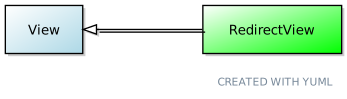
It is an extension of View and has 5 attributes:
- http_method_names (from
View) - pattern_name: The name of the URL pattern to redirect to. 1 This will be used if no
urlis used. - permanent: a flag to determine if the redirect is permanent or not. If set to
True, then the HTTP Status Code 301 is returned. If set toFalsethe 302 is returned - query_string: If
Truethen it will pass along the query string from the RedirectView. If it’sFalseit won’t. If this is set toTrueand neitherpattern\_namenorurlare set then nothing will be passed to theRedirectView - url: Where the Redirect should point. It will take precedence over the patter_name so you should only
urlorpattern\_namebut not both. This will need to be an absolute url, not a relative one, otherwise you may get a 404 error
The example below will give a 301 status code:
class myRedirectView(RedirectView):
    pattern_name = 'rango:template_view'
    permanent = True
    query_string = True
While this would be a 302 status code:
class myRedirectView(RedirectView):
    pattern_name = 'rango:template_view'
    permanent = False
    query_string = True
Methods
The method get\_redirect\_url allows you to perform actions when the redirect is called. From the Django Docs the example given is increasing a counter on an Article Read value.
Diagram
A visual representation of how RedirectView derives from View 2
Conclusion
In general, given the power of the url mapping in Django I’m not sure why you would need to use a the Redirect View. From Real Python they concur, stating:
As you can see, the class-based approach does not provide any obvious benefit while adding some hidden complexity. That raises the question: when should you use RedirectView?
If you want to add a redirect directly in your urls.py, using RedirectView makes sense. But if you find yourself overwriting getredirecturl, a function-based view might be easier to understand and more flexible for future enhancements.