From Classy Class Based Views DetailView
Render a "detail" view of an object.
By default this is a model instance looked up from
self.queryset, but the view will support display of any object by overridingself.get_object().
There are 7 attributes for the DetailView that are derived from the SingleObjectMixin. I’ll talk about five of them and the go over the ‘slug’ fields in their own section.
- context_object_name: similar to the
ListViewit allows you to give a more memorable name to the object in the template. You’ll want to use this if you want to have future developers (i.e. you) not hate you - model: similar to the
ListViewexcept it only returns a single record instead of all records for the model based on a filter parameter passed via theslug - pk_url_kwarg: you can set this to be something other than pk if you want … though I’m not sure why you’d want to
- query_pk_and_slug: The Django Docs have a pretty clear explanation of what it does
This attribute can help mitigate insecure direct object reference attacks. When applications allow access to individual objects by a sequential primary key, an attacker could brute-force guess all URLs; thereby obtaining a list of all objects in the application. If users with access to individual objects should be prevented from obtaining this list, setting querypkand*slug to True will help prevent the guessing of URLs as each URL will require two correct, non-sequential arguments. Simply using a unique slug may serve the same purpose, but this scheme allows you to have non-unique slugs. *
- queryset: used to return data to the view. It will supersede the value supplied for
modelif both are present
The Slug Fields
There are two attributes that I want to talk about separately from the others:
- slug_field
- slug_url_kwarg
If neither slug_field nor slug_url_kwarg are set the the url must contain <int:pk>. The url in the template needs to include o.id
views.py
There is nothing to show in the views.py file in this example
urls.py
path('detail_view/<int:pk>', views.myDetailView.as_view(), name='detail_view'),
\<ListView>.html
{% url 'rango:detail_view' o.id %}
If slug_field is set but slug_url_kwarg is NOT set then the url can be <slug>. The url in the template needs to include o.<slug_field>
views.py
class myDetailView(DetailView):
    slug_field = 'first_name'
urls.py
path('detail_view/<slug>/', views.myDetailView.as_view(), name='detail_view'),
\<ListView>.html
{% url 'rango:detail_view' o.first_name %}
If slug_field is not set but slug_url_kwarg is set then you get an error. Don’t do this one.
If both slug_field and slug_url_kwarg are set then the url must be <value> where value is what the parameters are set to. The url in the template needs to include o.<slug_field>
views.py
class myDetailView(DetailView):
    slug_field = 'first_name'
    slug_url_kwarg = 'first_name'
urls.py
path('detail_view/<first_name>/', views.myDetailView.as_view(), name='detail_view'),
\<ListView>.html
{% url 'rango:detail_view' o.first_name %}
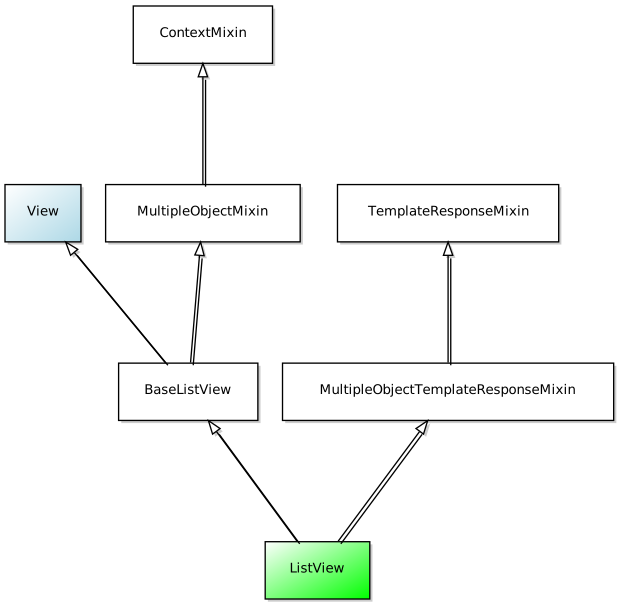
Diagram
A visual representation of how DetailView is derived can be seen here:
Conclusion
I think the most important part of the DetailView is to remember its relationship to ListView. Changes you try to implement on the Class for DetailView need to be incorporated into the template associated with the ListView you have.