What if Maintainer Burnout Isn't Burnout
Imagine you're staring at your 11th AI-generated pull request of the morning.
The code looks ... fine. The description is polished. Bullet points, a clear rationale, tests, and updated docs. But when you ask the contributor a question about why they'd chosen this approach over the one used everywhere else in the codebase ... nothing. Because they don't know. They'd never read the codebase. An agent had generated something plausible-looking, and a human hit submit.
You're not tired. You're not overworked. Not exactly. You just can't remember why you started doing this.
Yes, this is about AI, but it's also about what open source maintainers were experiencing even before AI.
Doctor Burnout
Dr. Joseph Silletti is a urologist who wrote a piece for MedPage Today called "What if Burnout Isn't the Problem?" 1 He'd noticed something about his colleagues that feels ... familiar.
They weren't exhausted. Or at least, exhaustion wasn't the only problem. They were still showing up. The work was manageable. But they'd lost something. Silletti describes it as "quietly losing the thread of why the work mattered in the first place." 2 (emphasis mine)
He says we're calling it burnout. But it's not burnout. Not exclusively. It's something else.
Burnout is a specific psychological construct: emotional exhaustion, depersonalization, diminished sense of personal accomplishment. It's a tank run dry. 3
Languishing is different. The term was coined by sociologist Corey Keyes 4 and popularized by Adam Grant during the pandemic. 5 It's the space between mental illness and flourishing. Stagnation. Disconnection. Dimming purpose. The tank has fuel. You've just forgotten where you were going.
Silletti puts it perfectly:
It isn't that we can't do it. It's, what's the point? 6
Is that how you're feeling, staring at those pull requests?
Open Source Has the Same Disease
The open source community has been treating maintainer distress as burnout for years. The Tidelift 2024 survey found that 60% of maintainers have quit or considered quitting. 7 The top reasons: competing life demands (54%), loss of interest (51%), burnout (44%).
But look at that list again. Loss of interest is number two. That's not the tank running dry. That's disengagement. That's someone who still can do the work ... they just don't know why they're doing it anymore.
The maintainer quotes from a 2025 report on burnout in open source sound exactly like Silletti's clinicians:
"Some also had a sense of directionlessness and loss of meaning in their OSS work." 8
"It starts feeling less like building and more like running unpaid support for strangers." 9
They're not describing a tank run dry. They're describing a tank running fine ... pointed at nothing.
The Sediment
Silletti's key metaphor is administrative sediment. He writes about how healthcare accumulated non-clinical work over years. Each piece was reasonable on its own. Each piece had its own justification.
Taken individually, none seemed unreasonable. Taken collectively, they have quietly buried the work that gives medicine its meaning under an ever-growing layer of administrative sediment. 10
Open source has its own sediment. And it accumulated the same way. Slowly, without malice, each piece seeming reasonable at the time.
Open source was never just about writing code. Each maintainer will likely have their own why for doing open source, but I think it centers around building. Building a library, building relationships with likeminded people, building understanding.
But it is always about building.
GitHub popularized the idea of social coding. It allowed for strangers to submit issues. Some of those strangers also submitted Pull Requests for those issues. Some people would only do a single issue, or a single PR. Others would stay around, forming a community.
The people that helped to form a community were always outnumbered by those that just stopped in to drop a PR or two. The community members were also outnumbered by those that reported issues. Over time, the people that reported issues went from having a sense of 'just wanted to let you know' to 'you need to fix this now'. And the 'you need to fix this now' crowd feels like it went from being a small percentage of reporters, to a larger percentage.
Maintainers that were simply offering up something for free were suddenly being treated as tech support. Sometimes by large companies that weren't paying for anything.
And so, as an open source maintainer, issue triage for entitled reporters replaced writing code. PR reviews replaced building features. Security patches replaced creative problem-solving. "Community" management replaced technical mentorship. One analysis found that maintainers spend 80% of their time on support and "community" management, and only 20% actually writing code. 11
Nobody did this to us on purpose. Each task arrived with justification. A bug report needs triaging. A contributor needs guidance. A security advisory needs a response. Each one, individually, is the right thing to do.
But here we are. The meaningful work, the building, got buried under the maintenance work. And we called the result burnout.
Then the Slop Showed Up
Suddenly AI slop arrived, and it made everything worse. But not in the way everyone thinks.
The volume numbers look like pure burnout, I'll grant that. AI-generated pull requests take roughly 12 times longer to review than human ones. 12 Daniel Stenberg, the creator of curl, killed their bug bounty program entirely, writing that "the never-ending slop submissions take a serious mental toll ... hampering our will to live." 13 GitHub added PR caps as an emergency measure. 14
But read what maintainers are actually saying. It's not "I'm too tired." It's this, from RedMonk:
"AI slop is ripping up the social contract between maintainers and contributors essential to open source development." 15
The social contract. The relationship.
The thing that made open source maintenance joyful was that someone cared enough about your work to try to improve it. You mentored them. They learned. The code got better. The community grew. That's the social contract.
AI slop doesn't add work. It replaces human connection with mechanized noise.
When the work becomes pointless, when you're closing PR #50 from an agent that couldn't tell you what design patterns your project uses if its "life" depended on it, the question isn't "I need a break."
It's "what's the point?"
That's not burnout. That's languishing. And slop is pouring gasoline on that fire.
Why Our Fixes Aren't Working
Here's where the framing matters. Silletti again:
The solution is one of subtraction, not supplementation. 16
We've been treating open source maintainer distress as a workload problem. And our solutions reflect that:
Pay them. Get more contributors. Add tooling. Build AI triage bots.
But slop is more contributors. AI triage bots just automate the emptiness. GitHub's PR caps reduce the volume but don't restore the meaning.
The yoga class for clinicians is the "pay maintainers" campaign for open source. Both treat symptoms without addressing the core issue: the work itself has lost its meaning.
Silletti proposes a test for healthcare leaders. He says they should ask of every task: does this bring the clinician closer to the patient or further away? 17
Here's my version for open source: does this task bring the maintainer closer to building or further away?
Triage of intentional, well thought out and reported issues? Closer. PR review for a human who wants to learn? Closer. Mentoring a new human contributor? Closer. AI-generated spam? Further.
Is it Burnout or Languishing?
Christina Maslach, the person who literally invented burnout research, I think would push back hard on this whole framing. Her three-dimensional model already includes cynicism (detachment from work) and reduced personal efficacy (loss of belief in your competence). 18 Those overlap heavily with the idea of languishing introduced earlier.
And her Six Areas of Worklife framework lists values as one of the mismatch areas that cause burnout. A values mismatch IS a meaning crisis. 19 So maybe languishing is just burnout without the exhaustion dimension? Maybe the distinction is academic.
The slop numbers are real. Twelve times the review time. DDoS-level volume. When you're drowning in 500 AI-generated PRs, calling it a "meaning crisis" might feel like calling a flood a water quality issue.
I get it. I might be wrong. Maybe Languishing is just Burnout by a different name ... but I don't think so.
Maybe It's Both
I think the truth is exhaustion and emptiness, feeding each other in a loop:
-
Slop increases the workload. Exhaustion sets in. (Burnout.)
-
Exhaustion reduces capacity for the meaningful work. Disconnection grows. (Languishing.)
-
Languishing kills motivation to keep fighting the slop. More slop gets through. Workload increases.
-
Repeat.
But here's the thing. The intervention matters. If we only treat the burnout side (reduce workload, add tooling, cap PRs), the languishing continues. If we only treat the languishing side (restore purpose, reconnect to meaning), the workload crushes people before the reconnection takes hold.
We need both. But we've been doing neither. We've been doing GitHub Sponsors and calling it done.
The distinction isn't about diagnostic purity. It's about what you reach for first. If you call it burnout, you reach for workload reduction. If you call it languishing, you reach for purpose. The loop needs both interventions. But we've only ever tried one.
What Do We Actually Do?
Silletti's prescription:
They must examine the job itself and identify the sediment of nonclinical tasks. The solution is not to work harder, or faster, or more resiliently through that sediment. The solution is to remove it. 20
For us, that means:
-
Remove the slop. Not just cap it. Reject the premise that all contributions are equal. A PR from someone who understands your codebase is worth a thousand PRs from an agent that doesn't.
-
Protect the social contract. The maintainer-contributor relationship is the meaning. Don't let AI industrialize it into spam.
-
Ask the question of every maintainer task: does this bring you closer to the building or further away? And if it takes you further away ... maybe stop doing it.
I'll be honest. I maintain a few, trivial, open source projects. I'm on the Django Software Foundation board. I'm on the Django Commons admin team. And I've felt this. Not the exhaustion, the emptiness. The mechanical closing of PRs. The realization that I'm going through the motions.
So what do we actually do? Start smaller than a framework. Next PR that lands in your queue, run it through the question above before you touch it: does reviewing this bring you closer to the building21, or further from it? If it's further, close it. Full stop. Do that ten times and you'll know more about your own maintainer practice than any framework could tell you.
And name it correctly. Not burnout, not laziness. Languishing. The tank has gas, we just forgot where we were pointed. Naming it right is the first task on the list, because you can't fix a diagnosis you keep getting wrong.
- https://www.medpagetoday.com/opinion/second-opinions/122202 ↩︎
- https://www.medpagetoday.com/opinion/second-opinions/122202 ↩︎
- https://pmc.ncbi.nlm.nih.gov/articles/PMC4911781/ ↩︎
- https://sites.prh.com/languishingbook ↩︎
- https://www.nytimes.com/2021/04/19/well/mind/covid-mental-health-languishing.html ↩︎
- https://www.medpagetoday.com/opinion/second-opinions/122202 ↩︎
- https://www.sonarsource.com/the-2024-tidelift-maintainer-impact-report.pdf ↩︎
- https://mirandaheath.website/static/oss_burnout_report_mh_25.pdf ↩︎
- https://www.reddit.com/r/opensource/comments/1q76f90/the_maintainer_burnout_is_real_and_it_is_getting/ ↩︎
- https://www.medpagetoday.com/opinion/second-opinions/122202 ↩︎
- https://medium.com/@sohail_saifii/the-open-source-maintainer-burnout-crisis-nobodys-fixing-5cf4b459a72b ↩︎
- https://webmatrices.com/post/vibe-coding-has-a-12x-cost-problem-maintainers-are-done ↩︎
- https://daniel.haxx.se/blog/2026/01/26/the-end-of-the-curl-bug-bounty/ ↩︎
- https://www.coderabbit.ai/blog/github-gives-maintainers-a-throttle-for-the-ai-pull-request ↩︎
- https://redmonk.com/kholterhoff/2026/02/03/ai-slopageddon-and-the-oss-maintainers/ ↩︎
- https://www.medpagetoday.com/opinion/second-opinions/122202 ↩︎
- https://www.medpagetoday.com/opinion/second-opinions/122202 ↩︎
- https://pmc.ncbi.nlm.nih.gov/articles/PMC4911781/ ↩︎
- https://www.demenzemedicinagenerale.net/images/mens-sana/Burnout_Organizational_Predictor.pdf ↩︎
- https://www.medpagetoday.com/opinion/second-opinions/122202 ↩︎
- keep in mind that
buildingcould mean one of many different things, and it's what you think of as building ↩︎
A Giant Pain in the Ass
Content Warning: This is a highly personal post about a cancer diagnosis.
On Feb 16, 2026 I was 'prepping' for a routine colonoscopy that was scheduled for February 17th at about 1pm. For those of you unaware what is involved in 'prepping' don't google it, but just know that your Gastroenterologist wants the 'end' of your GI tract 'clean'
This also involves a lot of not eating. So you can get hangry. Or at least most people do. I had felt something wasn't quite right for a while. Nothing I could really put my finger on, I just didn't feel right. So when it came time for the prep it turned out I wasn't really hungry anyway. I couldn't really eat the weekend before either, and had been having issues sleeping. I was stressed about what my colonoscopy would show. At least subconsciously I was worried.
On the day of my colonoscopy the staff at the office were all really nice. I even got a "First Colonoscopy" sticker!
I was wheeled into the procedure room, introduced to the doctor and told to look at the wall. The next thing I knew I was being wheeled out to the recovery room. I laid there for a few minutes and then I saw my wife Emily. I was still a bit groggy from the anesthesia but I was so happy to see her. It was the best feeling.
She came next to the bed I was laying on and the doctor came over. He let Emily know that she may want to sit down. She said she preferred to stand. The doctor then told me that during the procedure they found a tumor.
You have cancer
I let the phrase sink in ... "You have cancer" ... "I have cancer".
The doctor was not very comfortable delivering this news. You could tell this wasn't the type of thing he was used to doing. Emily even heard him saying "at the other place I don't have to tell patients this".
I think he tried his best to be positive about the diagnosis, but honestly it was a pretty shitty delivery. He kept saying things like "you're young" (at the time I was 47) ... "you're good looking" ... "you're married"
I didn't really understand why any of that mattered.
I have cancer
He then proceeded to let me know that the tumor had likely been there for years, maybe five. Had asked me if I had any symptoms, was there anything that felt off. How could I have not known something was wrong. I have cancer and it's my fault I didn't know sooner.
He also let me know that I'd need to have an ostomoy bag. For the rest of my life.
I have cancer ... that's all I could hear.
I cried. I cried in front of several people that I had never met before. I cried in front of my wife.
I have cancer. And I don't know anything about it at this point other than it seems like everyone I know with colorectal cancer died from it.
I have cancer.
I'm going to die
... those two phrases kept going through my head
I cried.
As an aside, I told a friend of mine how my cancer diagnosis was delivered to me. This friend has had many cancer battles / scares during their life. I figured when I told them my story they would say it wasn't so bad. Turns out it was. Even they were like, "Holy Shit. That's awful!"
After a few minutes, and once Emily and I were a bit more able to see the world, I was wheeled out to our car. We drove home. We didn't say much. What is there to even say? I have cancer.
We got home and although I could eat again, I wasn't hungry. I was afraid I'd never be hungry again.
That night I couldn't sleep. Or the night after. Or the night after.
The next day I had a follow up with a different GI doctor. He was basically like, "There's no new information. Why are you here?"
But we had questions. What are the next steps. Who should we contact? What do we do? The one question I didn't dare ask, "Am I going to die?"
For the next 16 days I lived in the grayest of gray areas. I could barely sleep, or eat. I lost about 8 pounds.
Emily and I spent time working to make sure that all of our affairs were in order. Are all of the banking apps installed on your phone? Do you have all of the passwords? Does the car title need to be updated? The title for the house? How do we do our finances?
We make a good team in that we each have our 'assignments'. We're pretty autonomous in those assignments. We'd talked about "cross training" on some of them, especially the financial stuff, but there just never seemed to be the time.
And now it felt like we didn't have the time but were going to have to make it. I felt like I was writing transition docs for leaving a job. But in this case I was afraid of the job I might be leaving.
To use any other word than brutal to describe these days wouldn't do justice to the way we felt. And even then it doesn't really begin to cover it.
During that time we told a few people. A very few people. Telling people made it real. Telling people was like delivering a trauma to them. Telling people led to questions. Questions we didn't have the answer for. Brutal.
I had nights where I would cry. Especially if I was alone. I have cancer, but there were things that still needed to happen. Emily had a major work event that she was responsible for. She had coworkers and friends she was able to rely on, but that didn't mean she didn't have to do things. Away from home. Away from me.
My Aunt had the same cancer diagnosis I do and she was helpful and caring and loving and kind and all of the things you need from a family member. But she didn't know the future. She didn't know if I was going to die. And so when the words, "You're going to be fine" came from her, they were nice, but hollow. I have cancer. I might die. I am scared.
On March 5th I met with a surgeon. Before meeting with the surgeon I needed to have an Abdominal CT scan done. It was completed about a week before I met with the surgeon. I had the results 2 days before meeting with the surgeon. I couldn't look at them. I didn't want to look at them.
The day of the surgery consult came. He was going to tell me the next steps. From what I heard surgery was likely to be my next step. My wife and I went to the appointment, she's been going to all of my appointments with me.
The staff were so nice and friendly and helpful. I started in one exam room and was moved to another exam room. My first thought was, "Oh no, was I in the 'you're going to be fine room' and got moved to the 'You're going to die' room? But the nurse let me know the reason for the move. A simple reason. No big deal. Except it was. It was the biggest deal. But she took the time to let me know the why of the move.
I went through the exam. Emily came back so the surgeon could talk to us.
All of the fear, and horrible anticipation. What ever he said next we were going to work through it. We were going to figure it out.
At the end of all of this, "we" might end up being just "she".
And the doctor said ...
It's actually not bad. We seem to have caught it early. We'll want to do chemo and radiation before reevaluating surgery.
I cried. This time I cried because it was the first hope I'd had in almost 3 weeks. I cried because my birthday was in 2 days and I had friends I was going to hang out with and it will be an actual happy party and not a pre wake party.
Since the surgeon I've seen a few more doctors. An oncologist and a radiation oncologist. Each appointment was mostly what one might expect. A brief conversation about potential side effects of the treatment. Which are pretty horrific if you think about them for too long. I try not to.
My treatment will be 5 days a week for 5 1/2 weeks of radiation and chemotherapy. Reevaluation of the tumor for potential surgery 6 - 12 weeks after that.
I'm sleeping better, but still not great. I eating better, but still not a ton.
And then ... for a few weeks ... nothing. Paper work is getting processed and I'm waiting for an MRI. The important part about the MRI is that it will tell me what stage and grade my tumor is. Once that's completed and the results are read then all of the doctors will have what they need to allow me to officially begin my treatment.
That being said, I have a tentative start date for my treatment. Unless my MRI shows something unexpected, I'll start my radiation and chemotherapy treatments on April 13. Officially. Fifty Five days from when I was told I had cancer to start of treatment. I'm not sure if this is a long time or not. It felt like a long time. A really long fucking time.
As part of the treatment you go in for a prep session. During this session they fit you for the device that blasts your tumor with radiation. In my case they also gave me 3 tattoos. One on either side and one right below my belly button.
I always thought my first tattoo would be of something way cooler 🤷🏻♂️
Before my diagnosis I had some plans for this year. I was going to go to PyCon US, PyOhio, and DjangoCon US. I even toyed with the idea of going to North Bay Python.
I won't be able to do any of these. Although my treatment will be done by late May, I'm not sure I can commit to much travel. I'm not sure how I'll be feeling.
Also, anywhere from 6 - 12 weeks after the end of my treatment I get re-evaluated for surgery. If the tumor is gone and the various docs feel like there's no risk, then surgery might not be required. If there is a risk, then surgery will be required.
The outcome of the surgery will be a colostomy bag that is either temporary (about 6 months) or permanent.
I'm less than 2 months into my cancer journey and there's still so much I don't know. Still so much that just can't be known. And honestly that's the hardest part.
My prognosis is good. My family and I are optimistic. But there's still so much we can't know. We hope that this will be a 'blip' and that by 2027 or 2028 we can go back to what ever normal is. But we just can't know.
One of the things I've really focused on over the last 2 months is trying to find the good things. I saw someone post on Mastodon (sorry, I can't find the original toot) about finding what they called glimmers. Those small things that make you happy.
I try to do that every day. A song I haven't heard in a long time. A friendly face while I'm out and about. A text from a person I haven't heard from in a while. Going for a swim. These are all things that I was taking for granted. I will likely end up taking them for granted again. But for now, I am really trying to be more appreciative of them. I'm trying to be more present.
Anyway, for those of you out there in that are 45+ and haven't gotten a colonoscopy. You should. We seem to have caught this early in the process. My prognosis is good. If someone hadn't told me I had cancer I would mostly have no idea.
Migrating to Hetzner with Coolify
What I did
A few weeks ago, I got to watch Jeff Triplett migrate DjangoPackages from DigitalOcean to Hetzner1 using Coolify. The magical world of Coolify made everything look just so ... easy. Jeff mentioned that one of the driving forces for the decision to go to Hetzner was the price, that is Hetzner is cheaper but with the same quality.
Aside
To give some perspective, the table below shows a comparison of what you I had and what I pay(paid) at each VPS
| Server Spec | Digital Ocean Cost | Hetzner Cost | Count |
|---|---|---|---|
| Managed Database with 1GB RAM, 1vCPU | $15.15 | NA | 2 |
| s-1vcpu-2gb | $12 | NA | 1 |
| s-1vcpu-1gb | $6 | NA | 3 |
| cpx11 | NA | $4.99 | 2 |
| cpx21 | NA | $9.99 | 2 |
| cpx31 | NA | $17.99 | 1 |
With Digital Ocean I was paying about $72.50 per month for my servers. This got me 2 Managed Databases (@$15 each) and 4 Ubuntu servers (1 s-1vcpu-2gb and 3 s-1vcpu-1gb).
Based on my maths for January I should see my Hetzner bill be about $61 with the only downside being that I have to 'manage' my databases myself ... however, with Digital Ocean I always felt like I was playing with house money because I didn't have the paid for backups. Now, with Hetzner, I have backups saved to an S3 bucket (and Coolify has amazing docs for how to set this up!)
End Aside
Original State
I had 6 servers on Digital Ocean
- 3 production web servers
- 1 test web server
- 1 managed database production server
- 1 managed database test server
This cost me roughly $75 per month.
Current State
- 2 production web servers
- 1 test web server
- 1 production database server
- 1 test database server
This cost me roughly $63 per month.
Setting Up Hetzner
In order to get this all started I need to create a Hetzner account2. Once I did that I created my first server, a CPX11 so that I could install Coolify.
Next, I need to clean up my DNS records. Over the years I had DNS managed at my registrar of choice (hover.com) and within Digital Ocean. Hetzner has a DNS server, so I decided to move everything there. Once all of my DNS was there, I added a record for my Coolify instance and proceeded with the initial set up.
In all I migrated 9 sites. They can be roughly broken down like this
Coolify: setting up projects, environments, resources
Coolify has several concepts that took a second to click for me
It took me some time reading through the docs but once it clicked I ended up segregating my projects in a way that made sense to me. I also ended up creating 2 environments for each project:
- Production
- UAT
Starting with Nixpacks
Initially I thought that Coolify would only support Docker or docker-compose files, but there is also an option for static sites, and Nixpacks. It turns out that Nixpacks were exactly what I wanted in order to get started.
NB: There is a note on the Nixpacks site that states
"⚠️ Maintenance Mode: This project is currently in maintenance mode and is not under active development. We recommend using Railpack as a replacement."
However, Railpack isn't something that Coolify offered so 🤷🏻♂️
I have a silly Django app called DoesTatisJrHaveAnErrorToday.com3 that seemed like the lowest risk site to start with on this experiment.
Outline of Migration steps
- Allow access to database server from associated Hetzner server, i.e. Production Hetzner server needs to access Production Digital Ocean managed database server, UAT Hetzner Web server needs access to UAT Digital Ocean managed database server
- Set up hetzner.domain.tld in DNS record, for example, hetzner.uat.doestatisjrhaveanerrortoday.com
- Set up site in Coolify in my chosen Project, Environment, and Resource. For me this was Tatis, UAT, "Does Tatis Jr Have An Error UAT"
- Configure the General tab in Coolify. For me this meant just adding an entry to 'Domains' with
https://hetzner.uat.doestatisjrhaveanerrortoday.com - Configure environment variables 4. 5
- Hit Deploy
- Verify everything works
- Update the
General>Domainsentry to havehttps://hetzner.uat.doestatisjrhaveanerrortoday.comandhttps://uat.doestatisjrhaveanerrortoday.com - Update DNS to have UAT point to Hetzner server
- Deploy again
- Wait ... for DNS propagation
- Verify
https://uat.doestatisjrhaveanerrortoday.comworks - Remove
https://hetzner.uat.doestatisjrhaveanerrortoday.comfrom DNS and Coolify - Deploy again
- Verify
https://uat.doestatisjrhaveanerrortoday.comstill works - Remove the GitHub Action I had to deploy to my Digital Ocean UAT server
- Repeat for Production, replacing
https://hetzner.uat.doestatisjrhaveanerrortoday.comwithhttps://hetzner.doestatisjrhaveanerrortoday.com
Repeat the process for each of my other Django sites (all 4 of them)
Switching to Dockerfile/docker-compose.yaml
This worked great, but
- The highest version of Python with Nixpacks is Python 3.13
- The warning message I mentioned above about Nixpacks being in "Maintenance Mode"
Also, I had a Datasette / Django app combination that I wanted to deploy, but couldn't figure out how with NIXPACKS. While the Django App isn't where I want it to be, and I'm pretty sure there's a Datasette plugin that would do most of what the Django app does, I liked the way it was set up and wanted to keep it!
Writing the Dockerfile and docker-compose.yaml files
I utilized Claude to assist with starting me off on my Dockerfile and docker-compose.yaml files. This made migrating off of the NIXPACK a bit easier than I thought it would be.
I was able to get all of my Django and Datasette apps onto a Dockerfile configuration but there was one site I have that scrape game data from TheAHL.com which has an accompanying Django app that required a docker-compose.yaml file to get set up6.
One gotcha I discovered was that the Coolify UI seems to indicate that you can declare your docker-compose file with any name, but my experience was that it expected the file to be called docker-compose.yaml not docker-compose.yml which did lead to a bit more time troubleshooting that I would have liked!
Upgrading all the things
OK, now with everything running from Docker I set about upgrading all of my Python versions to Python 3.14. This proved to be relatively easy for the Django apps, and a bit more complicated with the Datasette apps, but only because of a decision I had made at some point to pin to an alpha version 1.0 of Datasette. Once I discovered the underlying issue and resolved it, again, a walk in the park to upgrade.
Once I was on Python 3.14 it was another relatively straight forward task to upgrade all of my apps to Django 6.0. Honestly, Docker just feels like magic given what I was doing before and just how worried I'd get when trying to upgrade my Python versions or my Django versions.
Migrating database servers
Now I've been able to wind down all of my Web Servers, the only thing left is my managed database servers. In order to get them set up I set up pgadmin (with the help of Coolify) so that I didn't have to drop into psql in the terminal on the servers I was going to use for my database servers.
Once that was done I created backups of each database from Production and UAT on my MacBook so that I could restore them to the new Hetzner servers. To get the backup I ran this
docker run --rm postgres:17 pg_dump "postgresql://doadmin:password@host:port/database?sslmode=require" -F c --no-owner --no-privileges > database.dump
I did this for each of my 4 databases. Why did I use the docker run --rm postgres:17 pg_dump instead of just pg_dump? Because my MacBook had Postgres 16 while the server was on Postgres 17 and this was easier than upgrading my local Postgres instance.
Starting with UAT
I started with my test servers first so I could break things and have it not matter. I used my least risky site (tatis) first.
The steps I used were:
- Create database on Hetzner UAT database server
- Restore from UAT on Digital Ocean
- Repeat for each database
- Open up access to Hetzner database server for Hetzner UAT web server
- Change connection string for
DATABASE_URLfor tatis to point to Hetzner server in my environment variables - Deploy UAT site
- Verify change works
- Drop database from UAT Digital Ocean database server
- Verify site still runs
- Repeat for each Django app on UAT
- Allow access to Digital Ocean server from only my IP address
- Verify everything still works
- Destroy UAT managed database server
- Repeat for prod
For the 8 sites / databases this took about 1 hour. Which, given how much needed to be done was a pretty quick turn around. That being said, I spent probably 2.5 hours planning it out to make sure that I had everything set up and didn't break anything, even on my test servers.
Backups
One thing about the Digital Ocean managed servers is that backups were an extra fee. I did not pay for the backups. This was a mistake ... I should have, and it always freaked me out that I didn't have them enabled. Even though these are essentially hobby projects, when you don't do the right thing you know it.
Now that I'm on non-managed servers I decided to fix that, and it turns out that Coolify has a really great tutorial on how to set up an AWS S3 bucket to have your database backups written to.
It was so easy I was able to set up the backups for each of my databases with no fuss.
Coolify dashboard thing
I mentioned above that I upgraded all of apps to Python 3.14 and Django versions to 6.0. For all of the great things about Coolify, trying to find this information out on a high level is a pain in the ass. Luckily they have a fairly robust API that allowed me to vibe code a script that would output an HTML file that showed me everything I needed to know about my Applications with respect to Python, Django, and Datasette versions. It also helped me know about my database backup setups as well7!
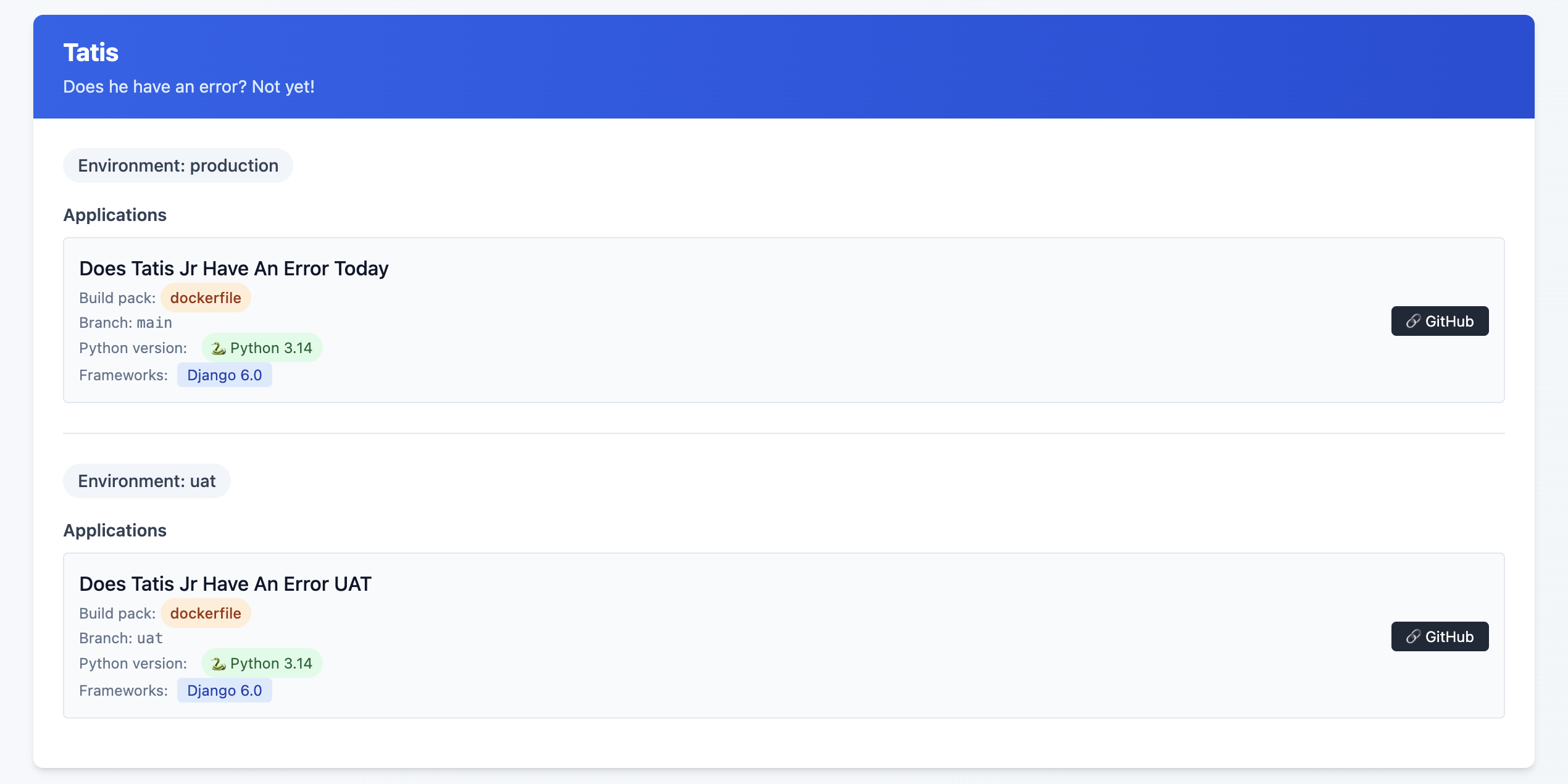
This is an example of the final state, but what I saw was some Sites on Django 4.2, others on Python 3.10 and ... yeah, it was a mess!
I might release this as a package or something at some point, but I'm not sure that anyone other than me would want to use it so, 🤷♂️
What this allows me to do now
One of the great features of Coolify are Preview Deployments which I've been able to implement relatively easily8. This allows me to be pretty confident that what I've done will work out OK. Even with a UAT server, sometimes just having that extra bit of security feels ... nice.
One thing I did (because I could, not because I needed to!) was to have a PR specific database on my UAT database server. Each database is called {project}_pr and is a full copy of my UAT database server. I have a cron job set up that restores these databases each night.
I used Claude to help generate the shell script below:
#!/bin/bash

# Usage: ./copy_db.sh source_db container_id [target_db]
# If target_db is not provided, it will be source_db_pr

source_db="$1"
container_id="$2"
target_db="$3"

# Validate required parameters
if [ -z "$source_db" ]; then
    echo "Error: Source database name required"
    echo "Usage: $0 source_db container_id [target_db]"
    exit 1
fi

if [ -z "$container_id" ]; then
    echo "Error: Container ID required"
    echo "Usage: $0 source_db container_id [target_db]"
    exit 1
fi

# Set default target_db if not provided
if [ -z "$target_db" ]; then
    target_db="${source_db}_pr"
fi

# Dynamic log filename
log_file="${source_db}_copy.log"

# Function to log with timestamp
log_message() {
    echo "$(date '+%Y-%m-%d %H:%M:%S') - $*" | tee -a "$log_file"
}

log_message "Starting database copy: $source_db -> $target_db"
log_message "Container: $container_id"

# Drop existing target database
log_message "Dropping database $target_db if it exists..."
if docker exec "$container_id" psql -U postgres -c "DROP DATABASE IF EXISTS $target_db;" >> "$log_file" 2>&1; then
    log_message "✓ Successfully dropped $target_db"
else
    log_message "✗ Failed to drop $target_db"
    exit 1
fi

# Create new target database
log_message "Creating database $target_db..."
if docker exec "$container_id" psql -U postgres -c "CREATE DATABASE $target_db;" >> "$log_file" 2>&1; then
    log_message "✓ Successfully created $target_db"
else
    log_message "✗ Failed to create $target_db"
    exit 1
fi

# Copy database using pg_dump
log_message "Copying data from $source_db to $target_db..."
if docker exec "$container_id" sh -c "pg_dump -U postgres $source_db | psql -U postgres $target_db" >> "$log_file" 2>&1; then
    log_message "✓ Successfully copied database"
else
    log_message "✗ Failed to copy database"
    exit 1
fi

log_message "Database copy completed successfully"
log_message "Log file: $log_file"
Again, is this strictly necessary? Not really. Did I do it anyway just because? Yes!
Was it worth it
Hell yes!
It took time. I'd estimate about 3 hours per Django site, and 1.5 hours per non-Django site. I'm happy with my backup strategy, and preview deployments are just so cool. I did this mostly over the Christmas / New Year holiday as I fought through a cold.
Another benefit of being on Coolify is that I'm able to run
What's next?
Getting everything set up to be mostly consistent is great, but there are still some differences that exist between each Django site that don't need to when it comes to the Dockerfile that each site is using.
I also see the potential to have better alignment on the use of my third party packages. Sometimes I chose package X because that's what I knew about at the time, and then I discovered package Y but never went back and switched it out where I was using package X before.
Finally, I really want to figure out the issue of https on some of the preview deployments.
- This is an affiliate link ↩︎
- This is an affiliate link ↩︎
- More details on why I have this site here ↩︎
- Considerations for Nixpacks. The default version of Python for Nixpacks is 3.11. You can override this with an environment variable
NIXPACKS_PYTHON_VERSIONto allow up to Python 3.13. ↩︎ - Here, you need to make sure that your ALLOWED_HOSTS is
hetzner.uat.doestatisjrhaveanerrortoday.com↩︎ - Do I need this set up? Probably not. I'm pretty sure there's a Datasette plugin that does allow for edits in the SQLite database, but this was more of a Can I do this, not I need to do this kind of thing ↩︎
- There are a few missing endpoints, specifically when it comes to Service database details ↩︎
- one of my sites doesn't like serving up the deployment preview with SSL, but I'm working on that! ↩︎
Year in Review 2025
I was hoping to have this written and posted last week, but for Christmas this year Santa brought me a cold which knocked me on my butt for a few days.
I had done a bit of prep, but wow, when I look back at 2025 it was a pretty big year for me personally.
Professional
I celebrated 17 years at my current employer. While this isn't a nice round number sort of anniversary, about 6 months before the actual anniversary date I was promoted to an Associated Vice President and joined the Senior Management Team. This has been a goal of mine since about 2010 and after a lot of hard work (and honestly more than a bit of good luck) I "made it".
In addition to the promotion at work, I also helped to lead a multi department team to a successful upgrade for a major application AND helped to lead a major network migration for our EHR that went really well. Two major projects accomplished in the same calendar year was a pretty good feeling.
We also do annual employee satisfaction surveys and my department had a 96% satisfaction rating. This is a really good feeling as a leader. We get shit done AND people are happy to do it!
Since 2021 my department has consistently scored above 90%. This isn't just me though! I have a great management team that helps to make this happen.
Over this same time period I've had 7 people leave the department1. Five of them because of retirement. I really like that where I work is a place you retire at more often than not! That, along with the high satisfaction rates, suggest that my management team and I are doing something right.
Django and Python
On the Django and Python side it was also a really big year. In February I spoke at PyCascades in Portland, Oregon.
In September I spoke at DjangoCon US in Chicago, Illinois. This was my THIRD talk at DjangoCon US2
I was also active with Django Commons on the admin team, was a Djangonaut.Space Navigator in Session 5 for 2 amazing Djangonauts, and got to hang out at Jeff's Office Hours pretty consistently (though not as often as I would have liked!)
The biggest accomplishment was getting elected to the DSF Board and then being elected Treasurer of the Board. This is still all very new and I'm trying to feel my way around, but I've got some amazing support and I'm really looking forward to working with the board in 2026 and beyond.
Technology
A few weeks ago I watched Jeff Triplet migrate various infrastructure for DjangoPackages.org from Digital Ocean to Hetzner with Coolify. This got me to dive into that ... pretty deeply. I spent a lot of my December PTO3 working to migrate my servers from Digital Ocean to Hetzner managed with Coolify. I plan to write more about that later, but needless to say, as of December 29, 2025 I had successfully migrated everything off Digital Ocean to Hetzner.
Personal
Music
Watching live music is a lot of fun. My wife Emily and I really enjoy doing this. We didn't get to see as many concerts as we would have liked to, but we were still able to see a few. Kelsea Ballerini (with our daughter Abby) and Benson Boone at Crypto.com arena in Downtown Los Angeles, Sessanta at Acrisure Arena, Third Eye Blind4 at a local casino, a show at the Grand Ole Opry in Nashville, Tennessee as part of a conference I attended. We also saw about 5 or 6 different bands in 3 days at different venues while we were in Nashville (though sadly we didn't get to see a show on the stage at the Taco Bell Cantina which feels like a real miss!) though we did get to see The Steel Drivers at the historic Ryman Auditorium
We also saw Post Modern Jukebox at the Fox Theater in Riverside. We stayed a few days to get out of the heat of the Coachella Valley, but were shocked to learn that Riverside is only about 15-20 degrees cooler. And when it's 115-120 here it can still be above 100 there!
We still had a great time and it convinced me even more that the wild idea my friend Mario and I had to pitch Riverside as a location for DjangoCon US 2027/2028 was actually a really good idea, not just a wild idea 😀
Hockey
I went to a ton of hockey games. To start the year off I went to the Cactus Cup and saw 4 NCAA Division 1 games in 2 days. The best part was sitting behind the goal right at the glass and seeing just how fast (and LOUD) the game can be.

I was pretty exhausted (but happy) by the end of it.
I also got to see 36 Firebirds home games (regular season5 and post season6), 2 Firebirds road games (both in San Diego against the Gulls), and was able to attend the AHL All Star Competition at Acrisure Arena in February.
On the NHL front I went to a game to watch the LA Kings host the Seattle Kraken (the Firebirds big kid club) and while I was in Nashville for a conference in November I got to watch the Nashville Predators play the Calgary Flames.
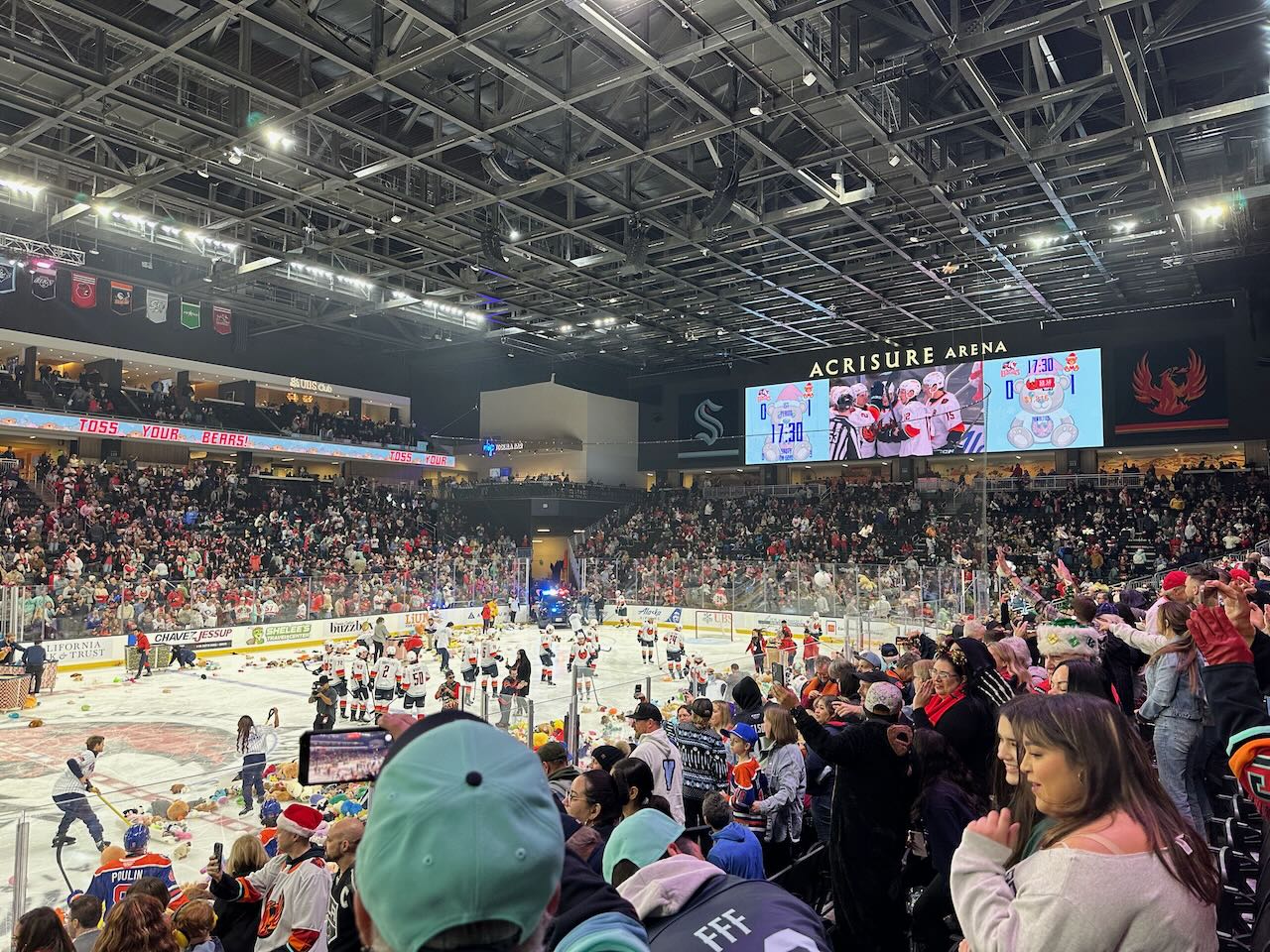
My favorite hockey-related experiences this year though were the Teddy Bear Toss game (even though the Firebirds lost) and getting to greet the players in the tunnel before the game
Baseball
Sadly we only made it out to a few baseball games this year. We saw a few California Winter League games one Saturday in February, and one game out in Rancho Cucamungo to see the Dodgers Low A Affiliate the Quakes play. The Dodgers won the World Series, and that was nice, but I didn't see any of their games in person this year.
Family
This year Abby started her second year of College so Emily and I continue to be empty nesters most of the year7
One of my favorite highlights from the year include Abby coming home from college for the weekend for my birthday last March to surprise me. A completely unexpected visit that literally made it one of the best birthdays ever. I read something earlier this year that once your child leaves your home for college, or whatever, they'll have spent about 95% of the time they're EVER going to spend with you. This hit me pretty hard. Like wanting to sob uncontrollably hard. So for Abby to come home to spend time with me for my birthday was the best gift ever.
Conclusion
Looking back it was a pretty great year. Lots of accomplishments, lots of great memories. The year started off with lots of fear and trepidation. I still have that (in spades) but I also am starting to have a bit more hope.
I don't have any lofty goals, and I didn't do the same kind of Theme planning that I've done in the past. This year it just didn't really work for me, so I'm pausing on that exercise.
That being said, if I was going to have a theme for 2026 it would be 'The year of Intentionality'. I've spent more time this year than I would have liked doing things but not thinking about what I wanted to do. I just did them because they were easy or it's just what I always do. For the last few weeks I've been trying (with varying degrees of success) to be more intentional in my actions, and my plan is to continue that into 2026.
Here's hoping to a great 2026!
- The department is 13 people ↩︎
- DCUS 2023, DCUS 2024 ↩︎
- Paid Time Off / Vacation ↩︎
- yes, they are still a band ... no this was not my idea! ↩︎
- This includes games for the 2024-25 and 2025-26 season ↩︎
- just 2025, obviously ↩︎
- I might just be misremembering, but when I was in college we didn't have this many breaks, and they weren't this long! ↩︎
Details on My Candidate Statement for the DSF
The Django Software Foundation Board of Directors elections are scheduled for November 2025 and I’ve decided to throw my hat into the ring. My hope specifically, if elected, is to be selected as the Treasurer. I have 4 main objectives over my two year term.
- Getting an Executive Director (ED) to help run the day-to-day operations of the DSF
- Identifying small to midsized companies for sponsorships
- Implementing a formal strategic planning process
- Setting up a fiscal sponsorship program to allow support of initiatives like Django Commons
These are outlined in my candidate statement, but I want to provide a bit more detail why I think they’re important, and some high level details on a plan to get them to completion.
These four goals are interconnected. We need an ED to scale operations, but funding an ED requires increased revenue through corporate sponsorships. Both benefit from having a strategic plan that guides priorities. And fiscal sponsorship potentially creates a new revenue stream while strengthening the ecosystem. This isn't four separate initiatives - it's a coherent plan for sustainable growth.
Getting an Executive Director (ED) to help run the day-to-day operations of the DSF
An ED provides day-to-day operational capacity that volunteer boards simply cannot match. While board members juggle DSF work with full-time jobs, an ED could:
- Call potential corporate sponsors every week, not just when someone has spare time
- Coordinate directly with Django Fellows on priorities and deliverables
- Support DjangoCon organizers across North & South America, Europe, Africa, and Asia with logistics and continuity
- Respond to the steady stream of trademark, licensing, and community inquiries
- Write grant applications to foundations that fund open source
- Prepare board materials so directors can focus on governance, not research
As Jacob Kaplan-Moss says in his 2024 DjangoCon US talk
We’re already at the limit of what a volunteer board can accomplish
Right now we're missing opportunities because volunteer bandwidth is maxed out. We can't pursue major corporate sponsors that need regular touchpoints. We can't support ecosystem projects that need fiscal sponsorship. We can't scale the Fellows program even though there's clearly more work than the current Fellows can handle.
As Treasurer, hiring an ED would be my top priority. Based on comparable nonprofit ED salaries, a part-time ED (20 hours/week) would cost approximately $60,000-$75,000 annually including benefits and overhead. A full-time ED would be $120,000-$150,000.
The DSF's current annual budget is roughly $300,000. Adding even a part-time ED would require increasing revenue by 25-30%. This is exactly why my second priority focuses on corporate sponsorships - we need sustainable revenue growth to support professional operations.
The path forward is phased: board members initiate corporate outreach to fund a part-time ED, who then scales up fundraising efforts to eventually become full-time and bring us toward that $1M budget Jacob outlined. We bootstrap professional operations through volunteer effort, then let the professional accelerate what volunteers started.
Identifying small to midsized companies for sponsorships
In Jacob Kaplan-Moss' 2024 DjangoCon US Talk, he outlines what the DSF could do with a $1M budget. I believe this is achievable, but it requires a systematic approach to corporate sponsorships.
Currently, the DSF focuses primarily on major sponsors. This makes sense - volunteer boards have limited bandwidth, so targeting "whales" is efficient. But we're leaving significant revenue on the table.
Consider the numbers: US Census data shows roughly 80,000-400,000 small to mid-sized tech companies (depending on definitions). Stack Overflow's 2024 survey indicates 46.9% of professional developers use Python, and 38% of Python web developers use Django. Even capturing a small fraction of companies using Django in production at a modest sponsorship tier ($500-$2,500/year) could significantly increase DSF revenue.
The challenge isn't identifying companies - it's having capacity to reach them. This is where an Executive Director becomes critical.
What an Executive Director Would Enable
A part-time Executive Director (ED) could:
- Dedicate 10+ hours weekly to corporate outreach instead of the 1-2 hours volunteer board members can spare
- Maintain a CRM system tracking sponsor relationships, touchpoints, and renewal cycles
- Create targeted outreach campaigns to Django-using companies in specific sectors (healthcare tech, fintech, e-commerce, etc.)
- Develop case studies showing Django's business value to help companies justify sponsorship
- Provide consistent follow-up and relationship management that volunteer boards cannot maintain
My First 90 Days as Treasurer
If elected, here's my concrete plan:
Month 1:
- Audit current sponsors and revenue sources
- Identify 20 target companies (mix of sizes) currently using Django
- Work with current board to draft outreach templates and sponsorship value propositions
Month 2:
- Begin systematic outreach to target companies
- Track response rates and refine approach
- Engage with Django community leaders to identify additional prospects
Month 3:
- Report results to board
- If we've secured commitments for additional $30K-$50K in annual recurring revenue, propose budget to hire part-time ED
- Continue to push forward the ED recruitment process
This is realistic volunteer-level effort (5-8 hours/week) that proves the concept before committing to an ED hire. Once we have an ED, they can scale this 5-10x.
Implementing a formal strategic planning process
The DSF needs a strategic plan - not as a bureaucratic exercise, but as a practical tool for making decisions and measuring progress.
Right now, we operate somewhat reactively. The Fellows program exists because it was created years ago. DjangoCons happen because organizers step up. Corporate sponsorships come in when companies reach out to us. This isn't necessarily bad, but it means we're not proactively asking: What should Django's ecosystem look like in 5 years? How do we get there?
A strategic plan would give us:
Clear priorities: When opportunities arise (a major donor, a new initiative, a partnership proposal), we can evaluate them against stated goals rather than deciding ad-hoc.
Accountability: We can measure whether we're making progress on what we said mattered. Did we grow the Fellows program like we planned? Did sponsorship revenue increase as projected?
Communication: Community members and potential sponsors can understand where the DSF is headed and how they can contribute.
As someone who's been in healthcare management since 2012, I've seen how strategic planning drives organizational effectiveness. The best plans aren't 50-page documents that sit on a shelf - they're living documents that inform quarterly board discussions and annual budget decisions.
For the DSF, I envision a strategic planning process that:
Year 1:
- Conduct stakeholder interviews with Fellows, corporate sponsors, community leaders, and DjangoCon organizers
- Identify 3-5 strategic priorities for the next 3 years (e.g., "double sponsorship revenue," "launch fiscal sponsorship program," "expand geographic diversity of Django community")
- Develop measurable outcomes for each priority
- Share draft plan with community for feedback
Ongoing:
- Review progress quarterly at board meetings
- Publish annual progress reports
- Revise plan every 3 years based on outcomes and changing needs
This connects directly to my other goals: we need a strategic plan to guide ED hiring, fundraising priorities, and fiscal sponsorship criteria. Without it, we're making isolated decisions rather than building toward a coherent vision.
Setting up a fiscal sponsorship program to allow support of initiatives like Django Commons
Django's success isn't just about the framework itself. It's about the ecosystem of packages, tools, and community organizations that have grown around it. Projects like Django Commons, Django Packages, regional Django user groups, and specialized packages serve thousands of developers daily. Yet these projects face a common challenge: they lack the legal and financial infrastructure to accept donations, pay for infrastructure, or compensate maintainers.
A fiscal sponsorship program would allow the DSF to serve as the legal and financial home for vetted Django ecosystem projects. Think of it as the DSF saying: "We'll handle the paperwork, taxes, and compliance; you focus on serving the community."
Who This Helps
- Community maintainers who need to accept donations but shouldn't have to become nonprofit experts
- Django Commons and similar initiatives that need to pay for infrastructure, security audits, or maintainer stipends
- Regional Django organizations that want to organize events or workshops but lack financial infrastructure
- Critical packages in the Django ecosystem that need sustainable funding models
- Corporate sponsors who want to support the broader ecosystem but need a tax-deductible vehicle
Why This Matters
Right now, valuable Django ecosystem projects are essentially flying without a net. If Django Commons needs to accept a $10,000 corporate donation to fund security audits, there's no clear path to doing so. If a critical package needs to pay for CI/CD infrastructure or compensate a maintainer for urgent security fixes, they're stuck. Some projects, such as Djangonaut Space, have tried to solve this individually by creating their own 501(c)(3)s or using platforms like Open Collective, but this fragments the community and creates overhead.
The Python Software Foundation already does this successfully for PyPI, PyLadies, and regional Python conferences. NumFOCUS sponsors dozens of scientific Python projects. There's no reason Django's ecosystem shouldn't have similar support.
For the DSF, this is also about long-term sustainability. A healthy Django depends on a healthy ecosystem. When popular packages go unmaintained or community initiatives shut down due to funding constraints, Django suffers. By providing fiscal sponsorship, we strengthen the entire Django community while also creating a new (modest) revenue stream through administrative fees that can fund DSF operations.
Moving Forward Together
These four initiatives - (1) hiring an Executive Director, (2) growing corporate sponsorships, (3) implementing strategic planning, and (4) launching fiscal sponsorship - represent an ambitious but achievable vision for the DSF's next two years. They're not just ideas; they're a roadmap for taking Django from a volunteer-run project to a professionally-supported ecosystem that can serve millions of developers for decades to come.
If you believe in this vision and think I can help make it happen, I'd be honored to have your vote. You can find more about my background and community involvement in my candidate statement.
Thank you for taking the time to read this, and regardless of the election outcome, I'm committed to supporting Django's continued success.
Deploying n8n on Digital Ocean
This guide shows you how to deploy n8n, a workflow automation tool, on your own VPS. Self-hosting gives you full control over your data, avoids monthly subscription costs, and lets you run unlimited workflows without usage limits.
I'm using Digital Ocean1 for this guide, but these steps work on any VPS provider. You'll need:
- A VPS with Ubuntu 24.04 (minimum 1GB RAM)
- A domain name with DNS access
- Basic familiarity with SSH and command line tools
Create and configure the VPS
Create a droplet with Ubuntu 24.04. Select a plan with at least:
- 1GB RAM
- 25GB Disk
- 1 vCPU
Note the IP address - you'll need it for DNS configuration.
SSH into the server:
ssh root@ipaddress
Update the system:
apt update
apt upgrade -y
Install Docker
Install Docker using the official repository:
# Add Docker's official GPG key
sudo apt-get update
sudo apt-get install ca-certificates curl
sudo install -m 0755 -d /etc/apt/keyrings
sudo curl -fsSL https://download.docker.com/linux/ubuntu/gpg -o /etc/apt/keyrings/docker.asc
sudo chmod a+r /etc/apt/keyrings/docker.asc

# Add the repository to Apt sources
echo \
  "deb [arch=$(dpkg --print-architecture) signed-by=/etc/apt/keyrings/docker.asc] https://download.docker.com/linux/ubuntu \
  $(. /etc/os-release && echo "${UBUNTU_CODENAME:-$VERSION_CODENAME}") stable" | \
  sudo tee /etc/apt/sources.list.d/docker.list > /dev/null
sudo apt-get update

# Install Docker and its components
sudo apt-get install docker-ce docker-ce-cli containerd.io docker-buildx-plugin docker-compose-plugin
Configure DNS
Create an A record at your domain registrar pointing your subdomain (e.g., n8n.yourdomain.com) to your droplet's IP address. If you're using Hover, follow their DNS management guide.
Create Docker Compose configuration
Create a docker-compose.yml file on your server. Start with the Caddy service for handling SSL and reverse proxy:
services:
  caddy:
    image: caddy:latest
    ports:
      - "80:80"
      - "443:443"
    restart: always
    volumes:
      - ./Caddyfile:/etc/caddy/Caddyfile:ro
      - caddy_data:/data
      - caddy_config:/config
      - ./logs:/var/log/caddy
    deploy:
      resources:
        limits:
          cpus: '0.5'
          memory: 500M
    healthcheck:
      test: ["CMD", "caddy", "version"]
      interval: 30s
      timeout: 10s
      retries: 3
    logging:
      driver: "json-file"
      options:
        max-size: "10m"
        max-file: "3"
volumes:
  caddy_data:
  caddy_config:
Create a Caddyfile in the same directory, replacing n8n.mydomain.com with your actual domain:
n8n.mydomain.com {
    # Enable compression
    encode gzip zstd

    # Reverse proxy to n8n
    reverse_proxy n8n:5678 {
        header_up Host {host}
        header_up X-Real-IP {remote}
        header_up X-Forwarded-For {remote}
        header_up X-Forwarded-Proto {scheme}
        header_up X-Forwarded-Host {host}

        transport http {
            keepalive 30s
            keepalive_idle_conns 10
        }
        flush_interval -1
    }

    # Security headers (relaxed CSP for n8n's dynamic interface)
    header {
        Strict-Transport-Security "max-age=31536000; includeSubDomains; preload"
        X-Content-Type-Options "nosniff"
        X-Frame-Options "SAMEORIGIN"
        Referrer-Policy "strict-origin-when-cross-origin"
        Content-Security-Policy "default-src 'self'; script-src 'self' 'unsafe-inline' 'unsafe-eval'; style-src 'self' 'unsafe-inline'; img-src 'self' data: blob:; connect-src 'self' wss: ws:; frame-src 'self'; worker-src 'self' blob:;"
        -Server
    }

    # Enable logging
    log {
        output file /var/log/caddy/n8n-access.log {
            roll_size 10MB
            roll_keep 5
        }
        format json
    }

    # Enable TLS with reasonable settings
    tls {
        protocols tls1.2 tls1.3
    }
}
Add n8n to Docker Compose
Add the n8n service under services: in your docker-compose.yml file. Replace n8n.mydomain.com with your domain in the environment variables:
  n8n:
    image: n8nio/n8n:latest
    container_name: n8n
    restart: always
    environment:
      - N8N_HOST=n8n.mydomain.com
      - N8N_PORT=5678
      - WEBHOOK_URL=https://n8n.mydomain.com/
      - GENERIC_TIMEZONE=UTC
    ports:
      - "5678:5678"
    volumes:
      - n8n_data:/home/node/.n8n
      - /etc/timezone:/etc/timezone:ro
      - /etc/localtime:/etc/localtime:ro
    deploy:
      resources:
        limits:
          cpus: '1.0'
          memory: 1G
    healthcheck:
      test: ["CMD", "wget", "--no-verbose", "--tries=1", "--spider", "http://localhost:5678/healthz"]
      interval: 30s
      timeout: 10s
      retries: 3
      start_period: 60s
    logging:
      driver: "json-file"
      options:
        max-size: "10m"
        max-file: "3"
Add n8n_data: to the volumes: section in your docker-compose.yml file:
volumes:
  caddy_data:
  caddy_config:
  n8n_data: # new line
Your final docker-compose.yml file will look like this:
services:
  caddy:
    image: caddy:latest
    ports:
      - "80:80"
      - "443:443"
    restart: always
    volumes:
      - ./Caddyfile:/etc/caddy/Caddyfile:ro
      - caddy_data:/data
      - caddy_config:/config
      - ./logs:/var/log/caddy
    deploy:
      resources:
        limits:
          cpus: '0.5'
          memory: 500M
    healthcheck:
      test: ["CMD", "caddy", "version"]
      interval: 30s
      timeout: 10s
      retries: 3
    logging:
      driver: "json-file"
      options:
        max-size: "10m"
        max-file: "3"
  n8n:
    image: n8nio/n8n:latest
    container_name: n8n
    restart: always
    environment:
      - N8N_HOST=n8n.mydomain.com
      - N8N_PORT=5678
      - WEBHOOK_URL=https://n8n.mydomain.com/
      - GENERIC_TIMEZONE=UTC
    ports:
      - "5678:5678"
    volumes:
      - n8n_data:/home/node/.n8n
      - /etc/timezone:/etc/timezone:ro
      - /etc/localtime:/etc/localtime:ro
    deploy:
      resources:
        limits:
          cpus: '1.0'
          memory: 1G
    healthcheck:
      test: ["CMD", "wget", "--no-verbose", "--tries=1", "--spider", "http://localhost:5678/healthz"]
      interval: 30s
      timeout: 10s
      retries: 3
      start_period: 60s
    logging:
      driver: "json-file"
      options:
        max-size: "10m"
        max-file: "3"
volumes:
  caddy_data:
  caddy_config:
  n8n_data:
Start the containers
Run the containers in detached mode:
docker compose up -d
Complete the setup
Navigate to https://n8n.yourdomain.com in your browser. Follow the setup wizard to create your admin account. Once complete, you can start building workflows.
- Referral Link ↩︎
Why We Need to Stop Fighting About AI Tools and Start Teaching Them
In mid-June, Hynek tooted on Mastodon the following toot:
Watching the frustratingly fruitless fights over the USEFULNESS of LLM-based coding helpers, I've come down to 3 points that explain why ppl seem to live in different realities:
Most programmers:
1) Write inconsequential remixes of trivial code that has been written many times before.
2) Lack the taste for good design & suck at code review in general (yours truly included).
3) Lack the judgement to differentiate between 1) & FOSS repos of nontrivial code, leading to PR slop avalanche.
1/3
So, if you're writing novel code & not another CRUD app or API wrapper, all you can see is LLMs fall on their faces.
Same goes for bigger applications if you care about design. Deceivingly, if you lack 2), you won't notice that an architecture is crap b/c it doesn't look worse than your usual stuff.
That means that the era of six figures for CRUD apps is coming to an end, but it also means that Claude Code et al can be very useful for certain tasks. Not every task involves splitting atoms. 2/3
2/3
There's also a bit of a corollary here. Given that LLMs are stochastic parrots, the inputs determine the outputs.
And, without naming names, certain communities are more… rigorous… at software design than others.
It follows that the quality of LLM-generated code will inevitably become a decision factor for choosing frameworks and languages and I'm not sure if I'm ready for that.
3/3
I've been having a lot of success with using Claude Code recently so I've been thinking about this toot a lot lately. Simon Willison talks a lot about the things that he's been able to do because he just asks OpenAI's ChatGPT while walking his dog. He's asking a coding agent to help him with ideas he has in languages with which he may not be familiar. However, he's a good enough programmer that he can spot anti-patterns that are being written by the agent.
For me, it comes down to the helpfulness of these agentic coding tools; they can help me write boiler plate code more quickly. What it's really coming down to, for me, is that when something is trivially easy to implement, like another CRUD app or an API wrapper, those problems are solved. We don't need to keep solving them in ways that don't really help. What we need to do in order to be better programmers is figure out how to solve problems most effectively. And if that's creating a CRUD app or an API wrapper or whatever, then yeah, you're not solving any huge problem there. But if you're looking to solve something in a very unique or novel way, agentic coding tools aren't going to help you as much.
I don't need to know how the internal combustion engine of my car works. I do need to know that when the check engine light comes on, I need to take it to a mechanic. And then that mechanic is going to use some device that lets them know what is wrong with the car and what needs to be done to fix it. This seems very analogous to the coding agents that we're seeing now. We don't have to keep trying to solve those problems with well-known solutions. We can and we should rely on the knowledge that is available to us and use that knowledge to solve these problems quickly. This allows us to focus on trying to solve new problems that no one has ever seen.
This doesn't mean we can skip learning the fundamentals. Like blocking and tackling in football, if you can't handle the basic building blocks of programming, you're not going to succeed with complex projects. That foundational understanding remains essential.
The real value of large language models and coding agents lies in how they can accelerate that learning process. Being able to ask an LLM about how a specific GitHub action works, or why you'd want to use a particular pattern, creates opportunities to understand concepts more quickly. These tools won't solve novel problems for you—that's still the core work of being a software developer. But they can eliminate the repetitive research and boilerplate implementation that used to consume so much of our time, freeing us to focus on the problems that actually require human creativity and problem-solving skills.
How many software developers write in assembly anymore? Some of us maybe, but really what it comes down to is that we don't have to. We've abstracted away a lot of that particular knowledge set to a point where we don't need it anymore. We can write code in higher-level languages to help us get to solutions more quickly. If that's the case, why shouldn't we use LLMs to help us get to solutions even more quickly?
I've noticed a tendency to view LLM-assisted coding as somehow less legitimate, but this misses the opportunity to help developers integrate these tools thoughtfully into their workflow. Instead of questioning the validity of using these tools, we should be focusing on how we can help people learn to use them effectively.
In the same way that we helped people to learn how to use Google, we should help them to use large language models. Back in the early 2000s when Google was just starting to become a thing, knowing how to effectively use it to exclude specific terms, search for exact phrases using quotation marks, that wasn't always known by everybody. But the people who knew how to do that were able to find things more effectively.
I see a parallel here. Instead of dismissing people who use these tools, we should be asking more constructive questions: How do we help them become more effective with LLMs? How do we help them use these tools to actually learn and grow as developers?
Understanding the limitations of large language models is crucial to using them well, but right now we're missing that opportunity by focusing on whether people should use them at all rather than how they can use them better.
We need to take a step back and re-evaluate how we use LLMs and how we encourage others to use them. The goal is getting to a point where we understand that LLMs are one more tool in our developer toolkit, regardless of whether we're working on open-source projects or commercial software. We don't need to avoid these tools. We just need to learn how to use them more effectively, and we need to do this quickly.
Migrating to Raindrop.io
With the announced demise of Pocket by Mozilla I needed to migrate all of my saved articles to 'something else' by the end of the month. I've actually tried to migrate from Pocket a few times over the years. I landed on Instapaper for a while, but it never really clicked for me. I tried a service called Devmarks that Adam G Hill runs, and I really liked it, but for whatever reason I stopped using it. I had also previously tried Raindrop.io ... and I'm not really sure what drove me away from it, but it didn't stick for me at the time.
Since I didn't have a choice about Pocket I did a bit of purusing my options, and finally landed on Raindrop.io again. The process of migration is pretty painless. I just export out the links from Pocket and then import them into Raindrop. No fuss ... no muss. Raindrop even checks for duplicates and allows you to not import them!
So, I imported everything (all 11,500+ articles!) and started to incorporate Raindrop into my workflow. This basically just means saving things to Raindrop instead of pocket, and then checking Raindrop instead of Pocket every week to make sure I'm all caught up on my articles to read.
Over the last weekend I was looking at how all of the imported items in Raindrop were put into the 'archive' collection and decided that I could probably do something about putting them into proper collections.
With the help of Claude Code, I was able to put them into better collections. There were some stragglers and I decided that I could categorize them on my own (there were less than 100).
I started going through these last ones I kept coming across articles for iOS7, or an app that I think I liked in 2015 but isn't on the App store anymore. I came across this article (which I also tooted about on Mastadon) from September 4, 2014 with the title What the Internet of Things Will Look Like in 2025 (Infographic). It's wildly naive, but a fun read nonetheless.
Needless to say it was the only gem in the 100 articles that I went through. I had so many saved articles that aren't 'Evergreen'. I then started looking at some of the articles that had been categorized and came across stuff for Django 1.11, Python 3.8, and other older stuff.
These were great articles when I read them, but I don't know that I need them now. In fact, when I looked at my general workflow for using any read-it-later service, I essentially save it to read later. If it's sitting in my read-it-later service for more than 4 weeks I'll either delete or just archive it.
So really, unless I'm planning on doing something with these articles, I'm not sure that I need to keep them. And that's when it hit me ... I can just delete them. All of them. I don't need to keep them. If they are truly impactful, I can write up something about them in Obsidian. If I really think someone else will get something out of my reaction I can write it up and post it. But, if I'm being honest with myself, this is just digital clutter that isn't "sparking" any joy for me.
So, just like that, I went from having 11,000+ links to having 0. And I have no ragrets.
I'm sure there's some deeper story here about physical things and just letting them go as well, and maybe I'll be able to apply that to my non-digital life, but for now, I'm just going to revel in the fact that I was able to offload this thing and just not ... care? Be sad? I'm not sure what the correct term would be here.
Regardless, it was a good exercise to have gone through, and I'm glad I did.
A New Project at Work
I was added to a work email that was requesting a not-so-small new project that was going to need to be completed. The problem that needed to be solved was a bit squishy, but it had been well thought out, and it had an importance to it that was easy to see.
There was still some workflows and data that needed to be reviewed, but overall it was on a good path to having a real project feel to it.
One question still outstanding is, what platform will this project be implemented on? In our EHR, or on a separate web app?
During my weekly project review meeting with the Web Development team I let them know about the potential for this new project and that it would likely need to take priority over one of our current projects. The start is still a couple of weeks away so we have time to plan for it (as much as we can anyway). We looked at the project board and determined a ranking of the current projects. We decided on the project that would likely get bumped if this new one ends up with the web developers. And just like that we had a contingency plan for how to plan for this project given our current constraints.
Now, this project may never make its way to the web development team, but having that conversation with the manager, and then during our standup today, to let the team know that this might be something that will need to be worked on by them felt right. No surprises in a few weeks. No randomness about what projects we'll be working on ... just a bit of planning to prepare for something that might never come.
Eisenhower said, "Plans are nothing, planning is everything."
The team appreciated being in the loop about a potential project and being able to align expectations moving forward. I felt grateful that this was brought to my attention well before it was submitted as a request. The requester now has a bit more information on who to speak with internally, and it really felt like we were working together to solve a problem in a very professional way.
I wish all projects started like this. It would make life way easier and not so much like this
Updated TIL
While browsing Mastodon the other day I came across a toot that linked to this Cursed Knowledge page. I thought it was a great page, but it occurred to me that it could be helpful to apply the same sort of styling to my TIL Repo.
My TIL (Today I Learned) repository was inspired by Simon Wilison's and is basically a rip off completely inspired by him.
Now, I'm not a front end guy, and while I can do some pretty basic stuff with GitHub Actions, I knew that what I wanted to do far outstripped my current capabilities. Enter Claude!
I started with this prompt
You are an expert in GitHub Actions, and GitHub. Additionally, you are an expert in HTML, CSS, and JavaScript. The solutions provided can not leverage JavaScript frameworks.
I then made this request
I currently have a Today I learned (TIL) repository on GitHub located here
https://github.com/ryancheley/til
I came across the idea of documenting cursed information here
https://immich.app/cursed-knowledge/
I would like to implement my TIL in a timeline the same way the cursed knowledge page was done.
How can I do that?
It output this
name: Build TIL Timeline
on:
push:
branches: [ main ]
pull_request:
branches: [ main ]
schedule:
# Rebuild daily at 6 AM UTC
- cron: '0 6 * * *'
permissions:
contents: read
pages: write
id-token: write
jobs:
build-timeline:
runs-on: ubuntu-latest
steps:
- name: Checkout repository
uses: actions/checkout@v4
- name: Setup Node.js
uses: actions/setup-node@v4
with:
node-version: '18'
- name: Generate timeline data
run: |
node << 'EOF'
const fs = require('fs');
const path = require('path');
// Function to extract metadata from markdown files
function extractTilData(filePath, content) {
const relativePath = path.relative('.', filePath);
const fileName = path.basename(filePath, '.md');
// Extract title from first heading or use filename
const titleMatch = content.match(/^#\s+(.+)$/m);
const title = titleMatch ? titleMatch[1] : fileName.replace(/[-_]/g, ' ');
// Extract first paragraph as description
const lines = content.split('\n').filter(line => line.trim());
let description = '';
for (const line of lines) {
if (!line.startsWith('#') && line.trim() && !line.startsWith('```')) {
description = line.trim();
break;
}
}
// Get file stats for date
const stats = fs.statSync(filePath);
const date = stats.mtime; // Use modification time
// Extract category from directory structure
const pathParts = relativePath.split('/');
const category = pathParts.length > 1 ? pathParts[0] : 'General';
return {
title,
description: description || 'No description available',
date: date.toISOString().split('T')[0], // YYYY-MM-DD format
url: `https://github.com/ryancheley/til/blob/main/${relativePath}`,
category,
fileName: relativePath
};
}
// Recursively find all markdown files
function findMarkdownFiles(dir) {
const files = [];
const entries = fs.readdirSync(dir, { withFileTypes: true });
for (const entry of entries) {
const fullPath = path.join(dir, entry.name);
if (entry.isDirectory() && !entry.name.startsWith('.')) {
files.push(...findMarkdownFiles(fullPath));
} else if (entry.isFile() && entry.name.endsWith('.md') && entry.name !== 'README.md') {
files.push(fullPath);
}
}
return files;
}
// Generate timeline data
const markdownFiles = findMarkdownFiles('.');
const tilEntries = [];
for (const filePath of markdownFiles) {
try {
const content = fs.readFileSync(filePath, 'utf8');
const tilData = extractTilData(filePath, content);
tilEntries.push(tilData);
} catch (error) {
console.error(`Error processing ${filePath}:`, error.message);
}
}
// Sort by date (newest first)
tilEntries.sort((a, b) => new Date(b.date) - new Date(a.date));
// Create output directory
if (!fs.existsSync('docs')) {
fs.mkdirSync('docs');
}
// Write timeline data
fs.writeFileSync('docs/timeline-data.json', JSON.stringify(tilEntries, null, 2));
console.log(`Generated timeline with ${tilEntries.length} entries`);
EOF
- name: Generate timeline HTML
run: |
mkdir -p docs
cat > docs/index.html << 'EOF'
<!DOCTYPE html>
<html lang="en">
<head>
<meta charset="UTF-8">
<meta name="viewport" content="width=device-width, initial-scale=1.0">
<title>Ryan's Today I Learned Timeline</title>
<style>
* {
margin: 0;
padding: 0;
box-sizing: border-box;
}
body {
font-family: -apple-system, BlinkMacSystemFont, 'Segoe UI', system-ui, sans-serif;
background: linear-gradient(135deg, #667eea 0%, #764ba2 100%);
min-height: 100vh;
color: #333;
}
.container {
max-width: 1200px;
margin: 0 auto;
padding: 2rem;
}
.header {
text-align: center;
margin-bottom: 3rem;
color: white;
}
.header h1 {
font-size: 3rem;
margin-bottom: 1rem;
text-shadow: 2px 2px 4px rgba(0,0,0,0.3);
}
.header p {
font-size: 1.2rem;
opacity: 0.9;
max-width: 600px;
margin: 0 auto;
}
.timeline {
position: relative;
margin-top: 2rem;
}
.timeline::before {
content: '';
position: absolute;
left: 2rem;
top: 0;
bottom: 0;
width: 2px;
background: linear-gradient(to bottom, #4CAF50, #2196F3, #FF9800, #E91E63);
}
.timeline-item {
position: relative;
margin-bottom: 2rem;
margin-left: 4rem;
background: white;
border-radius: 12px;
padding: 1.5rem;
box-shadow: 0 8px 25px rgba(0,0,0,0.1);
transition: transform 0.3s ease, box-shadow 0.3s ease;
}
.timeline-item:hover {
transform: translateY(-5px);
box-shadow: 0 15px 35px rgba(0,0,0,0.15);
}
.timeline-item::before {
content: '';
position: absolute;
left: -3rem;
top: 2rem;
width: 16px;
height: 16px;
background: #4CAF50;
border: 3px solid white;
border-radius: 50%;
box-shadow: 0 0 0 3px rgba(76, 175, 80, 0.3);
}
.timeline-item:nth-child(4n+2)::before { background: #2196F3; box-shadow: 0 0 0 3px rgba(33, 150, 243, 0.3); }
.timeline-item:nth-child(4n+3)::before { background: #FF9800; box-shadow: 0 0 0 3px rgba(255, 152, 0, 0.3); }
.timeline-item:nth-child(4n+4)::before { background: #E91E63; box-shadow: 0 0 0 3px rgba(233, 30, 99, 0.3); }
.timeline-header {
display: flex;
justify-content: space-between;
align-items: flex-start;
margin-bottom: 1rem;
flex-wrap: wrap;
gap: 1rem;
}
.timeline-title {
font-size: 1.4rem;
font-weight: 600;
color: #2c3e50;
text-decoration: none;
flex-grow: 1;
transition: color 0.3s ease;
}
.timeline-title:hover {
color: #3498db;
}
.timeline-meta {
display: flex;
gap: 1rem;
align-items: center;
flex-shrink: 0;
}
.timeline-date {
background: linear-gradient(135deg, #667eea, #764ba2);
color: white;
padding: 0.5rem 1rem;
border-radius: 20px;
font-size: 0.9rem;
font-weight: 500;
}
.timeline-category {
background: #f8f9fa;
color: #6c757d;
padding: 0.4rem 0.8rem;
border-radius: 15px;
font-size: 0.8rem;
font-weight: 500;
border: 1px solid #e9ecef;
}
.timeline-description {
color: #5a6c7d;
line-height: 1.6;
font-size: 1rem;
}
.loading {
text-align: center;
padding: 3rem;
color: white;
font-size: 1.2rem;
}
.error {
background: #f8d7da;
color: #721c24;
padding: 1rem;
border-radius: 8px;
border: 1px solid #f5c6cb;
margin-bottom: 2rem;
}
.stats {
background: rgba(255,255,255,0.95);
border-radius: 12px;
padding: 1.5rem;
margin-bottom: 2rem;
backdrop-filter: blur(10px);
border: 1px solid rgba(255,255,255,0.2);
}
.stats-grid {
display: grid;
grid-template-columns: repeat(auto-fit, minmax(200px, 1fr));
gap: 1rem;
text-align: center;
}
.stat-item {
padding: 1rem;
}
.stat-number {
font-size: 2rem;
font-weight: bold;
color: #667eea;
display: block;
}
.stat-label {
color: #666;
font-size: 0.9rem;
margin-top: 0.5rem;
}
@media (max-width: 768px) {
.container {
padding: 1rem;
}
.header h1 {
font-size: 2rem;
}
.timeline::before {
left: 1rem;
}
.timeline-item {
margin-left: 2rem;
padding: 1rem;
}
.timeline-item::before {
left: -2rem;
}
.timeline-header {
flex-direction: column;
align-items: stretch;
}
.timeline-meta {
justify-content: space-between;
}
}
</style>
</head>
<body>
<div class="container">
<div class="header">
<h1>Today I Learned</h1>
<p>A timeline of discoveries, learnings, and insights from my development journey</p>
</div>
<div class="stats" id="stats" style="display: none;">
<div class="stats-grid">
<div class="stat-item">
<span class="stat-number" id="totalEntries">0</span>
<div class="stat-label">Total Entries</div>
</div>
<div class="stat-item">
<span class="stat-number" id="categoriesCount">0</span>
<div class="stat-label">Categories</div>
</div>
<div class="stat-item">
<span class="stat-number" id="latestEntry">-</span>
<div class="stat-label">Latest Entry</div>
</div>
</div>
</div>
<div class="loading" id="loading">Loading timeline...</div>
<div class="error" id="error" style="display: none;"></div>
<div class="timeline" id="timeline"></div>
</div>
<script>
async function loadTimeline() {
try {
const response = await fetch('timeline-data.json');
if (!response.ok) {
throw new Error('Failed to load timeline data');
}
const entries = await response.json();
displayTimeline(entries);
displayStats(entries);
} catch (error) {
console.error('Error loading timeline:', error);
document.getElementById('loading').style.display = 'none';
document.getElementById('error').style.display = 'block';
document.getElementById('error').textContent = 'Failed to load timeline. Please try again later.';
}
}
function displayStats(entries) {
const categories = [...new Set(entries.map(entry => entry.category))];
const latest = entries.length > 0 ? new Date(entries[0].date).toLocaleDateString() : '-';
document.getElementById('totalEntries').textContent = entries.length;
document.getElementById('categoriesCount').textContent = categories.length;
document.getElementById('latestEntry').textContent = latest;
document.getElementById('stats').style.display = 'block';
}
function displayTimeline(entries) {
const timelineContainer = document.getElementById('timeline');
const loading = document.getElementById('loading');
loading.style.display = 'none';
if (entries.length === 0) {
timelineContainer.innerHTML = '<p style="text-align: center; color: white;">No entries found.</p>';
return;
}
const timelineHTML = entries.map(entry => {
const date = new Date(entry.date).toLocaleDateString('en-US', {
year: 'numeric',
month: 'short',
day: 'numeric'
});
return `
<div class="timeline-item">
<div class="timeline-header">
<a href="${entry.url}" class="timeline-title" target="_blank" rel="noopener noreferrer">
${entry.title}
</a>
<div class="timeline-meta">
<span class="timeline-category">${entry.category}</span>
<span class="timeline-date">${date}</span>
</div>
</div>
<div class="timeline-description">
${entry.description}
</div>
</div>
`;
}).join('');
timelineContainer.innerHTML = timelineHTML;
}
// Load timeline on page load
loadTimeline();
</script>
</body>
</html>
EOF
- name: Setup Pages
uses: actions/configure-pages@v4
- name: Upload artifact
uses: actions/upload-pages-artifact@v3
with:
path: 'docs'
deploy:
environment:
name: github-pages
url: ${{ steps.deployment.outputs.page_url }}
runs-on: ubuntu-latest
needs: build-timeline
if: github.ref == 'refs/heads/main'
steps:
- name: Deploy to GitHub Pages
id: deployment
uses: actions/deploy-pages@v4
I added it to my TIL repo and tested to see how it looked. It was a great start!
I then followed up with
this is a great start! however, it looks like the are a few issues: 1. All of the dates on the timeline are the published date and not the date of the actual learning. There is a SQLite database that stores this kind of meta data 2. The order of the items matches the order they are displayed on the Read Me, which is by category and not by date (see point 1) 3. the colors for each TIL seem to just rotate in order and aren't associated with any specific category of TIL
Claude went to work and generated a new GitHub Action for me
name: Build TIL Timeline
on:
push:
branches: [ main ]
pull_request:
branches: [ main ]
schedule:
# Rebuild daily at 6 AM UTC
- cron: '0 6 * * *'
permissions:
contents: read
pages: write
id-token: write
jobs:
build-timeline:
runs-on: ubuntu-latest
steps:
- name: Check out repo
uses: actions/checkout@v4
with:
fetch-depth: 0 # Need full history for git analysis
- name: Set up Python
uses: actions/setup-python@v5
with:
python-version: 3.12
- uses: actions/cache@v4
name: Configure pip caching
with:
path: ~/.cache/pip
key: ${{ runner.os }}-pip-${{ hashFiles('**/requirements.txt') }}
restore-keys: |
${{ runner.os }}-pip-
- name: Install Python dependencies
run: |
python -m pip install --upgrade pip
pip install -r requirements.txt
- name: Build database
run: python build_database.py
- name: Generate timeline data from SQLite
run: |
python << 'EOF'
import sqlite3
import json
import os
from pathlib import Path
# Connect to the SQLite database
db_path = Path("tils.db")
if not db_path.exists():
print("Database not found!")
exit(1)
conn = sqlite3.connect(db_path)
conn.row_factory = sqlite3.Row # Enable dict-like access to rows
# Query all TIL entries, ordered by created date (actual learning date)
cursor = conn.execute("""
SELECT
path,
slug,
topic,
title,
url,
body,
created,
created_utc,
updated,
updated_utc
FROM til
ORDER BY created_utc DESC
""")
entries = []
for row in cursor:
# Extract first paragraph as description, excluding headers and code blocks
lines = row['body'].split('\n')
description = ''
for line in lines:
line = line.strip()
if line and not line.startswith('#') and not line.startswith('```') and line != '---':
description = line
break
# Clean up the description
if len(description) > 200:
description = description[:200] + '...'
# Extract date from created_utc (YYYY-MM-DD format)
created_date = row['created_utc'].split('T')[0] if row['created_utc'] else row['created'].split('T')[0]
entry = {
'title': row['title'],
'description': description or 'No description available',
'date': created_date,
'url': row['url'],
'category': row['topic'],
'fileName': row['path'].replace('_', '/'), # Convert back from slug format
'slug': row['slug']
}
entries.append(entry)
conn.close()
# Create output directory
os.makedirs('docs', exist_ok=True)
# Write timeline data
with open('docs/timeline-data.json', 'w') as f:
json.dump(entries, f, indent=2)
print(f"Generated timeline with {len(entries)} entries")
# Generate category statistics for consistent coloring
categories = {}
for entry in entries:
cat = entry['category']
if cat not in categories:
categories[cat] = len([e for e in entries if e['category'] == cat])
# Sort categories by count (most popular first) for consistent color assignment
sorted_categories = sorted(categories.items(), key=lambda x: x[1], reverse=True)
category_colors = {}
# Define a set of distinct colors for categories
color_palette = [
'#4CAF50', # Green
'#2196F3', # Blue
'#FF9800', # Orange
'#E91E63', # Pink
'#9C27B0', # Purple
'#00BCD4', # Cyan
'#FF5722', # Deep Orange
'#795548', # Brown
'#607D8B', # Blue Grey
'#FFC107', # Amber
'#8BC34A', # Light Green
'#3F51B5', # Indigo
'#F44336', # Red
'#009688', # Teal
'#CDDC39', # Lime
]
for i, (category, count) in enumerate(sorted_categories):
category_colors[category] = color_palette[i % len(color_palette)]
# Write category color mapping
with open('docs/category-colors.json', 'w') as f:
json.dump(category_colors, f, indent=2)
print(f"Generated color mapping for {len(category_colors)} categories")
EOF
- name: Generate timeline HTML
run: |
cat > docs/index.html << 'EOF'
<!DOCTYPE html>
<html lang="en">
<head>
<meta charset="UTF-8">
<meta name="viewport" content="width=device-width, initial-scale=1.0">
<title>Ryan's Today I Learned Timeline</title>
<meta name="description" content="A chronological timeline of learning discoveries from software development, featuring insights on Python, Django, SQL, and more.">
<style>
* {
margin: 0;
padding: 0;
box-sizing: border-box;
}
body {
font-family: -apple-system, BlinkMacSystemFont, 'Segoe UI', system-ui, sans-serif;
background: linear-gradient(135deg, #667eea 0%, #764ba2 100%);
min-height: 100vh;
color: #333;
}
.container {
max-width: 1200px;
margin: 0 auto;
padding: 2rem;
}
.header {
text-align: center;
margin-bottom: 3rem;
color: white;
}
.header h1 {
font-size: 3rem;
margin-bottom: 1rem;
text-shadow: 2px 2px 4px rgba(0,0,0,0.3);
}
.header p {
font-size: 1.2rem;
opacity: 0.9;
max-width: 600px;
margin: 0 auto;
}
.filters {
background: rgba(255,255,255,0.95);
border-radius: 12px;
padding: 1.5rem;
margin-bottom: 2rem;
backdrop-filter: blur(10px);
border: 1px solid rgba(255,255,255,0.2);
}
.filter-group {
display: flex;
flex-wrap: wrap;
gap: 0.5rem;
align-items: center;
}
.filter-label {
font-weight: 600;
margin-right: 1rem;
color: #666;
}
.category-filter {
padding: 0.4rem 0.8rem;
border-radius: 20px;
border: 2px solid transparent;
background: #f8f9fa;
color: #666;
cursor: pointer;
transition: all 0.3s ease;
font-size: 0.9rem;
user-select: none;
}
.category-filter:hover {
transform: translateY(-2px);
box-shadow: 0 4px 8px rgba(0,0,0,0.1);
}
.category-filter.active {
color: white;
border-color: currentColor;
font-weight: 600;
}
.timeline {
position: relative;
margin-top: 2rem;
}
.timeline::before {
content: '';
position: absolute;
left: 2rem;
top: 0;
bottom: 0;
width: 2px;
background: linear-gradient(to bottom, #4CAF50, #2196F3, #FF9800, #E91E63);
}
.timeline-item {
position: relative;
margin-bottom: 2rem;
margin-left: 4rem;
background: white;
border-radius: 12px;
padding: 1.5rem;
box-shadow: 0 8px 25px rgba(0,0,0,0.1);
transition: all 0.3s ease;
opacity: 1;
}
.timeline-item.hidden {
display: none;
}
.timeline-item:hover {
transform: translateY(-5px);
box-shadow: 0 15px 35px rgba(0,0,0,0.15);
}
.timeline-item::before {
content: '';
position: absolute;
left: -3rem;
top: 2rem;
width: 16px;
height: 16px;
background: var(--category-color, #4CAF50);
border: 3px solid white;
border-radius: 50%;
box-shadow: 0 0 0 3px rgba(76, 175, 80, 0.3);
}
.timeline-header {
display: flex;
justify-content: space-between;
align-items: flex-start;
margin-bottom: 1rem;
flex-wrap: wrap;
gap: 1rem;
}
.timeline-title {
font-size: 1.4rem;
font-weight: 600;
color: #2c3e50;
text-decoration: none;
flex-grow: 1;
transition: color 0.3s ease;
}
.timeline-title:hover {
color: #3498db;
}
.timeline-meta {
display: flex;
gap: 1rem;
align-items: center;
flex-shrink: 0;
}
.timeline-date {
background: linear-gradient(135deg, #667eea, #764ba2);
color: white;
padding: 0.5rem 1rem;
border-radius: 20px;
font-size: 0.9rem;
font-weight: 500;
}
.timeline-category {
background: var(--category-color, #f8f9fa);
color: white;
padding: 0.4rem 0.8rem;
border-radius: 15px;
font-size: 0.8rem;
font-weight: 500;
border: 1px solid rgba(255,255,255,0.2);
}
.timeline-description {
color: #5a6c7d;
line-height: 1.6;
font-size: 1rem;
}
.loading {
text-align: center;
padding: 3rem;
color: white;
font-size: 1.2rem;
}
.error {
background: #f8d7da;
color: #721c24;
padding: 1rem;
border-radius: 8px;
border: 1px solid #f5c6cb;
margin-bottom: 2rem;
}
.stats {
background: rgba(255,255,255,0.95);
border-radius: 12px;
padding: 1.5rem;
margin-bottom: 2rem;
backdrop-filter: blur(10px);
border: 1px solid rgba(255,255,255,0.2);
}
.stats-grid {
display: grid;
grid-template-columns: repeat(auto-fit, minmax(200px, 1fr));
gap: 1rem;
text-align: center;
}
.stat-item {
padding: 1rem;
}
.stat-number {
font-size: 2rem;
font-weight: bold;
color: #667eea;
display: block;
}
.stat-label {
color: #666;
font-size: 0.9rem;
margin-top: 0.5rem;
}
@media (max-width: 768px) {
.container {
padding: 1rem;
}
.header h1 {
font-size: 2rem;
}
.timeline::before {
left: 1rem;
}
.timeline-item {
margin-left: 2rem;
padding: 1rem;
}
.timeline-item::before {
left: -2rem;
}
.timeline-header {
flex-direction: column;
align-items: stretch;
}
.timeline-meta {
justify-content: space-between;
}
.filter-group {
flex-direction: column;
align-items: stretch;
gap: 1rem;
}
.category-filter {
text-align: center;
}
}
</style>
</head>
<body>
<div class="container">
<div class="header">
<h1>Today I Learned</h1>
<p>A chronological timeline of discoveries, learnings, and insights from my development journey</p>
</div>
<div class="stats" id="stats" style="display: none;">
<div class="stats-grid">
<div class="stat-item">
<span class="stat-number" id="totalEntries">0</span>
<div class="stat-label">Total Entries</div>
</div>
<div class="stat-item">
<span class="stat-number" id="categoriesCount">0</span>
<div class="stat-label">Categories</div>
</div>
<div class="stat-item">
<span class="stat-number" id="latestEntry">-</span>
<div class="stat-label">Latest Entry</div>
</div>
<div class="stat-item">
<span class="stat-number" id="filteredCount">0</span>
<div class="stat-label">Showing</div>
</div>
</div>
</div>
<div class="filters" id="filters" style="display: none;">
<div class="filter-group">
<span class="filter-label">Filter by category:</span>
<div id="categoryFilters"></div>
</div>
</div>
<div class="loading" id="loading">Loading timeline...</div>
<div class="error" id="error" style="display: none;"></div>
<div class="timeline" id="timeline"></div>
</div>
<script>
let allEntries = [];
let categoryColors = {};
let activeCategory = null;
async function loadTimeline() {
try {
// Load timeline data and category colors
const [entriesResponse, colorsResponse] = await Promise.all([
fetch('timeline-data.json'),
fetch('category-colors.json')
]);
if (!entriesResponse.ok || !colorsResponse.ok) {
throw new Error('Failed to load timeline data');
}
allEntries = await entriesResponse.json();
categoryColors = await colorsResponse.json();
displayTimeline(allEntries);
displayStats(allEntries);
createCategoryFilters();
} catch (error) {
console.error('Error loading timeline:', error);
document.getElementById('loading').style.display = 'none';
document.getElementById('error').style.display = 'block';
document.getElementById('error').textContent = 'Failed to load timeline. Please try again later.';
}
}
function createCategoryFilters() {
const categories = [...new Set(allEntries.map(entry => entry.category))];
const filtersContainer = document.getElementById('categoryFilters');
// Add "All" filter
const allFilter = document.createElement('span');
allFilter.className = 'category-filter active';
allFilter.textContent = 'All';
allFilter.onclick = () => filterByCategory(null);
filtersContainer.appendChild(allFilter);
// Add category filters
categories.sort().forEach(category => {
const filter = document.createElement('span');
filter.className = 'category-filter';
filter.textContent = category;
filter.style.setProperty('--category-color', categoryColors[category] || '#666');
filter.onclick = () => filterByCategory(category);
filtersContainer.appendChild(filter);
});
document.getElementById('filters').style.display = 'block';
}
function filterByCategory(category) {
activeCategory = category;
// Update filter button states
document.querySelectorAll('.category-filter').forEach(filter => {
filter.classList.remove('active');
if ((category === null && filter.textContent === 'All') ||
filter.textContent === category) {
filter.classList.add('active');
if (category !== null) {
filter.style.background = categoryColors[category];
}
}
});
// Filter timeline items
const filteredEntries = category ?
allEntries.filter(entry => entry.category === category) :
allEntries;
displayTimeline(filteredEntries);
updateFilteredCount(filteredEntries.length);
}
function updateFilteredCount(count) {
document.getElementById('filteredCount').textContent = count;
}
function displayStats(entries) {
const categories = [...new Set(entries.map(entry => entry.category))];
const latest = entries.length > 0 ? new Date(entries[0].date).toLocaleDateString() : '-';
document.getElementById('totalEntries').textContent = entries.length;
document.getElementById('categoriesCount').textContent = categories.length;
document.getElementById('latestEntry').textContent = latest;
document.getElementById('filteredCount').textContent = entries.length;
document.getElementById('stats').style.display = 'block';
}
function displayTimeline(entries) {
const timelineContainer = document.getElementById('timeline');
const loading = document.getElementById('loading');
loading.style.display = 'none';
if (entries.length === 0) {
timelineContainer.innerHTML = '<p style="text-align: center; color: white;">No entries found.</p>';
return;
}
const timelineHTML = entries.map(entry => {
const date = new Date(entry.date).toLocaleDateString('en-US', {
year: 'numeric',
month: 'short',
day: 'numeric'
});
const categoryColor = categoryColors[entry.category] || '#666';
return `
<div class="timeline-item" style="--category-color: ${categoryColor}">
<div class="timeline-header">
<a href="${entry.url}" class="timeline-title" target="_blank" rel="noopener noreferrer">
${entry.title}
</a>
<div class="timeline-meta">
<span class="timeline-category" style="--category-color: ${categoryColor}; background: ${categoryColor};">
${entry.category}
</span>
<span class="timeline-date">${date}</span>
</div>
</div>
<div class="timeline-description">
${entry.description}
</div>
</div>
`;
}).join('');
timelineContainer.innerHTML = timelineHTML;
}
// Load timeline on page load
loadTimeline();
</script>
</body>
</html>
EOF
- name: Setup Pages
uses: actions/configure-pages@v4
- name: Upload artifact
uses: actions/upload-pages-artifact@v3
with:
path: 'docs'
deploy:
environment:
name: github-pages
url: ${{ steps.deployment.outputs.page_url }}
runs-on: ubuntu-latest
needs: build-timeline
if: github.ref == 'refs/heads/main'
steps:
- name: Deploy to GitHub Pages
id: deployment
uses: actions/deploy-pages@v4
Another huge step forward! However, there was one last change that was needed
oh wow! much better! The last issue I'm seeing is that because I have so many categories, the Filter by category needs a way to wrap based on the page width. Right now it's on a single line, but would likely benefit from a css style that will wrap the lines
And I got this
name: Build TIL Timeline
on:
push:
branches: [ main ]
pull_request:
branches: [ main ]
schedule:
# Rebuild daily at 6 AM UTC
- cron: '0 6 * * *'
permissions:
contents: read
pages: write
id-token: write
jobs:
build-timeline:
runs-on: ubuntu-latest
steps:
- name: Check out repo
uses: actions/checkout@v4
with:
fetch-depth: 0 # Need full history for git analysis
- name: Set up Python
uses: actions/setup-python@v5
with:
python-version: 3.12
- uses: actions/cache@v4
name: Configure pip caching
with:
path: ~/.cache/pip
key: ${{ runner.os }}-pip-${{ hashFiles('**/requirements.txt') }}
restore-keys: |
${{ runner.os }}-pip-
- name: Install Python dependencies
run: |
python -m pip install --upgrade pip
pip install -r requirements.txt
- name: Build database
run: python build_database.py
- name: Generate timeline data from SQLite
run: |
python << 'EOF'
import sqlite3
import json
import os
from pathlib import Path
# Connect to the SQLite database
db_path = Path("tils.db")
if not db_path.exists():
print("Database not found!")
exit(1)
conn = sqlite3.connect(db_path)
conn.row_factory = sqlite3.Row # Enable dict-like access to rows
# Query all TIL entries, ordered by created date (actual learning date)
cursor = conn.execute("""
SELECT
path,
slug,
topic,
title,
url,
body,
created,
created_utc,
updated,
updated_utc
FROM til
ORDER BY created_utc DESC
""")
entries = []
for row in cursor:
# Extract first paragraph as description, excluding headers and code blocks
lines = row['body'].split('\n')
description = ''
for line in lines:
line = line.strip()
if line and not line.startswith('#') and not line.startswith('```') and line != '---':
description = line
break
# Clean up the description
if len(description) > 200:
description = description[:200] + '...'
# Extract date from created_utc (YYYY-MM-DD format)
created_date = row['created_utc'].split('T')[0] if row['created_utc'] else row['created'].split('T')[0]
entry = {
'title': row['title'],
'description': description or 'No description available',
'date': created_date,
'url': row['url'],
'category': row['topic'],
'fileName': row['path'].replace('_', '/'), # Convert back from slug format
'slug': row['slug']
}
entries.append(entry)
conn.close()
# Create output directory
os.makedirs('docs', exist_ok=True)
# Write timeline data
with open('docs/timeline-data.json', 'w') as f:
json.dump(entries, f, indent=2)
print(f"Generated timeline with {len(entries)} entries")
# Generate category statistics for consistent coloring
categories = {}
for entry in entries:
cat = entry['category']
if cat not in categories:
categories[cat] = len([e for e in entries if e['category'] == cat])
# Sort categories by count (most popular first) for consistent color assignment
sorted_categories = sorted(categories.items(), key=lambda x: x[1], reverse=True)
category_colors = {}
# Define a set of distinct colors for categories
color_palette = [
'#4CAF50', # Green
'#2196F3', # Blue
'#FF9800', # Orange
'#E91E63', # Pink
'#9C27B0', # Purple
'#00BCD4', # Cyan
'#FF5722', # Deep Orange
'#795548', # Brown
'#607D8B', # Blue Grey
'#FFC107', # Amber
'#8BC34A', # Light Green
'#3F51B5', # Indigo
'#F44336', # Red
'#009688', # Teal
'#CDDC39', # Lime
]
for i, (category, count) in enumerate(sorted_categories):
category_colors[category] = color_palette[i % len(color_palette)]
# Write category color mapping
with open('docs/category-colors.json', 'w') as f:
json.dump(category_colors, f, indent=2)
print(f"Generated color mapping for {len(category_colors)} categories")
EOF
- name: Generate timeline HTML
run: |
cat > docs/index.html << 'EOF'
<!DOCTYPE html>
<html lang="en">
<head>
<meta charset="UTF-8">
<meta name="viewport" content="width=device-width, initial-scale=1.0">
<title>Ryan's Today I Learned Timeline</title>
<meta name="description" content="A chronological timeline of learning discoveries from software development, featuring insights on Python, Django, SQL, and more.">
<style>
* {
margin: 0;
padding: 0;
box-sizing: border-box;
}
body {
font-family: -apple-system, BlinkMacSystemFont, 'Segoe UI', system-ui, sans-serif;
background: linear-gradient(135deg, #667eea 0%, #764ba2 100%);
min-height: 100vh;
color: #333;
}
.container {
max-width: 1200px;
margin: 0 auto;
padding: 2rem;
}
.header {
text-align: center;
margin-bottom: 3rem;
color: white;
}
.header h1 {
font-size: 3rem;
margin-bottom: 1rem;
text-shadow: 2px 2px 4px rgba(0,0,0,0.3);
}
.header p {
font-size: 1.2rem;
opacity: 0.9;
max-width: 600px;
margin: 0 auto;
}
.filters {
background: rgba(255,255,255,0.95);
border-radius: 12px;
padding: 1.5rem;
margin-bottom: 2rem;
backdrop-filter: blur(10px);
border: 1px solid rgba(255,255,255,0.2);
}
.filter-group {
display: flex;
flex-direction: column;
gap: 1rem;
}
.filter-label {
font-weight: 600;
color: #666;
margin-bottom: 0.5rem;
}
.category-filters-container {
display: flex;
flex-wrap: wrap;
gap: 0.5rem;
align-items: center;
}
.category-filter {
padding: 0.4rem 0.8rem;
border-radius: 20px;
border: 2px solid transparent;
background: #f8f9fa;
color: #666;
cursor: pointer;
transition: all 0.3s ease;
font-size: 0.9rem;
user-select: none;
}
.category-filter:hover {
transform: translateY(-2px);
box-shadow: 0 4px 8px rgba(0,0,0,0.1);
}
.category-filter.active {
color: white;
border-color: currentColor;
font-weight: 600;
}
.timeline {
position: relative;
margin-top: 2rem;
}
.timeline::before {
content: '';
position: absolute;
left: 2rem;
top: 0;
bottom: 0;
width: 2px;
background: linear-gradient(to bottom, #4CAF50, #2196F3, #FF9800, #E91E63);
}
.timeline-item {
position: relative;
margin-bottom: 2rem;
margin-left: 4rem;
background: white;
border-radius: 12px;
padding: 1.5rem;
box-shadow: 0 8px 25px rgba(0,0,0,0.1);
transition: all 0.3s ease;
opacity: 1;
}
.timeline-item.hidden {
display: none;
}
.timeline-item:hover {
transform: translateY(-5px);
box-shadow: 0 15px 35px rgba(0,0,0,0.15);
}
.timeline-item::before {
content: '';
position: absolute;
left: -3rem;
top: 2rem;
width: 16px;
height: 16px;
background: var(--category-color, #4CAF50);
border: 3px solid white;
border-radius: 50%;
box-shadow: 0 0 0 3px rgba(76, 175, 80, 0.3);
}
.timeline-header {
display: flex;
justify-content: space-between;
align-items: flex-start;
margin-bottom: 1rem;
flex-wrap: wrap;
gap: 1rem;
}
.timeline-title {
font-size: 1.4rem;
font-weight: 600;
color: #2c3e50;
text-decoration: none;
flex-grow: 1;
transition: color 0.3s ease;
}
.timeline-title:hover {
color: #3498db;
}
.timeline-meta {
display: flex;
gap: 1rem;
align-items: center;
flex-shrink: 0;
}
.timeline-date {
background: linear-gradient(135deg, #667eea, #764ba2);
color: white;
padding: 0.5rem 1rem;
border-radius: 20px;
font-size: 0.9rem;
font-weight: 500;
}
.timeline-category {
background: var(--category-color, #f8f9fa);
color: white;
padding: 0.4rem 0.8rem;
border-radius: 15px;
font-size: 0.8rem;
font-weight: 500;
border: 1px solid rgba(255,255,255,0.2);
}
.timeline-description {
color: #5a6c7d;
line-height: 1.6;
font-size: 1rem;
}
.loading {
text-align: center;
padding: 3rem;
color: white;
font-size: 1.2rem;
}
.error {
background: #f8d7da;
color: #721c24;
padding: 1rem;
border-radius: 8px;
border: 1px solid #f5c6cb;
margin-bottom: 2rem;
}
.stats {
background: rgba(255,255,255,0.95);
border-radius: 12px;
padding: 1.5rem;
margin-bottom: 2rem;
backdrop-filter: blur(10px);
border: 1px solid rgba(255,255,255,0.2);
}
.stats-grid {
display: grid;
grid-template-columns: repeat(auto-fit, minmax(200px, 1fr));
gap: 1rem;
text-align: center;
}
.stat-item {
padding: 1rem;
}
.stat-number {
font-size: 2rem;
font-weight: bold;
color: #667eea;
display: block;
}
.stat-label {
color: #666;
font-size: 0.9rem;
margin-top: 0.5rem;
}
@media (max-width: 768px) {
.container {
padding: 1rem;
}
.header h1 {
font-size: 2rem;
}
.timeline::before {
left: 1rem;
}
.timeline-item {
margin-left: 2rem;
padding: 1rem;
}
.timeline-item::before {
left: -2rem;
}
.timeline-header {
flex-direction: column;
align-items: stretch;
}
.timeline-meta {
justify-content: space-between;
}
.filter-group {
gap: 1rem;
}
.category-filters-container {
justify-content: center;
}
}
</style>
</head>
<body>
<div class="container">
<div class="header">
<h1>Today I Learned</h1>
<p>A chronological timeline of discoveries, learnings, and insights from my development journey</p>
</div>
<div class="stats" id="stats" style="display: none;">
<div class="stats-grid">
<div class="stat-item">
<span class="stat-number" id="totalEntries">0</span>
<div class="stat-label">Total Entries</div>
</div>
<div class="stat-item">
<span class="stat-number" id="categoriesCount">0</span>
<div class="stat-label">Categories</div>
</div>
<div class="stat-item">
<span class="stat-number" id="latestEntry">-</span>
<div class="stat-label">Latest Entry</div>
</div>
<div class="stat-item">
<span class="stat-number" id="filteredCount">0</span>
<div class="stat-label">Showing</div>
</div>
</div>
</div>
<div class="filters" id="filters" style="display: none;">
<div class="filter-group">
<span class="filter-label">Filter by category:</span>
<div class="category-filters-container" id="categoryFilters"></div>
</div>
</div>
<div class="loading" id="loading">Loading timeline...</div>
<div class="error" id="error" style="display: none;"></div>
<div class="timeline" id="timeline"></div>
</div>
<script>
let allEntries = [];
let categoryColors = {};
let activeCategory = null;
async function loadTimeline() {
try {
// Load timeline data and category colors
const [entriesResponse, colorsResponse] = await Promise.all([
fetch('timeline-data.json'),
fetch('category-colors.json')
]);
if (!entriesResponse.ok || !colorsResponse.ok) {
throw new Error('Failed to load timeline data');
}
allEntries = await entriesResponse.json();
categoryColors = await colorsResponse.json();
displayTimeline(allEntries);
displayStats(allEntries);
createCategoryFilters();
} catch (error) {
console.error('Error loading timeline:', error);
document.getElementById('loading').style.display = 'none';
document.getElementById('error').style.display = 'block';
document.getElementById('error').textContent = 'Failed to load timeline. Please try again later.';
}
}
function createCategoryFilters() {
const categories = [...new Set(allEntries.map(entry => entry.category))];
const filtersContainer = document.getElementById('categoryFilters');
// Add "All" filter
const allFilter = document.createElement('span');
allFilter.className = 'category-filter active';
allFilter.textContent = 'All';
allFilter.onclick = () => filterByCategory(null);
filtersContainer.appendChild(allFilter);
// Add category filters
categories.sort().forEach(category => {
const filter = document.createElement('span');
filter.className = 'category-filter';
filter.textContent = category;
filter.style.setProperty('--category-color', categoryColors[category] || '#666');
filter.onclick = () => filterByCategory(category);
filtersContainer.appendChild(filter);
});
document.getElementById('filters').style.display = 'block';
}
function filterByCategory(category) {
activeCategory = category;
// Update filter button states
document.querySelectorAll('.category-filter').forEach(filter => {
filter.classList.remove('active');
if ((category === null && filter.textContent === 'All') ||
filter.textContent === category) {
filter.classList.add('active');
if (category !== null) {
filter.style.background = categoryColors[category];
}
}
});
// Filter timeline items
const filteredEntries = category ?
allEntries.filter(entry => entry.category === category) :
allEntries;
displayTimeline(filteredEntries);
updateFilteredCount(filteredEntries.length);
}
function updateFilteredCount(count) {
document.getElementById('filteredCount').textContent = count;
}
function displayStats(entries) {
const categories = [...new Set(entries.map(entry => entry.category))];
const latest = entries.length > 0 ? new Date(entries[0].date).toLocaleDateString() : '-';
document.getElementById('totalEntries').textContent = entries.length;
document.getElementById('categoriesCount').textContent = categories.length;
document.getElementById('latestEntry').textContent = latest;
document.getElementById('filteredCount').textContent = entries.length;
document.getElementById('stats').style.display = 'block';
}
function displayTimeline(entries) {
const timelineContainer = document.getElementById('timeline');
const loading = document.getElementById('loading');
loading.style.display = 'none';
if (entries.length === 0) {
timelineContainer.innerHTML = '<p style="text-align: center; color: white;">No entries found.</p>';
return;
}
const timelineHTML = entries.map(entry => {
const date = new Date(entry.date).toLocaleDateString('en-US', {
year: 'numeric',
month: 'short',
day: 'numeric'
});
const categoryColor = categoryColors[entry.category] || '#666';
return `
<div class="timeline-item" style="--category-color: ${categoryColor}">
<div class="timeline-header">
<a href="${entry.url}" class="timeline-title" target="_blank" rel="noopener noreferrer">
${entry.title}
</a>
<div class="timeline-meta">
<span class="timeline-category" style="--category-color: ${categoryColor}; background: ${categoryColor};">
${entry.category}
</span>
<span class="timeline-date">${date}</span>
</div>
</div>
<div class="timeline-description">
${entry.description}
</div>
</div>
`;
}).join('');
timelineContainer.innerHTML = timelineHTML;
}
// Load timeline on page load
loadTimeline();
</script>
</body>
</html>
EOF
- name: Setup Pages
uses: actions/configure-pages@v4
- name: Upload artifact
uses: actions/upload-pages-artifact@v3
with:
path: 'docs'
deploy:
environment:
name: github-pages
url: ${{ steps.deployment.outputs.page_url }}
runs-on: ubuntu-latest
needs: build-timeline
if: github.ref == 'refs/heads/main'
steps:
- name: Deploy to GitHub Pages
id: deployment
uses: actions/deploy-pages@v4
All told from start to finish, this took about 20 minutes. There are still some potential updates, but for 20 minutes of work I was able to take a 'wild' idea that I would have never been able to do before and had something that I'm actually excited about! And it has the added bonus of encouraging me to write more TILs because I now have this nice looking timeline of my TILs.
Page 1 / 24