Pitching Stats and Python
I'm an avid Twitter user, mostly as a replacement RSS feeder, but also because I can't stand Facebook and this allows me to learn about really important world events when I need to and to just stay isolated with my head in the sand when I don't. It's perfect for me.
One of the people I follow on Twitter is Dr. Drang who is an Engineer of some kind by training. He also appears to be a fan of baseball and posted an analysis of Jake Arrieata's pitching over the course of the 2016 MLB season (through September 22 at least).
When I first read it I hadn't done too much with Python, and while I found the results interesting, I wasn't sure what any of the code was doing (not really anyway).
Since I had just spent the last couple of days learning more about BeautifulSoup specifically and Python in general I thought I'd try to do two things:
- Update the data used by Dr. Drang
- Try to generalize it for any pitcher
Dr. Drang uses a flat csv file for his analysis and I wanted to use BeautifulSoup to scrape the data from ESPN directly.
OK, I know how to do that (sort of ¯\(ツ)/¯)
First things first, import your libraries:
import pandas as pd
from functools import partial
import requests
import re
from bs4 import BeautifulSoup
import matplotlib.pyplot as plt
from datetime import datetime, date
from time import strptime
The next two lines I ~~stole~~ borrowed directly from Dr. Drang's post. The first line is to force the plot output to be inline with the code entered in the terminal. The second he explains as such:
The odd ones are the
rcParamscall, which makes the inline graphs bigger than the tiny Jupyter default, and the functools import, which will help us create ERAs over small portions of the season.
I'm not using Jupyter I'm using Rodeo as my IDE but I kept them all the same:
%matplotlib inline
plt.rcParams['figure.figsize'] = (12,9)
In the next section I use BeautifulSoup to scrape the data I want from ESPN:
url = 'http://www.espn.com/mlb/player/gamelog/_/id/30145/jake-arrieta'
r = requests.get(url)
year = 2016

date_pitched = []
full_ip = []
part_ip = []
earned_runs = []

tables = BeautifulSoup(r.text, 'lxml').find_all('table', class_='tablehead mod-player-stats')
for table in tables:
    for row in table.find_all('tr'): # Remove header
        columns = row.find_all('td')
        try:
            if re.match('[a-zA-Z]{3}\s', columns[0].text) is not None:
                date_pitched.append(
                    date(
                    year
                    , strptime(columns[0].text.split(' ')[0], '%b').tm_mon
                    , int(columns[0].text.split(' ')[1])
                    )
                )
                full_ip.append(str(columns[3].text).split('.')[0])
                part_ip.append(str(columns[3].text).split('.')[1])
                earned_runs.append(columns[6].text)
        except Exception as e:
            pass
This is basically a rehash of what I did for my Passer scraping (here, here, and here).
This proved a useful starting point, but unlike the NFL data on ESPN which has pre- and regular season breaks, the MLB data on ESPN has monthly breaks, like this:
Regular Season Games through October 2, 2016
DATE
Oct 1
Monthly Totals
DATE
Sep 24
Sep 19
Sep 14
Sep 9
Monthly Totals
DATE
Jun 26
Jun 20
Jun 15
Jun 10
Jun 4
Monthly Totals
DATE
May 29
May 23
May 17
May 12
May 7
May 1
Monthly Totals
DATE
Apr 26
Apr 21
Apr 15
Apr 9
Apr 4
Monthly Totals
However, all I wanted was the lines that correspond to columns[0].text with actual dates like 'Apr 21'.
In reviewing how the dates were being displayed it was basically '%b %D', i.e. May 12, Jun 4, etc. This is great because it means I want 3 letters and then a space and nothing else. Turns out, Regular Expressions are great for stuff like this!
After a bit of Googling I got what I was looking for:
re.match('[a-zA-Z]{3}\s', columns[0].text)
To get my regular expression and then just add an if in front and call it good!
The only issue was that as I ran it in testing, I kept getting no return data. What I didn't realize is that returns a NoneType when it's false. Enter more Googling and I see that in order for the if to work I have to add the is not None which leads to results that I wanted:
Oct 22
Oct 16
Oct 13
Oct 11
Oct 7
Oct 1
Sep 24
Sep 19
Sep 14
Sep 9
Jun 26
Jun 20
Jun 15
Jun 10
Jun 4
May 29
May 23
May 17
May 12
May 7
May 1
Apr 26
Apr 21
Apr 15
Apr 9
Apr 4
The next part of the transformation is to convert to a date so I can sort on it (and display it properly) later.
With all of the data I need, I put the columns into a Dictionary:
dic = {'date': date_pitched, 'Full_IP': full_ip, 'Partial_IP': part_ip, 'ER': earned_runs}
and then into a DataFrame:
games = pd.DataFrame(dic)
and apply some manipulations to the DataFrame:
games = games.sort_values(['date'], ascending=[True])
games[['Full_IP','Partial_IP', 'ER']] = games[['Full_IP','Partial_IP', 'ER']].apply(pd.to_numeric)
Now to apply some Baseball math to get the Earned Run Average:
games['IP'] = games.Full_IP + games.Partial_IP/3
games['GERA'] = games.ER/games.IP*9
games['CIP'] = games.IP.cumsum()
games['CER'] = games.ER.cumsum()
games['ERA'] = games.CER/games.CIP*9
In the next part of Dr. Drang's post he writes a custom function to help create moving averages. It looks like this:
def rera(games, row):
    if row.name+1 < games:
        ip = df.IP[:row.name+1].sum()
        er = df.ER[:row.name+1].sum()
    else:
        ip = df.IP[row.name+1-games:row.name+1].sum()
        er = df.ER[row.name+1-games:row.name+1].sum()
    return er/ip*9
The only problem with it is I called my DataFrame games, not df. Simple enough, I'll just replace df with games and call it a day, right? Nope:
def rera(games, row):
    if row.name+1 < games:
        ip = games.IP[:row.name+1].sum()
        er = games.ER[:row.name+1].sum()
    else:
        ip = games.IP[row.name+1-games:row.name+1].sum()
        er = games.ER[row.name+1-games:row.name+1].sum()
    return er/ip*9
When I try to run the code I get errors. Lots of them. This is because while i made sure to update the DataFrame name to be correct I overlooked that the function was using a parameter called games and Python got a bit confused about what was what.
OK, round two, replace the parameter games with games_t:
def rera(games_t, row):
    if row.name+1 < games_t:
        ip = games.IP[:row.name+1].sum()
        er = games.ER[:row.name+1].sum()
    else:
        ip = games.IP[row.name+1-games_t:row.name+1].sum()
        er = games.ER[row.name+1-games_t:row.name+1].sum()
    return er/ip*9
No more errors! Now we calculate the 3- and 4-game moving averages:
era4 = partial(rera, 4)
era3 = partial(rera,3)
and then add them to the DataFrame:
games['ERA4'] = games.apply(era4, axis=1)
games['ERA3'] = games.apply(era3, axis=1)
And print out a pretty graph:
plt.plot_date(games.date, games.ERA3, '-b', lw=2)
plt.plot_date(games.date, games.ERA4, '-r', lw=2)
plt.plot_date(games.date, games.GERA, '.k', ms=10)
plt.plot_date(games.date, games.ERA, '--k', lw=2)
plt.show()
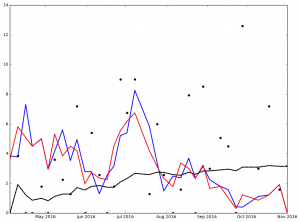
Dr. Drang focused on Jake Arrieta (he is a Chicago guy after all), but I thought it was be interested to look at the Graphs for Arrieta and the top 5 finishers in the NL Cy Young Voting (because Clayton Kershaw was 5th place and I'm a Dodgers guy).
Here is the graph for Jake Arrieata:
And here are the graphs for the top 5 finishers in Ascending order in the 2016 NL Cy Young voting:
Max Scherzer winner of the 2016 NL Cy Young Award
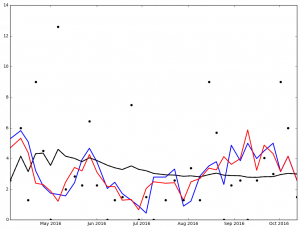
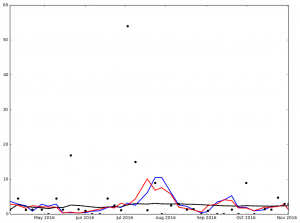
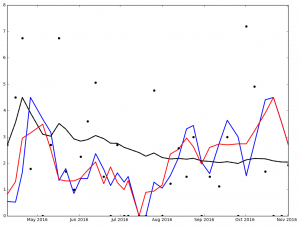
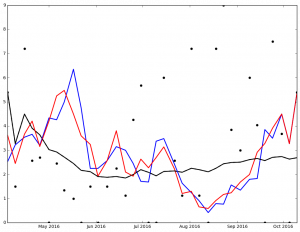
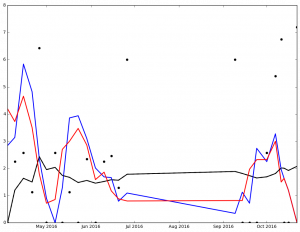
I've not spent much time analyzing the data, but I'm sure that it says something. At the very least, it got me to wonder, 'How many 0 ER games did each pitcher pitch?'
I also noticed that the stats include the playoffs (which I wasn't intending). Another thing to look at later.
Legend:
- Black Dot - ERA on Date of Game
- Black Solid Line - Cumulative ERA
- Blue Solid Line - 3-game trailing average ERA
- Red Solid Line - 4-game trailing average ERA
Full code can be found on my Github Repo
Web Scrapping - Passer Data (Part I)
For the first time in many years I've joined a Fantasy Football league with some of my family. One of the reasons I have not engaged in the Fantasy football is that, frankly, I'm not very good. In fact, I'm pretty bad. I have a passing interest in Football, but my interests lie more with Baseball than football (especially in light of the NFLs policy on punishing players for some infractions of league rules, but not punishing them for infractions of societal norms (see Tom Brady and Ray Lewis respectively).
That being said, I am in a Fantasy Football league this year, and as of this writing am a respectable 5-5 and only 2 games back from making the playoffs with 3 games left.
This means that what I started on yesterday I really should have started on much sooner, but I didn't.
I had been counting on ESPN's 'projected points' to help guide me to victory ... it's working about as well as flipping a coin (see my record above).
I had a couple of days off from work this week and some time to tinker with Python, so I thought, what the hell, let's see what I can do.
Just to see what other people had done I did a quick Google Search and found someone that had done what I was trying to do with data from the NBA in 2013.
Using their post as a model I set to work.
The basic strategy I am mimicking is to:
- Get the Teams and put them into a dictionary
- Get the 'matches' and put them into a dictionary
- Get the player stats and put them into a dictionary for later analysis
I start of importing some standard libraries pandas, requests, and BeautifulSoup (the other libraries are for later).
import pandas as pd
import requests
from bs4 import BeautifulSoup
import csv
import numpy as np
from datetime import datetime, date
Next, I need to set up some variables. BeautifulSoup is a Python library for pulling data out of HTML and XML files.. It's pretty sweet. The code below is declaring a URL to scrape and then users the requests library to get the actual HTML of the page and put it into a variable called r.
url = 'http://espn.go.com/nfl/teams'
r = requests.get(url)
r has a method called text which I'll use with BeautifulSoup to create the soup. The 'lxml' declares the parser type to be used. The default is lxml and when I left it off I was presented with a warning, so I decided to explicitly state which parser I was going to be using to avoid the warning.
soup = BeautifulSoup(r.text, 'lxml')
Next I use the find_all function from BeautifulSoup. The cool thing about find_all is that you can either pass just a tag element, i.e. li or p, but you can add an additional class_ argument (notice the underscore at the end ... I missed it more than once and got an error because class is a keyword used by Python). Below I'm getting all of the `ul' elements of the class type 'medium-logos'.
tables = soup.find_all('ul', class_='medium-logos')
Now I set up some list variables to hold the items I'll need for later use to create my dictionary
teams = []
prefix_1 = []
prefix_2 = []
teams_urls = []
Now, we do some actual programming:
Using a nested for loop to find all of the li elements in the variable called lis which is based on the variable tables (recall this is all of the HTML from the page I scrapped that has only the tags that match <ul class='medium-logos></ul> and all of the content between them).
The nested for loop creates 2 new variables which are used to populate the 4 lists from above. The creating of the info variable gets the a tag from the li tags. The url variable takes the href tag from the info variable. In order to add an item to a list (remember, all of the lists above are empty at this point) we have to invoke the method append on each of the lists with the data that we care about (as we look through).
The function split can be used on a string (which url is). It allows you to take a string apart based on a passed through value and convert the output into a list. This is super useful with URLs since there are many cases where we're trying to get to the path. Using split('/') allows the URL to be broken into it's constituent parts. The negative indexes used allows you to go from right to left instead of left to right.
To really break this down a bit, if we looked at just one of the URLs we'd get this:
http://www.espn.com/nfl/team/_/name/ten/tennessee-titans
The split('/') command will turn the URL into this:
['http:', '', 'www.espn.com', 'nfl', 'team', '_', 'name', 'ten', 'tennessee-titans']
Using the negative index allows us to get the right most 2 values that we need.
for table in tables:
    lis = table.find_all('li')
    for li in lis:
        info = li.h5.a
        teams.append(info.text)
        url = info['href']
        teams_urls.append(url)
        prefix_1.append(url.split('/')[-2])
        prefix_2.append(url.split('/')[-1])
Now we put it all together into a dictionary
dic = {'url': teams_urls, 'prefix_2': prefix_2, 'prefix_1': prefix_1, 'team': teams}
teams = pd.DataFrame(dic)
This is the end of part 1. Parts 2 and 3 will be coming later this week.
I've also posted all of the code to my GitHub Repo.
Pushing Changes from Pythonista to GitHub - Step 1
With the most recent release of the iOS app Workflow I was toying with the idea of writing a workflow that would allow me to update / add a file to a GitHub repo via a workflow.
My thinking was that since Pythonista is only running local files on my iPad if I could use a workflow to access the api elements to push the changes to my repo that would be pretty sweet.
In order to get this to work I'd need to be able to accomplosh the following things (not necessarily in this order)
- Have the workflow get a list of all of the repositories in my GitHub
- Get the current contents of the app to the clip board
- Commit the changes to the master of the repo
I have been able to write a Workflow that will get all of the public repos of a specified github user. Pretty straight forward stuff.
The next thing I'm working on getting is to be able to commit the changes from the clip board to a specific file in the repo (if one is specified) otherwise a new file would be created.
I really just want to 'have the answer' for this, but I know that the journey will be the best part of getting this project completed.
So for now, I continue to read the GitHub API Documentation to discover exactly how to do what I want to do.
An Update to my first Python Script
Nothing can ever really be considered done when you're talking about programming, right?
I decided to try and add images to the python script I wrote last week and was able to do it, with not too much hassel.
The first thing I decided to do was to update the code on pythonista on my iPad Pro and verify that it would run.
It took some doing (mostly because I forgot that the attributes in an img tag included what I needed ... initially I was trying to programmatically get the name of the person from the image file itelf using regular expressions ... it didn't work out well).
Once that was done I branched the master on GitHub into a development branch and copied the changes there. Once that was done I performed a pull request on the macOS GitHub Desktop Application.
Finally, I used the macOS GitHub app to merge my pull request from development into master and now have the changes.
The updated script will now also get the image data to display into the multi markdown table:
| Name | Title | Image |
| --- | --- | --- |
|Mike Cheley|CEO/Creative Director||
|Ozzy|Official Greeter||
|Jay Sant|Vice President||
|Shawn Isaac|Vice President||
|Jason Gurzi|SEM Specialist||
|Yvonne Valles|Director of First Impressions||
|Ed Lowell|Senior Designer||
|Paul Hasas|User Interface Designer||
|Alan Schmidt|Senior Web Developer||
Which gets displayed as this:
Name Title Image
Mike Cheley CEO/Creative Director  Ozzy Official Greeter
  Jay Sant Vice President
  Shawn Isaac Vice President
  Jason Gurzi SEM Specialist
  Yvonne Valles Director of First Impressions
  Ed Lowell Senior Designer
  Paul Hasas User Interface Designer
  Alan Schmidt Senior Web Developer
My First Python Script that does 'something'
I've been interested in python as a tool for a while and today I had the chance to try and see what I could do.
With my 12.9 iPad Pro set up at my desk, I started out. I have Ole Zorn's Pythonista 3 installed so I started on my first script.
My first task was to scrape something from a website. I tried to start with a website listing doctors, but for some reason the html rendered didn't include anything useful.
So the next best thing was to find a website with staff listed on it. I used my dad's company and his staff listing as a starting point.
I started with a quick Google search to find Pythonista Web Scrapping and came across this post on the Pythonista forums.
That got me this much of my script:
import bs4, requests

myurl = 'http://www.graphtek.com/Our-Team'

def get_beautiful_soup(url):

return bs4.BeautifulSoup(requests.get(url).text, "html5lib")

soup = get_beautiful_soup(myurl)
Next, I needed to see how to start traversing the html to get the elements that I needed. I recalled something I read a while ago and was (luckily) able to find some help.
That got me this:
tablemgmt = soup.findAll('div', attrs={'id':'our-team'})
This was close, but it would only return 2 of the 3 div tags I cared about (the management team has a different id for some reason ... )
I did a search for regular expressions and Python and found this useful stackoverflow question and saw that if I updated my imports to include re then I could use regular expressions.
Great, update the imports section to this:
import bs4, requests, re
And added re.compile to my findAll to get this:
tablemgmt = soup.findAll('div', attrs={'id':re.compile('our-team')})
Now I had all 3 of the div tags I cared about.
Of course the next thing I wanted to do was get the information i cared out of the structure tablemgmt.
When I printed out the results I noticed leading and trailing square brackets and eveytime I tried to do something I'd get an error.
It took an embarrassingly long time to realize that I needed to treat tablemgmt as an array. Whoops!
Once I got through that it was straight forward to loop through the data and output it:
list_of_names = []

for i in tablemgmt:

for row in i.findAll('span', attrs={'class':'team-name'}):

text = row.text.replace('<span class="team-name"', '')

if len(text)>0:

list_of_names.append(text)

list_of_titles = []

for i in tablemgmt:

for row in i.findAll('span', attrs={'class':'team-title'}):

text = row.text.replace('<span class="team-title"', '')

if len(text)>0:

list_of_titles.append(text)
The last bit I wanted to do was to add some headers and make the lists into a two column multimarkdown table.
OK, first I needed to see how to 'combine' the lists into a multidimensional array. Another google search and ... success. Of course the answer would be on stackoverflow
With my knowldge of looping through arrays and the function zip I was able to get this:
for j, k in zip(list_of_names, list_of_titles):

print('|'+ j + '|' + k + '|')
Which would output this:
|Mike Cheley|CEO/Creative Director|

|Ozzy|Official Greeter|

|Jay Sant|Vice President|

|Shawn Isaac|Vice President|

|Jason Gurzi|SEM Specialist|

|Yvonne Valles|Director of First Impressions|

|Ed Lowell|Senior Designer|

|Paul Hasas|User Interface Designer|

|Alan Schmidt|Senior Web Developer|
This is close, however, it still needs headers.
No problem, just add some static lines to print out:
print('| Name | Title |')
print('| --- | --- |')
And voila, we have a multimarkdown table that was scrapped from a web page:
| Name | Title |
| --- | --- |
|Mike Cheley|CEO/Creative Director|
|Ozzy|Official Greeter|
|Jay Sant|Vice President|
|Shawn Isaac|Vice President|
|Jason Gurzi|SEM Specialist|
|Yvonne Valles|Director of First Impressions|
|Ed Lowell|Senior Designer|
|Paul Hasas|User Interface Designer|
|Alan Schmidt|Senior Web Developer|
Which will render to this:
Name Title
Mike Cheley CEO/Creative Director Ozzy Official Greeter Jay Sant Vice President Shawn Isaac Vice President Jason Gurzi SEM Specialist Yvonne Valles Director of First Impressions Ed Lowell Senior Designer Paul Hasas User Interface Designer Alan Schmidt Senior Web Developer
Page 13 / 13