uv and pip
On Sunday November 3 I posted this to Mastodon:
I've somehow managed to get Python on my macbook to not install packages into the virtual environment I've activated and I'm honestly not sure how to fix this.
Has anyone else ever run into this problem? If so, any pointers on how to fix it?
I got lots of helpful replies and with those replies I was able to determine what the issue was and 'fix' it.
A timeline of events
I was working on updating a library of mine and because it had been a while since it had been worked on, I had to git clone it locally. When I did that I then set out to try uv for the virtual environment management.
This worked well (and was lightning FAST) and I was hacking away at the update I wanted to do.
Then I had a call with my daughter to review her upcoming schedule for the spring semester. When I got back to working on my library I kind of dove right in and started to get an error messages about the library not being installed
zsh: command not found: the-well-maintained-test
So I tried to install it (though I was 100% sure it was already there) and got this message
ERROR: Could not find an activated virtualenv (required).
I deleted the venv directory and started over again (using uv still) and ran into the same issue.
I restarted my Mac (at my day job I use Windows computers and this is just a natural reaction to do when something doesn't work the way I think it should1)
That didn't fix the issue 😢
I spent the next little while certain that in some way pipx or pyenv had jacked up my system, so I uninstalled them ... now you might ask why I thought this, and dear reader, I have no f$%&ing clue.
With those pesky helpers out of the way, pip still wasn't working the way I expected it to!
I then took to Mastodon and with this one response I saw what I needed
@ryancheley Are you running python -m pip install... Or just pip install...? If that's a venv created by uv, pip isn't installed I think, so 'pip install' might resolve to a pip in a different python installation
I went back to my terminal, and sure enough that was the issue. I haven't used uv enough to get a real sense of it, and when I was done talking with my daughter, my brain switched to Python programming, but it forgot that I had used uv to set everything up.
Lessons learned
This was a good lesson but I'm still unsure about a few things:
- How do I develop a cli using
uv? - Why did it seem that my cli testing worked fine right up until the call with my daughter, and now it seems that I can't develop cli's with
uv?
I did write a TIL for this but I discovered that
uv venv venv
is not a full replacement for
python -m venv venv
Specifically uv does not include pip, which is what contributed to my issues. You can include pip by running this command though
uv venv venv --seed
Needless to say, with the help of some great people on the internet I got my issue resolved, but I did spend a good portion of Monday evening un-f$%&ing my MacBook Pro by reinstalling pyenv, and pipx2 ... and cleaning up my system Python for 3.12 and 3.13 ... turns out Homebrew REALLY doesn't want you to do anything with the system Python, even if you accidentally installed a bunch of cruft in there accidentally.
- Yes this is dumb, and yes I hate it ↩︎
- As of this writing I've uninstalled pipx because
uvcan replace it too. See Jeff Triplett's post uv does everything ↩︎
Migrating django-tailwind-cli to Django Commons
On Tuesday October 29 I worked with Oliver Andrich, Daniel Moran and Storm Heg to migrate Oliver's project django-tailwind-cli from Oliver's GitHub project to Django Commons.
This was the 5th library that has been migrated over, but the first one that I 'lead'. I was a bit nervous. The Django Commons docs are great and super helpful, but the first time you do something, it can be nerve wracking.
One thing that was super helpful was knowing that Daniel and Storm were there to help me out when any issues came up.
The first set up steps are pretty straight forward and we were able to get through them pretty quickly. Then we ran into an issue that none of us had seen previously.
django-tailwind-cli had initially set up GitHub Pages set up for the docs, but migrated to use Read the Docs. However, the GitHub pages were still set in the repo so when we tried to migrate them over we ran into an error. Apparently you can't remove GitHub pages using Terraform (the process that we use to manage the organization).
We spent a few minutes trying to parse the error, make some changes, and try again (and again) and we were able to finally successfully get the migration completed 🎉
Some other things that came up during the migration was a maintainer that was set in the front end, but not in the terraform file. Also, while I was making changes to the Terraform file locally I ran into an issue with an update that had been done in the GitHub UI on my branch which caused a conflict for me locally.
I've had to deal with this kind of thing before, but ... never with an audience! Trying to work through the issue was a bit stressful to say the least 😅
But, with the help of Daniel and Storm I was able to resolve the conflicts and get the code pushed up.
As of this writing we have 6 libraries that are part of the Django Commons organization and am really excited for the next time that I get to lead a migration. Who knows, at some point I might actually be able to do one on my own ... although our hope is that this can be automated much more ... so maybe that's what I can work on next
Working on a project like this has been really great. There are such great opportunities to learn various technologies (terraform, GitHub Actions, git) and getting to work with great collaborators.
What I'm hoping to be able to work on this coming weekend is1:
- Get a better understanding of Terraform and how to use it with GitHub
- Use Terraform to do something with GitHub Actions
- Try and create a merge conflict and then use the git cli, or Git Tower, or VS Code to resolve the merge conflict
For number 3 in particular I want to have more comfort for fixing those kinds of issues so that if / when they come up again I can resolve them.
- Now will I actually be able to 🤷🏻 ↩︎
Django Commons
First, what are "the commons"? The concept of "the commons" refers to resources that are shared and managed collectively by a community, rather than being owned privately or by the state. This idea has been applied to natural resources like air, water, and grazing land, but it has also expanded to include digital and cultural resources, such as open-source software, knowledge databases, and creative works.
As Organization Administrators of Django Commons, we're focusing on sustainability and stewardship as key aspects.
Asking for help is hard, but it can be done more easily in a safe environment. As we saw with the xz utils backdoor attack, maintainer burnout is real. And while there are several arguments about being part of a 'supply chain' if we can, as a community, offer up a place where maintainers can work together for the sustainability and support of their packages, Django community will be better off!
From the README of the membership repo in Django Commons
Django Commons is an organization dedicated to supporting the community's efforts to maintain packages. It seeks to improve the maintenance experience for all contributors; reducing the barrier to entry for new contributors and reducing overhead for existing maintainers.
OK, but what does this new organization get me as a maintainer? The (stretch) goal is that we'll be able to provide support to maintainers. Whether that's helping to identify best practices for packages (like requiring tests), or normalize the idea that maintainers can take a step back from their project and know that there will be others to help keep the project going. Being able to accomplish these two goals would be amazing ... but we want to do more!
In the long term we're hoping that we're able to do something to help provide compensation to maintainers, but as I said, that's a long term goal.
The project was spearheaded by Tim Schilling and he was able to get lots of interest from various folks in the Django Community. But I think one of the great aspects of this community project is the transparency that we're striving for. You can see here an example of a discussion, out in the open, as we try to define what we're doing, together. Also, while Tim spearheaded this effort, we're really all working as equals towards a common goal.
What we're building here is a sustainable infrastructure and community. This community will allow packages to have a good home, to allow people to be as active as they want to be, and also allow people to take a step back when they need to.
Too often in tech, and especially in OSS, maintainers / developers will work and work and work because the work they do is generally interesting, and has interesting problems to try and solve.
But this can have a downside that we've all seen .. burnout.
By providing a platform for maintainers to 'park' their projects, along with the necessary infrastructure to keep them active, the goal is to allow maintainers the opportunity to take a break if, or when, they need to. When they're ready to return, they can do so with renewed interest, with new contributors and maintainers who have helped create a more sustainable environment for the open-source project.
The idea for this project is very similar to, but different from, Jazz Band. Again, from the README
Django Commons and Jazzband have similar goals, to support community-maintained projects. There are two main differences. The first is that Django Commons leans into the GitHub paradigm and centers the organization as a whole within GitHub. This is a risk, given there's some vendor lock-in. However, the repositories are still cloned to several people's machines and the organization controls the keys to PyPI, not GitHub. If something were to occur, it's manageable.
The second is that Django Commons is built from the beginning to have more than one administrator. Jazzband has been working for a while to add additional roadies (administrators), but there hasn't been visible progress. Given the importance of several of these projects it's a major risk to the community at large to have a single point of failure in managing the projects. By being designed from the start to spread the responsibility, it becomes easier to allow people to step back and others to step up, making Django more sustainable and the community stronger.
One of the goals for Django Commons is to be very public about what's going on. We actively encourage use of the Discussions feature in GitHub and have several active conversations happening there now1 2 3
So far we've been able to migrate ~3~ 4 libraries4 5 6 7into Django Commons. Each one has been a great learning experience, not only for the library maintainers, but also for the Django Commons admins.
We're working to automate as much of the work as possible. Daniel Moran has done an amazing job of writing Terraform scripts to help in the automation process.
While there are still several manual steps, with each new library, we discover new opportunities for automation.
This is an exciting project to be a part of. If you're interested in joining us you have a couple of options
- Transfer your project into Django Commons
- Join as member and help contribute to one of the projects that's already in Django Commons
I'm looking forward to seeing you be part of this amazing community!
DjangoCon US 2024 Talk
At DjangoCon US 2023 I gave a talk, and wrote about my experience preparing for that talk
Well, I spoke again at DjangoCon US this year (2024) and had a similar, but wildly different experience in preparing for my talk.
Last year I lamented that I didn't really track my time (which is weird because I track my time for ALL sorts of things!).
This year, I did track my time and have a much better sense of how much time I prepared for the talk.
Another difference between each year is that in 2023 I gave a 45 minute talk, while this year my talk was 25 minutes.
I've heard that you need about 1 hour of prep time for each 1 minute of talk that you're going to give. That means that, on average, for a 25 minute talk I'd need about 25 hours of prep time.
My time tracking shows that I was a little short of that (19 hours) but my talk ended up being about 20 minutes, so it seems that maybe I was on track for that.
This year, as last year, my general prep technique was to:
- Give the presentation AND record it
- Watch the recording and make notes about what I needed to change
- Make the changes
I would typically do each step on a different day, though towards the end I would do steps 2 and 3 on the same day, and during the last week I would do all of the steps on the same day.
This flow really seems to help me get the most of out practicing my talk and getting a sense of its strengths and weaknesses.
One issue that came up a week before I was to leave for DjangoCon US is that my boss said I couldn't have anything directly related to my employer in the presentation. My initial drafts didn't have specifics, but the examples I used were too close for my comfort on that, so I ended up having to refactor that part of my talk.
Honestly, I think it came out better because of it. During my practice runs I felt like I was kind of dancing around topics, but once I removed them i felt freer to just kind of speak my mind.
Preparing and giving talks like these are truly a ton of work. Yes, you'll (most likely) be given a free ticket to the conference you're speaking at — but unless you're a seasoned public speaker you will have to practice a lot to give a great talk.
One thing I didn't mention in my prep time is that my talk was essentially just a rendition of my series of blog posts I started writing at DjangoCon US 2023 (Error Culture)
So when you add in the time it took for me to brainstorm those articles, write, and edit them, we're probably looking at another 5 - 7 hours of prep.
This puts me closer to the 25 hours of prep time for the 25 minute talk.
I've given 2 talks so far, and after each one I've said, 'Never again!'
It's been a few weeks since I gave my talk, and I have to say, I'm kind of looking forward to trying to give a talk again next year. Now, I just need to figure out what I would talk about that anyone would want to hear. 🤔
SSH Keys
If you want to access a server in a 'passwordless' way, the best approach I know is to use SSH Keys. This is great, but what does that mean and how do you set it up?
I'm going to attempt to write out the steps for getting this done.
Let's assume we have two servers, web1 and web2. These two servers have 1 non-root user which I'll call user1.
So we have something like this
user1@web1user1@web2
Suppose we want to allow user1 from web2 to access web1.
At a high level, we need to allow SSH access to web1 for user1 on web2 we need to:
- Create
user1onweb1 - Create
user1onweb2 - Create SSH keys on
web2foruser1 - Add the public key for
user1fromweb2to onto theauthorized_keysfor foruser1onweb1
OK, let's try this. I am using DigitalOcean and will be taking advantage of their CLI tool doctl
To create a droplet, there are two required arguments.:
- image
- size
I'm also going to include a few other options
- tag
- region
- ssh-keys1
Below is the command to use to create a server called web-t-001
doctl compute droplet create web-t-001 \
  --image ubuntu-24-04-x64 \
  --size s-1vcpu-1gb \
  --enable-monitoring \
  --region sfo2 \
  --tag-name test \
  --ssh-keys $(doctl compute ssh-key list --output json | jq -r 'map(.id) | join(",")')
and to create a server called web-t-002
doctl compute droplet create web-t-002 \
  --image ubuntu-24-04-x64 \
  --size s-1vcpu-1gb \
  --enable-monitoring \
  --region sfo2 \
  --tag-name test \
  --ssh-keys $(doctl compute ssh-key list --output json | jq -r 'map(.id) | join(",")')
The values for the ssh-keys above will get all of the ssh-keys I have stored at DigitalOcean and add them.
The output looks something like:
--ssh-keys 1234, 4567, 6789, 1222
Now that we've created two droplets called web-t-001 and web-t-002 we can set up user1 on each of the servers.
I'll SSH as root into each of the servers and create user1 on each (I can do this because of the ssh keys that were added as part of the droplet creation)
adduser --disabled-password --gecos "User 1" user1 --home /home/user1
I then switch to user1
su user1
and run this command
ssh-keygen -q -t rsa -b 2048 -f /home/user1/.ssh/id_rsa -N ''
This will generate two files in ~/.ssh without any prompts:
id_rsaid_rsa.pub
The id_rsa identifies the computer. This is the Private Key. It should NOT be shared with anyone!
The id_rsa.pub. This is the Public Key. It CAN be shared.
The contents of the id_rsa.pub file will be used for the authorized_keys file on the computer this user will SSH into.
OK, what does this actually look like?
On web-t-002, I get the content of ~/.ssh/id_rsa.pub for user1 and copy it to my clipboard.
Then from web-t-001 as user1 I paste that into the the authorized_keys in ~/.ssh. If the file isn't already there, it needs to be created.
This tells web-t-001 that a computer with the private key that matches the public key is allowed to access as user1
The implementation of this is to be on web-t-002 as user1 and then run the command
ssh user1@web-t-001
The first time this is done, a prompt will come up that looks like this:
The authenticity of host 'xxx.xxx.xxx.xxx (xxx.xxx.xxx.xxx)' can't be established.
ED25519 key fingerprint is SHA256:....
This key is not known by any other names.
Are you sure you want to continue connecting (yes/no/[fingerprint])?
This ensure that you know which computer you're connecting to and you want to continue. This helps to prevent potential man-in-the-middle attacks. When you type yes this creates a file called known_hosts
OK, so where are we at? The table below shows the files, their content, and their servers
| Server | id_rsa | id_rsa.pub | authorized_keys | known_hosts |
|---|---|---|---|---|
| web-t-001 | private key | ssh-rsa AAAAB3NzaC1yc2EAAAADAQABAAACAQDFwHs8VKWWSH737fVz4cs+5Eq8OcRJRf2ti0ytaChM1ySh2+olcKokHao3fl5G+ZZv4pQeKfCh8ClFP86g7rZN1evu2EFVlmBo1Ked4IwF4UBY2+rnfZmvxeHd+smtyZgfVZI/6ySfe1D+inAqv7otsMsNRRuE4aG0DNEJ39qwFxukGNcDXk9RNVvmwbCc5zT/HN0yMJ6Y7KtfPZgjl5v854VodZkfxsLpah7Bn64zAQr/xDh2KcWbtDrsvTdjNMPY7oW20VoqDs98mA6xAw9RNMI+xotNmivdWdv3BEYj9JyH61euTBQ27HC4LsOPuCOFKBqOwGXiJhpzvJZbNCcvQEztem3kqQFAPLg+4wBInyxnY2i31QX7+2IJs0a4pYTWRSRcrvwBAvi2GlXGltrZ7V6KOLzwBrXLD7XiO3C5kO5fcpanKlm/RdVAxUTjUq159H+v9om8HAgX/pIpYBpPnRrG7setNQVzDNQsxfR/YC0h+f9LWnnaBV6+51IjbaqAPSSf6KYv0AKO5XNlJsSTXNRBZaRvrfr0qllgXU82f9y8Eb0sgjL71wD9Fv24fV0toFW8PH3yOeePC6d7kNqZkFdSBksChzqagZwPudYnVhMmhMYV7k1v831H8WHdGPVRe9Z3BDnSCzf8o8fRS3mSEAJBiT30bXlGWUNopIpsgw== user1@ahc-web-t-001 | ssh-rsa AAAAB3NzaC1yc2EAAAADAQABAAACAQCbx+wTVEcdy2Uu2iB+u6+R8Q0yH9ws92GM6K/XXmAXoUuXylkdJzw9vUeuaZTmGxwGRdp+lLh+vVDmiuzrUPjbkFA7Y1SxfR5lgJu7PviDDZzsFeUo5fqSp6FOC5x75jOjqy6fc68GzOnoxk4WR6EWKWRd+xqdgCTGWiuhfUEl1lw7YN8MUhd1Hi0Ef55ZpH133jCzffWbkLFFInyIwuzG6jaPsobNPRshvg9kUoFwo5WqCx/s8Zk4iVl86yCwoV+pXjiubLylSKF7hb7uDE4Ll8gADOtuXUqmc470yvzSxxI4yaZOFz4Ajo1qZHgscSOxWgb+ZVIOKhGK5ftHPaZ4CCxXuhW5J8L3Aqs0WQeRu9Goof83V/ruZhzgg1vnhmC2511QSS2dL6U7n2JNLtNnXNjeSQ0BGVlY1FuZRczmAxN9nJETmRCdUfiTwKdPS4LdfAwrnckPHKtk1QoFKietLwfbmipU+pGvt6qKpKeRfZ/XGbG+ZiQ7oPiqcYU/eh54IAUxxo9CvVHtn742A4ABqK5+0MJP5VuY3fcDU8dIvA0r4LpxRpG/KSB4yZMUhjf+KR7QUpN3mJIDOKTDAxpGOqpNoD2gTYGpyT13AdrRROpOjOJZJqDiVi6m6r/U+sIgqymsxDqBur5+n4VxvvXbdNd+6vz7AI12WA8I8+0xZw== user1@ahc-web-t-002 | NULL |
| web-t-002 | private key | ssh-rsa AAAAB3NzaC1yc2EAAAADAQABAAACAQCbx+wTVEcdy2Uu2iB+u6+R8Q0yH9ws92GM6K/XXmAXoUuXylkdJzw9vUeuaZTmGxwGRdp+lLh+vVDmiuzrUPjbkFA7Y1SxfR5lgJu7PviDDZzsFeUo5fqSp6FOC5x75jOjqy6fc68GzOnoxk4WR6EWKWRd+xqdgCTGWiuhfUEl1lw7YN8MUhd1Hi0Ef55ZpH133jCzffWbkLFFInyIwuzG6jaPsobNPRshvg9kUoFwo5WqCx/s8Zk4iVl86yCwoV+pXjiubLylSKF7hb7uDE4Ll8gADOtuXUqmc470yvzSxxI4yaZOFz4Ajo1qZHgscSOxWgb+ZVIOKhGK5ftHPaZ4CCxXuhW5J8L3Aqs0WQeRu9Goof83V/ruZhzgg1vnhmC2511QSS2dL6U7n2JNLtNnXNjeSQ0BGVlY1FuZRczmAxN9nJETmRCdUfiTwKdPS4LdfAwrnckPHKtk1QoFKietLwfbmipU+pGvt6qKpKeRfZ/XGbG+ZiQ7oPiqcYU/eh54IAUxxo9CvVHtn742A4ABqK5+0MJP5VuY3fcDU8dIvA0r4LpxRpG/KSB4yZMUhjf+KR7QUpN3mJIDOKTDAxpGOqpNoD2gTYGpyT13AdrRROpOjOJZJqDiVi6m6r/U+sIgqymsxDqBur5+n4VxvvXbdNd+6vz7AI12WA8I8+0xZw== user1@ahc-web-t-002 | NULL | |1|V6uYGlSiYXpzFAly9RQHybzl07o=|VUkDfRcKGyUgLdJn+iw6RJE+r68= ssh-ed25519 AAAAC3NzaC1lZDI1NTE5AAAAILpbPHA1jL0MHzBI8qb2X0mHDx3UlrKCdbz1IspvaJW9 |1|dshOpqJI2zQxEpj1pleDmtkijIY=|ZYV8bCeLNDdyE7STDPaO2TzYUEQ= ssh-rsa AAAAB3NzaC1yc2EAAAADAQABAAABgQDnGgQUmsCG23b6iYxRHq5MU9xd8Q/p8j3EyZn9hvs4IsBoCgeNXjyXK28x7Mt7tmfjrF/4jLcq4o2TTAwF6eVQZ4KXoBa73dYqYDmYTVKTwzZL9CsJTWHTsSnU8V/J3Tml+hIFrjZzWP34+lL9xyOVin5R0PT/OCG49ecb5tt2FxTZeyWI47B/bCDGXV9g1tjZ8+mnbLXpIdQ9+6GllRZrEGvXWm6z/U3YHO84dcG0IZJ7QsEaAiLSBC/t83So4MDQgdttm+aHZXds4jej5E3QwUex8JkVVn0X7Nr4yKMDkSk7ABD6AFhpa4ESXysqI33CUaSBROAuu4lmfOkLmyRZK2vQ6soiOW8iBgCEl/q8MSOEpZeAi3faYbUnOpLzLDBcCoAuSDoexrTixxlhJmRDeS3PlcXmzvkJl7RRKUYZZcPQOd2w9ipCIAD1PevNlnmmZcfkRe0RRvAyF1mqcO/x5Ovtq9QLbycFHYfh/3LcPuDOWBtT+mVd5FeNUMsZ6+8= |1|HJd+aDFM66x8jJT1zUZV59ceL10=|PfHQu/Yg35QPBKk7FvNO/46b76o= ecdsa-sha2-nistp256 AAAAE2VjZHNhLXNoYTItbmlzdHAyNTYAAAAIbmlzdHAyNTYAAABBBP+XwUozGye03WJ6zC7yoJQaYF8HiUQKmZwnQO0wSxMm9x9nBdPEx1bmyZHHUbMnwQnoeAMmd6hgK6H8hbxzEas= |
OK, so now we have set it up so that user1 on web-t-002 can access web-t-001 as user1. A reasonable question to ask at this point might be, can I go the other way without any extra steps?
Let's try it and see!
From web-t-001 as user1 lets run
ssh user1@web-t-002
And see what happens
We get the same warning message we got before, and if we enter yes we then see
user1@yyy.yyy.yyy.yyy: Permission denied (publickey).
What's going on?
We haven't added the public key for user1 from web-t-002 to the authorized_keys file on web-t-001.
Let's do that now.
Similar to before we'll get the content of the id_rsa.pub from web-t-001 for user1 and copy it to the authorized_keys file on web-t-002 for user1.
When we do this we are now able to connect to web-t-002 from web-t-001 as user1
OK, SSH has 4 main files involved:
id_rsa.pub(public key): The SSH key pair is used to authenticate the identity of a user or process that wants to access a remote system using the SSH protocol. The public key is used by both the user and the remote server to encrypt messages.id_rsa(private key): The private key is secret, known only to the user, and should be encrypted and stored safelyknown_hosts: stores the public keys and fingerprints of the hosts accessed by a userauthorized_keys: file containing all of the authorized public keys that have been generated. This is what tells the server that it’s Ok to use the key to allow a connection
Using with GHA
ssh-action from AppleBoy
A general way to access your server with GHA (say for CICD) is to use the GitHub action from appleboy called ssh-action
There are 3 key components needed to get this to work:
- host
- username
- key
Each of these can/should be put into repository secrets. Setting those up is outside the scope of this article. For details on how to set repository secrets, see this article.
Using the servers from above we could set up the following secrets
- SSH_HOST: web-t-001 IP Address
- SSH_KEY: the content from /home/user1/.ssh/id_rsa ( from web-t-002 )
- SSH_USERNAME: user1
And then set up an GitHub Action like this
name: Test Workflow

on:
  workflow_dispatch:

jobs:
  deploy:
    runs-on: ubuntu-22.04
    steps:
      - name: deploy code
        uses: appleboy/ssh-action@v0.1.10
        with:
          host: ${{ secrets.SSH_HOST }}
          port: 22
          key: ${{ secrets.SSH_KEY }}
          username: ${{ secrets.SSH_USERNAME }}

          script: |
            echo "This is a test" >  ~/test.txt
Using this set up we've made the docker image that runs the GHA to be (basically) known as web-t-001 and it has access as user1 in the same way we did in the terminal.
When this action is run it will ssh into web-t-001 as user1 and create a file called test.txt in the home directory. The content of that file will be "This is a test"
- I'm using these keys so that I can gain access to the server as root ↩︎
Using justpath to go on a pyrrhic adventure to clean up my PATH
A while ago I heard about a project called justpath from Jeff Tripplet on Mastodon. It seemed like a neat project to try and clean up my path and I figured, what the heck, let me give it a try.
I installed it and when I ran it for the first time, the output looked like this
 1 /Users/ryan/.cargo/bin
 2 /usr/local/opt/ruby/bin (resolves to /usr/local/Cellar/ruby/3.2.2_1/bin)
 3 /Users/ryan/google-cloud-sdk/bin
 4 /Users/ryan/.pyenv/shims
 5 /opt/homebrew/Cellar/pyenv-virtualenv/1.2.3/shims
 6 /opt/homebrew/bin
 7 /opt/homebrew/sbin
 8 /Library/Frameworks/Python.framework/Versions/3.12/bin
 9 /usr/local/bin (duplicates: 3)
10 /usr/local/sbin
11 /Library/Frameworks/Python.framework/Versions/3.11/bin
12 /Library/Frameworks/Python.framework/Versions/3.10/bin
13 /usr/local/bin (duplicates: 3)
14 /System/Cryptexes/App/usr/bin (resolves to /System/Volumes/Preboot/Cryptexes/App/usr/bin)
15 /usr/bin
16 /bin
17 /usr/sbin
18 /sbin
19 /var/run/com.apple.security.cryptexd/codex.system/bootstrap/usr/local/bin (resolves to /private/var/run/com.apple.security.cryptexd/codex.system/bootstrap/usr/local/bin, directory does not exist)
20 /var/run/com.apple.security.cryptexd/codex.system/bootstrap/usr/bin (resolves to /private/var/run/com.apple.security.cryptexd/codex.system/bootstrap/usr/bin, directory does not exist)
21 /var/run/com.apple.security.cryptexd/codex.system/bootstrap/usr/appleinternal/bin (resolves to /private/var/run/com.apple.security.cryptexd/codex.system/bootstrap/usr/appleinternal/bin, directory does not exist)
22 /opt/X11/bin
23 /Library/Apple/usr/bin
24 /Library/TeX/texbin (resolves to /usr/local/texlive/2024basic/bin/universal-darwin)
25 /usr/local/share/dotnet
26 ~/.dotnet/tools (directory does not exist)
27 /Library/Frameworks/Mono.framework/Versions/Current/Commands (resolves to /Library/Frameworks/Mono.framework/Versions/6.12.0/Commands)
28 /Applications/Postgres.app/Contents/Versions/latest/bin (resolves to /Applications/Postgres.app/Contents/Versions/14/bin)
29 /Applications/Xamarin Workbooks.app/Contents/SharedSupport/path-bin (directory does not exist)
30 /Users/ryan/.local/bin (duplicates: 2)
31 /usr/local/bin (duplicates: 3)
32 /Users/ryan/.local/bin (duplicates: 2)
That's a lot to look at, but helpfully there are a few flags to get only the 'bad' items
justpath --invalid

justpath --duplicates
Running justpath --invalid got this
18 /var/run/com.apple.security.cryptexd/codex.system/bootstrap/ usr/local/bin (resolves to /private/var/run/com.apple.security.cryptexd/codex.system/bootstrap/usr/local/bin, directory does not exist)
19 /var/run/com.apple.security.cryptexd/codex.system/bootstrap/usr/bin (resolves to /private/var/run/com.apple.security.cryptexd/codex.system/bootstrap/usr/bin, directory does not exist)
20 /var/run/com.apple.security.cryptexd/codex.system/bootstrap/usr/appleinternal/bin (resolves to /private/var/run/com.apple.security.cryptexd/codex.system/bootstrap/usr/appleinternal/bin, directory does not exist)
26 ~/.dotnet/tools (directory does not exist)
29 /Applications/Xamarin Workbooks.app/Contents/SharedSupport/path-bin (directory does not exist)
and running justpath --duplicates got this
 8 /usr/local/bin (duplicates: 3)
12 /usr/local/bin (duplicates: 3)
30 /Users/ryan/.local/bin (duplicates: 2)
31 /usr/local/bin (duplicates: 3)
32 /Users/ryan/.local/bin (duplicates: 2)
Great! Now I know what is invalid and what is duplicated. Surely justpath will have a command to clean this up, right?

Turns out not so much, and for good reasons:
justpathdoes not alter the path itself, it provides the corrected version that a user can apply further. A child process the one that Python is running in cannot alter the parent environment PATH. As for reading the PATH -justpathrelies on what is available fromos.environ['PATH'].
So I posted on Mastodon to see how others may have approached this and Jeff replied back
I ran the tool and copied the output before starting from an empty PATH.
Then I ran justpath and added them back one at a time.
mise helped me cut at least half a dozen weird/duplicate path statements alone. I had quite a bit of tool overlap.
I poked around with trying to find where the invalid values were coming from and found this answer
Cryptexes are used to update parts of macOS quickly, without requiring a full rebuild of the SSV (see this answer for details). I don't know whether removing these paths will break the installation of such cryptexes. But if you want to take the risk, you can remove
/etc/paths.d/10-cryptex(or move it to a safe place in case you need it later on). PS: Invalid entries in PATH don't really hurt, they primarily slow down (a very little bit) the lookup of new commands run from the shell the first time.
This supported my assumption that the invalid PATH variables were likely due to macOS upgrades (I guessed that based on the existence of invalid PATH variables on other Macs in my house that didn't have a programmer / developer using them)
So, with that I found 2 files that were in /etc/paths.d and moved them to my desktop. Once that was done I restarted my terminal and got this output
 1 /Users/ryan/.cargo/bin
 2 /usr/local/opt/ruby/bin (resolves to /usr/local/Cellar/ruby/3.2.2_1/bin)
 3 /Users/ryan/google-cloud-sdk/bin
 4 /Users/ryan/.pyenv/shims
 5 /opt/homebrew/Cellar/pyenv-virtualenv/1.2.3/shims
 6 /opt/homebrew/bin
 7 /opt/homebrew/sbin
 8 /Library/Frameworks/Python.framework/Versions/3.12/bin
 9 /usr/local/bin (duplicates: 3)
10 /usr/local/sbin
11 /Library/Frameworks/Python.framework/Versions/3.11/bin
12 /Library/Frameworks/Python.framework/Versions/3.10/bin
13 /usr/local/bin (duplicates: 3)
14 /System/Cryptexes/App/usr/bin (resolves to /System/Volumes/Preboot/Cryptexes/App/usr/bin)
15 /usr/bin
16 /bin
17 /usr/sbin
18 /sbin
19 /opt/X11/bin
20 /Library/Apple/usr/bin
21 /Library/TeX/texbin (resolves to /usr/local/texlive/2024basic/bin/universal-darwin)
22 /usr/local/share/dotnet
23 /Library/Frameworks/Mono.framework/Versions/Current/Commands (resolves to /Library/Frameworks/Mono.framework/Versions/6.12.0/Commands)
24 /Applications/Postgres.app/Contents/Versions/latest/bin (resolves to /Applications/Postgres.app/Contents/Versions/14/bin)
25 /Users/ryan/.local/bin (duplicates: 2)
26 /usr/local/bin (duplicates: 3)
27 /Users/ryan/.local/bin (duplicates: 2)
This just left the duplicates that were being added. There are a few spots where applications (or people!) will add items to PATH and there are MANY opinions on which one is The Right Way TM. I use zshell and looked in each of these files (~/.profile, ~/.zshrc, ~/.zprofile) and found that only my .zshrc file contained the addition to PATH for the duplicates I was seeing
/usr/local/bin/Users/ryan/.local/bin
With that, I simply commented them out of my .zshrc, restarted my terminal and now I am down to only two duplicates duplicate
 8 /usr/local/bin (duplicates: 2)
12 /usr/local/bin (duplicates: 2)
I looked everywhere trying to find where this duplicate was coming from. I tried a few variations of find
find . -type f -name '.*' 2>/dev/null -exec grep -H '/usr/local/bin' {} \;
But the results were only the commented out lines from .zshrc.
I did find this issue on the Homebrew repo and thought I might be onto something, but it was for a different path so that doesn't seem to be the culprit.
I eventually gave up on trying to find the one true source of the duplicate entry (though I suspect that there is something adding it in the same way that Homebrew is can add a duplicate PATH variable) because I found this command
typeset -U path
I added it to my .zshrc, restarted my terminal and voila, a clean PATH
 1 /Users/ryan/.cargo/bin
 2 /Users/ryan/google-cloud-sdk/bin
 3 /Users/ryan/.pyenv/shims
 4 /opt/homebrew/Cellar/pyenv-virtualenv/1.2.3/shims
 5 /opt/homebrew/bin
 6 /opt/homebrew/sbin
 7 /Library/Frameworks/Python.framework/Versions/3.12/bin
 8 /usr/local/bin
 9 /usr/local/sbin
10 /Library/Frameworks/Python.framework/Versions/3.11/bin
11 /Library/Frameworks/Python.framework/Versions/3.10/bin
12 /System/Cryptexes/App/usr/bin (resolves to /System/Volumes/Preboot/Cryptexes/App/usr/bin)
13 /usr/bin
14 /bin
15 /usr/sbin
16 /sbin
17 /opt/X11/bin
18 /Library/Apple/usr/bin
19 /Library/TeX/texbin (resolves to /usr/local/texlive/2024basic/bin/universal-darwin)
20 /usr/local/share/dotnet
21 /Library/Frameworks/Mono.framework/Versions/Current/Commands (resolves to /Library/Frameworks/Mono.framework/Versions/6.12.0/Commands)
22 /Applications/Postgres.app/Contents/Versions/latest/bin (resolves to /Applications/Postgres.app/Contents/Versions/16/
I still want to try and figure out where that extra /usr/local/bin is coming from, but for now, I have been able to clean up my PATH.
So, the question is, does this really matter? In the answer I found the last statement really caught my attention
PS: Invalid entries in PATH don't really hurt, they primarily slow down (a very little bit) the lookup of new commands run from the shell the first time.
So the answer is, probably not, BUT just knowing that I had duplicates and invalid entries in my PATH was like a splinter in my brain 1 that needed to be excised.
What are your experiences with your PATH? Have you gone to these lengths to clean it up, figured, "Meh, it's not hurting anything, why bother?"
- Yes, that is a Matrix reference ↩︎
Trying out pyenv ... again
I think I first tried pyenv probably sometime in late 2022. I saw some recent stuff about it on Mastadon and thought I'd give it another go.
I read through the installation instructions at the ReadMe at the repo and checked to see if it was already installed (spoiler alert it was!)
I noticed that I was not on the current version (2.3.36 at the time of this writing) and decided that I needed to update it.
With the update out of the way I tried to install a version of Python with it, starting at Python 3.10 (because why not?!)
pyenv install 3.10
But when I ran it I got an error like this:
BUILD FAILED (OS X 12.3.1 using python-build 20180424)
Which lead me here. There were some comments people left about deleting directories (which always makes me a bit uneasy ... especially when they're in /Library/)
Reading further down I did come across this comment
I had to uninstall and reinstall Home Brew before it returned to work. It concerned the change from Mac Intel to Mac M1(Silicon). See the article below from Josh Alletto to find out why. https://earthly.dev/blog/homebrew-on-m1/#:~: text=On%20Intel%20Macs %2C%20Homebrew%2C%20and, %2Fusr%2Flocal%2Fbin%20.&text= Homebrew%20chose%20%2Fusr %2Flocal%2F,in%20your %20PATH%20by%20default.
The link in the comment was a bit malformed, but I was able to clean it up and get this link. This is where I re-discovered1 that the way Homebrew is installed changed with the transition to the Apple Silicon.
Now, I got a new M2 MacBook Pro in March 2023 and since I don't use Homebrew a lot AND I didn't really use pyenv for anything, I hadn't noticed that stuff kind of changed.
Following the steps outlined I was able to redo my Homebrew and now have pyenv working. Now, the only question is will it's use 'stick' with me this time?
- earlier in the day I was working through a post by Marijke about Caddy and there was a statement in her write up about how Homebrew on the M1 Macs stored files in a different directory, but when I ran the command to check where Homebrew was pointing I got the Intel location, not the Apple Silicon location ... this really should have been my first clue that some part of my set up was incorrect ↩︎
So you want to give a talk at a conference?
Last October I gave my first honest to goodness, on my own, up on the stage by myself talk at a tech conference. It was the most stressful yet fulfilling professional experience I've had.
Fulfilling in that I've wanted to get better at speaking in public and this helped in that goal.
Stressful in that I really wanted to do a good job and wasn't sure that I could, or worse, that anyone would care about what I had to say.
Well, neither of those things turned out to be true. I did get a lot of good feedback which tells me I did a good job, and people were very encouraging for the words that I had to say, so people did care.
My presentation went so well that I was even interviewed by Jay Miller.
You can see my actual talk here, but I thought it would also be interesting for you to see how I got here.
Submitting the idea
I submitted my talk idea for DCUS 2023 in May and it was selected in June. That gave me roughly 3 months to get my loose outline of an idea into a 45 minute talk.
Brain storming how the talk would go
I have tried to get a better workflow for brainstorming ideas in general, but I really wanted to up my game for this talk. To that end I used the Story Teller Tactics cards to help determine the path of the story I would tell in my presentation.
That helped when I got to mind mapping1 my talk.

The use of the Story Teller Tactics, combined with my mind map, lead to a starting point for creating my presentation
My 'Oh Sh%t moment'
Back in early July I was browsing Mastodon (instead of working on my presentation) and came across a link to an article with the title How To Become A Better Speaker At Conferences. I saved it to my read it later service and went on browsing. A few weeks later I actually read the article (around July 25).
This bit of advice got me a little worried:
On a practical level, a 45-minute talk can take a surprisingly long time to put together. I reckon it takes me at least an hour of preparation for every minute of content.
Yikes! That means I would need to prepare and rehearse and prepare for 45 hours over the course of 14 weeks (almost 4 hours per week on average). So I set up a schedule for how I would meet this requirement
Working on the presentation
I spent all of August and the early part of September working on my presentation for about 3 hours a week. Adding slight tweaks to it here and there. I conducted a dry run with my team at work to assess my presentation's progress.
The dry run went fine, but it was clear that my presentation was missing something.
Asking for feedback
Django Con offers up mentors to help you work on your talk. If you're newer to giving presentations, I highly recommend engaging with one of them. The feedback they provide is priceless!
I had the great fortune to reach out to Katie McLaughlin who had just given a talk at PyCon Australia titled Present Like a Pro. I watched that before reaching out to her and she gave some very good advice on presentation.
Getting serious about preparing for the talk
As I said, I had done a dry run with my team at work and it was fine but I could tell that the way I was working on my presentation wasn't getting it to where I wanted it to be. So I decided to go all in on practicing and trying to make it the best I could. In order to accomplish that I believe I would need to engage in deliberate practice by actually giving my presentation. This was a breakthrough moment for me in improving the presentation and my deliver of it.
In order to have deliberate practice I set up the following routine:
- Give my presentation and RECORD it
- Watch my presentation and make notes about what needed to be improved
- Update my presentation based on the notes from #2
- Go back to step 1
Steps 1 - 3 were done on different days. For example, on Monday I would record me giving the presentation; on Tuesday I would watch the presentation and make notes; on Wednesday I would update the presentation based on my notes from Tuesday; on Thursday I would start over.
I did this a total of 7 times over 21 days. Two of these times when giving the presentation I gave it to a 'live' audience and was able to get feedback from them on various parts of the presentation.
I did one final dry run on October 13th (the Friday before my presentation was to happen for real)
That Friday was the last time I even looked at my presentation before giving it. I know some people will talk about making updates on the plane ride to the conference, or the night before, or the hour before, but that would stress the crap out of me, and I was already stressed out enough!
Giving my talk for Real
On Monday October 16th I gave my talk in front of people, in real life, for the first time. Here I am up on stage with the crowd in the background
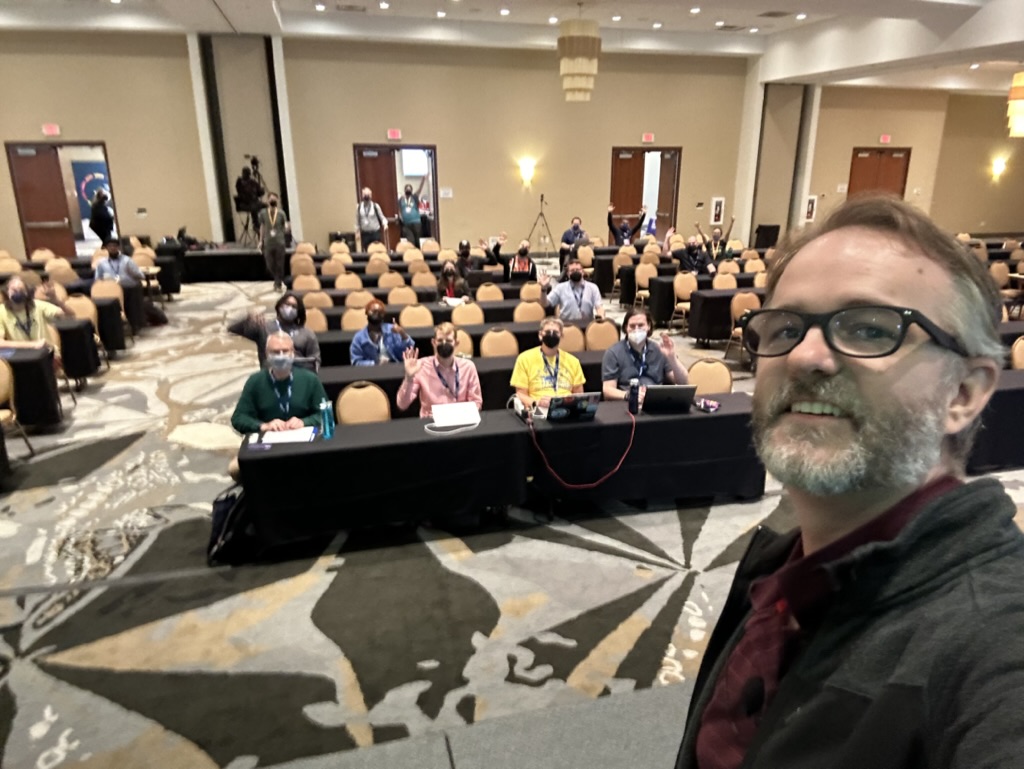
All in all it was a really fulfilling experience, but it was pretty hard too. This was the first time I spoke at a Tech Conference and I really wanted to do well.
As I said before, I received some really good feedback on the talk and I was really glad to have done it.
Now, you might ask, "Would I have to go to all of this trouble to prepare for a talk?"
Maybe, maybe not. I just happened to find this particular prep process worked well for my brain.
It was nice to hear from some of the attendees surprised that my talk was the first honest to goodness talk on my own I had ever given because it sounded so polished and well done.
Practice makes better, and in this case (based on the videos) it sure did for me
A Big Thank you
A presentation like this took a lot out of me, but I am extremely grateful to a few people in particular:
- Katie McLaughlin
- The Team of Web Developers at work
- Bookie
- Chris
- Jason
- Jon
- My daughter Abigail
A little bit extra
If you want to see more details on my talk, here is a playlist of the dry run attempts I did to prepare2
If you want to see the repo where the changes were tracked for my presentation it can be found here
If you want to see my annotated slides, you can find them here
Time tracking
I time track the crap out of my work day, and I really wish I would have done that here just to get a more exact idea of how much time I spent preparing, but some basic back of the envelope math gives me nearly 56 hours of prep for this. One thing I do religiously for work is track my time. I do this for a couple of reasons, but for some reason, I didn't do that as I prepared for my talk here. The time I have here is mostly estimates based on my memory (which could be wildly over stated, or understated).
| Activity | Time Spent |
|---|---|
| Story Teller Tactics Work | 1.5 Hours |
| Mind Mapping Talk | 3 hours |
| Initial Draft of Presentation | 5 Hours |
| Presentation Updates | 18 Hours |
| Deliberate Practice | 28 Hours |
| Total Time | 55.5 hours |
DjangoCon US 2023
My Experience at DjangoCon US 2023
A few days ago I returned from DjangoCon US 2023 and wow, what an amazing time. The only regret I have is that I didn't take very many pictures. This is something I will need to work on for next year.
On Monday October 16th I gave a talk Contributing to Django or how I learned to stop worrying and just try to fix an ORM Bug. The video will be posted on YouTube in a few weeks. This was the first tech conference I've ever spoken at!!!! I was super nervous leading up to the talk, and even a bit at the start, but once I got going I finally settled in.
Here's me on stage taking a selfie with the crowd behind me
Luckily, my talk was one of the first non-Keynote talks so I was able to relax and enjoy the conference while the rest of the time.
After the conference talks ended on Wednesday I stuck around for the sprints. This is such a great time to be able to work on open source projects (Django adjacent or not) and just generally hang out with other Djangonauts. I was able to do some work on DjangoPackages with Jeff Triplett, and just generally hang out with some truly amazing people.
The Django community is just so great. I've been to many conferences before, but this one is the first where I feel like I belong.
I am having some of those post conference blues, but thankfully Kojo Idrissa wrote something about how to help with that. And taking his advice, it has been helpful to come down from the Conference high.
Although the location of DjangoCon US 2024 hasn't been announced yet, I'm making plans to attend.
I am also setting myself some goals to have completed by the start of DCUS 2024
- join the fundraising working group
- work on at least 1 code related ticket in Trac
- work on at least 1 doc related ticket in Trac
- have been part of a writing group with fellow Djangonauts and posted at least 1 article per month
I had a great experience speaking, and I think I'd like to do it again, but I'm still working through that.
It's a lot harder to give a talk than I thought it would be! That being said, I do have in my 'To Do' app a task to 'Brainstorm DjangoCon talk ideas' so we'll see if (1) I'm able to come up with anything, and (2) I have a talk accepted for 2024.
GCP Cloud Architect Exam Experience
Last October it was announced that Desert Oasis Healthcare (the company I work for) signed on to pilot Google's Care Studio. DOHC is the first ambulatory clinic to sign on.
I had been in some of the discovery meetings before the announcement and was really excited about the opportunity. So far our use of any Cloud platforms at work has been extremely limited (that is to say, we don't use ANY of the big three cloud solutions for our tech) so this seemed to provide a really good opportunity.
As we worked through the project scoping there were conversations about the handoff to DOHC and it occurred to me that I didn't have any knowledge of what GCP offered, what any of it did, or how any of it could work.
I've had on my 'To Do' list to learn one of the Big Three Cloud services (AWS, Azure, or GCP) but because we didn't use ANY of them at work I was (a) worried about picking the 'wrong' one and (b) worried that even if I picked one I'd NEVER be able to use it!
The partnership with Google changed that. Suddenly which cloud service to learn was apparent AND I'd be able to use whatever I learned for work!
Great, now I know which cloud service to start to learn about ... the next question is, "What do I try to learn?". In speaking with some of the folks at Google they recommended one of three Certification options:
After reviewing each of them and having a good idea of what I need to know for work, I opted for the Cloud Architect path.
Knowing which certification I was going to work towards, I started to see what learning options were available for me. It just so happens that Coursera partnered with the California State Library to offer free training which is great because Coursera has a learning path for the Cloud Architect Exam! So I signed up for the first course of that path right before Thanksgiving and started to work my way through the courses.
I spent most of the holidays working through these courses, going pretty fast through them. The labs offered up are so helpful. They actually allow you to work with GCP for FREE during your labs which is amazing.
After I made my way through the Coursera learning Path I bought the book Google Cloud Certified Professional Cloud Architect Study Guide which was really helpful. It came with 100 electronic flash cards and 2 practice exams, and each chapter had questions at the end.
I will say that the practice exams and chapter questions from the book weren't really like the ACTUAL exam questions BUT it did help me in my learning, especially regarding the case studies used in the exams.
I read through the book several times, and used the practice questions in the chapters to drive what parts of the documentation I'd read to shore up my understand of the topics.
Finally, after about 3 months of pretty constant studying I took the test. I opted for the remote proctoring option and I'd say that I really liked this option. I was able to take the test in the same place I had done most of my studying. I did have to remove essentially EVERYTHING from my home office, but not having to drive anywhere, and not having to worry about unfamiliar surroundings really helped me out (I think).
I had 2 hours in which to answer 60 questions. My general strategy for taking tests is to go through the test, mark questions that I'm unsure of and eliminate answers that I know to not be true on those questions. Once I've gone through the test I revisit all of the unsure questions and work through those.
My final pass is to go through ALL of the questions and make sure I didn't do something silly.
Using this strategy I used 1 hour and 50 minutes of the 2 hours ... and I passed!
The unfortunate part of the test is that you only get a Pass or Fail so you don't have any opportunity to know what parts of the exam you missed. Now, if you fail this could be a huge help in working to pass it next time, but even if you pass it I think it would be helpful to know what areas you might struggle in.
All in all this was a pretty great experience and it's already helping with the GCP implementation at work. I'm able to ask better questions because I'm at least aware of the various services and what they do.
Page 2 / 13